If your team is still tracking work through a mix of WhatsApp messages, email threads, and sticky notes, you already know the problem. Things fall through the cracks. Someone misses an update. A task gets done twice — or not at all. A shared task list fixes this by giving everyone one place to see what needs to happen, who owns it, and when it’s due.
But just creating a shared list isn’t enough. How you set it up, how your team uses it daily, and how you keep it from turning into a cluttered mess — that’s where most teams struggle. This guide walks you through exactly how to build and use a shared task list that actually works in practice.
Why a Shared Task List Changes How Teams Work
When everyone on your team can see the same tasks in the same place, something shifts. Accountability becomes visible. Priorities become obvious. You stop spending half your day answering “what’s the status on this?” because the answer is already there.
Research from Harvard Business Review has shown that tracking meaningful progress — even small daily wins — is one of the strongest drivers of team motivation and performance. A well-maintained shared task list makes that progress visible to everyone, not just the manager.
For remote and hybrid teams especially, this visibility isn’t a nice-to-have — it’s the foundation of async work that doesn’t collapse into confusion.
How to Set Up a Shared Task List Your Team Will Actually Use
The most common reason shared task lists fail is poor setup. Teams dump every task into one list with no structure, and within a week it’s unmanageable. Here’s a better approach.
Step 1: Define the Scope Before You Add a Single Task
Decide what this shared list is for. Is it a team-wide project list? A weekly sprint board? A running list of recurring operational tasks? Mixing everything into one list is where clarity dies. Start with one focused scope — for example, “all active client deliverables for Q1” — and expand only when the team has a working habit around it.
Step 2: Use Consistent Task Structure
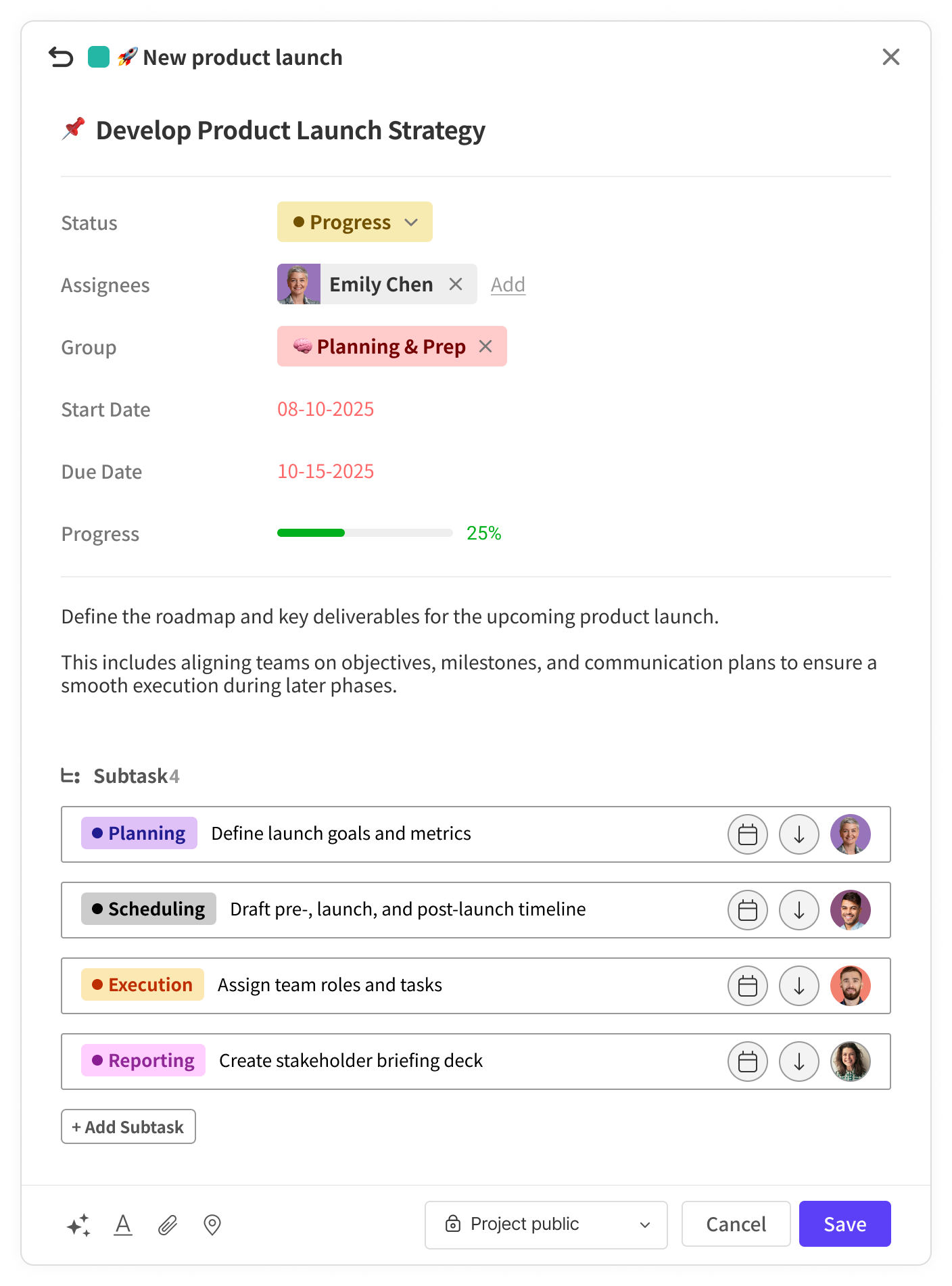
Every task on your shared list should answer four questions without anyone having to ask: What needs to be done? Who owns it? When is it due? What’s the current status? If a task is missing any of these, it creates friction and follow-up. Make this structure non-negotiable from day one.
A simple format that works well:
- Task name: Clear, action-oriented (e.g. “Draft Q2 budget proposal” not “Budget”)
- Owner: One person — not a team or a department
- Due date: Specific date, not “this week”
- Status: To do / In progress / Review / Done
- Notes or context: Any blockers, dependencies, or links needed
Step 3: Choose the Right Tool — and Keep Everyone in It
The tool you use matters less than whether your whole team actually uses it. That said, complexity kills adoption. If your team has to sit through training sessions just to add a task, they’ll go back to WhatsApp within a week.
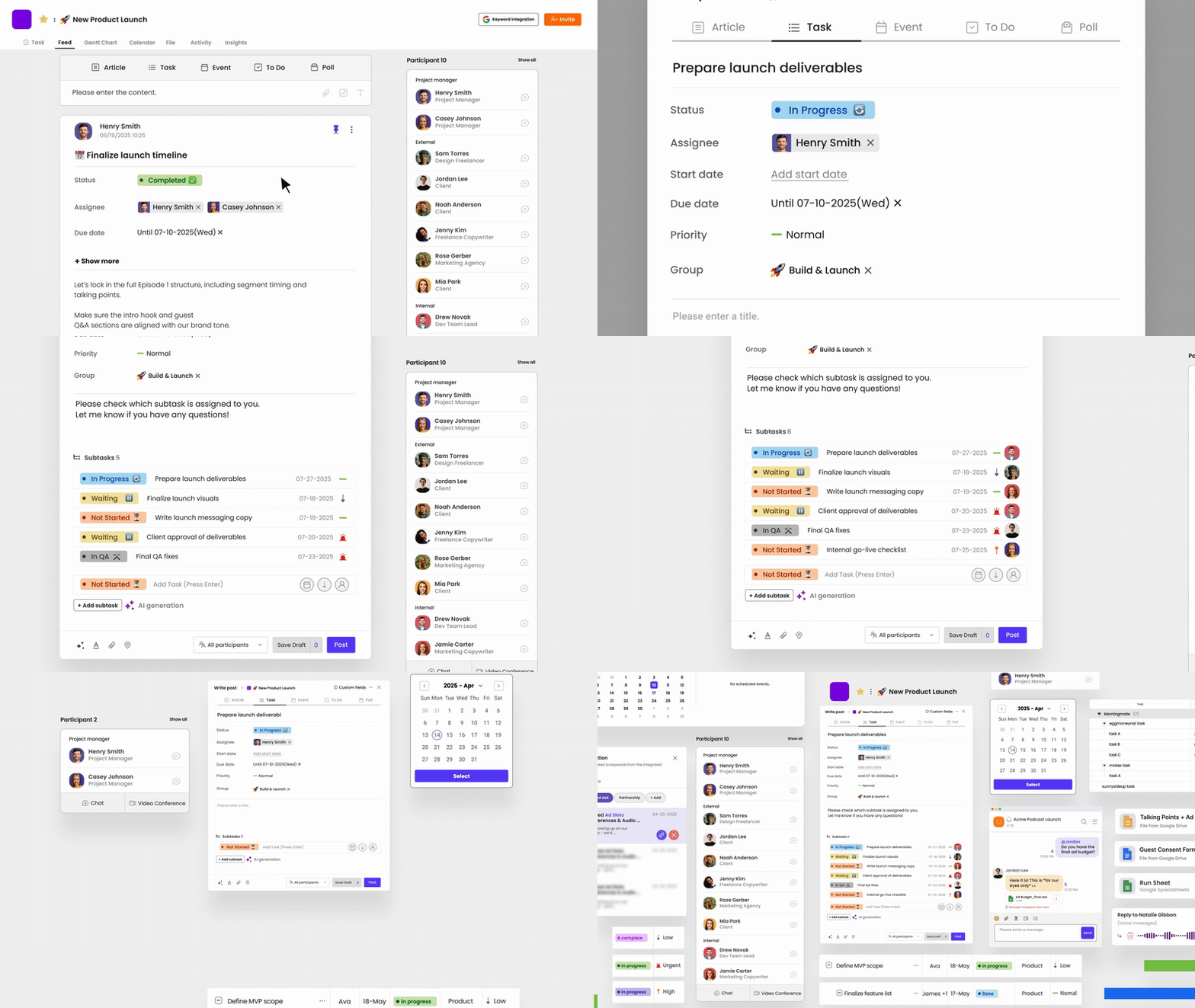
This is where Morningmate fits naturally for a lot of teams. It’s a lightweight work management tool with built-in task management and team chat — designed to feel familiar rather than complicated. The Feed view works like a social media timeline, so non-technical team members can get up and running without a learning curve. Tasks live alongside conversations, which means context doesn’t get lost across five different apps.
Running Your Shared Task List Day to Day
Setup is the easy part. The hard part is keeping the list accurate, relevant, and actually used. These habits make the difference.
Build a Daily Check-in Habit
Ask every team member to spend five minutes each morning reviewing their assigned tasks and updating statuses. This isn’t about surveillance — it’s about making sure the shared list reflects reality. A task marked “In progress” that’s actually blocked is worse than having no list at all.
For remote teams managing async communication, this morning check-in replaces the need for a daily standup call. Everyone posts their updates to the task list, and the whole team is aligned without anyone having to schedule a meeting.
Keep the List Clean — Weekly
Set a recurring time — Friday afternoon or Monday morning — to archive completed tasks, reprioritize what’s active, and add new work for the coming week. This is often called a “list review” and takes less than 20 minutes when done consistently. Skip it two weeks in a row and the list becomes a graveyard of half-done tasks that no one trusts.
Assign One Owner Per Task — Always
Shared responsibility is no responsibility. Gallup research consistently shows that clarity of role and ownership is directly linked to employee engagement and follow-through. When a task belongs to a group, everyone quietly assumes someone else will handle it. Assign one person. If multiple people are involved, that person is the coordinator — not the one doing everything, but the one making sure it gets done.
Common Mistakes Teams Make With Shared Task Lists
Even with good intentions, teams fall into patterns that make shared lists less useful over time. Here are the ones to watch for.
- Adding tasks but never updating them. A task list that isn’t updated is just a wish list. Status updates are the whole point.
- Making tasks too vague. “Follow up with client” tells no one anything. “Send revised proposal to Acme Corp by Thursday” is actionable.
- Using the list for everything. Not every conversation needs to become a task. Use judgment — if it can be handled in two minutes, just do it.
- Skipping the review cycle. Without regular cleanup, the list grows stale and people stop trusting it.
- Running parallel lists. If half the team uses the shared list and the other half keeps their own private version, you’ve just created a new coordination problem.
Structuring Your Shared List for Different Team Types
Not every team works the same way. Here’s how to adapt the shared task list approach depending on your setup.
For Remote Teams
Prioritize async-friendly detail in every task. Since you can’t tap someone on the shoulder for context, the task itself needs to carry enough information for someone to act on it without a follow-up message. Include relevant files, links, and notes directly in the task. Tools like Morningmate that combine task management with built-in team chat make this easier — discussions stay attached to the work, not floating in a separate inbox.
For Hybrid Teams
The biggest risk in hybrid work is a two-tier information system: in-office people who know things from hallway conversations, and remote people who are always catching up. Your shared task list should be the single source of truth regardless of where someone is working. Any decision made in a meeting — in person or virtual — should land in the task list within the hour.
For Growing Companies
As teams scale, a single shared list becomes unwieldy. Organize by project or department, and use a tool that gives leadership visibility across all of them without requiring them to dig into every task. Morningmate‘s workspace structure lets managers see cross-team activity in one place — which matters a lot when you’re overseeing multiple projects and can’t be in every room. This kind of visibility for managers is what separates companies that scale smoothly from ones that grow chaotically.
A Simple Framework to Get Started This Week
You don’t need a perfect system before you start. Here’s a practical sequence to launch a shared task list with your team in the next five days.
- Day 1: Agree on the scope. What one area of work will the list cover first?
- Day 2: Choose a tool and set up a shared workspace. Keep it simple — one list, clear structure.
- Day 3: Add all current active tasks. Assign an owner and a due date to every single one.
- Day 4: Walk the team through it. Spend 15 minutes — not more — showing everyone how to update their tasks.
- Day 5: Do your first list review. Check what’s accurate, what’s missing, what’s already done.
After two weeks of consistent use, the habit sets in. After a month, most teams can’t imagine going back to email threads and scattered messages to track their work.
A shared task list is one of the simplest, highest-impact changes you can make to how your team works together. The technology isn’t the hard part — the habit is. Start small, stay consistent, and let the visibility do the work for you.