Most teams don’t switch collaboration tools because they sat down one day and decided to. They switch because things quietly broke down — a missed deadline here, a lost file there, a team member who stopped checking the group chat weeks ago. The warning signs are usually subtle at first, and then suddenly very obvious.
If your team is relying on a mix of email threads, WhatsApp groups, and scattered spreadsheets to get work done, you’re not alone. But you’re also likely paying a price you can’t fully see — in time lost searching for information, in miscommunication, and in the kind of low-grade frustration that chips away at team morale over time.
This article walks you through the clearest signs you need a new team collaboration tool — and what to look for when you start evaluating your options.
Your team uses too many tools to do one job
If your team needs three apps to complete a single workflow — say, a WhatsApp message to flag a task, an email to share the file, and a spreadsheet to track progress — that’s a coordination problem disguised as a process. Every handoff between tools is a point where context gets lost.
Research from Harvard Business Review has found that collaboration overload — the accumulation of too many tools, meetings, and check-ins — is one of the leading drains on workplace productivity. When your infrastructure forces people to juggle multiple platforms just to stay in sync, the tool is working against you, not for you.
Ask yourself: how many apps does your team open before noon just to figure out what to work on? If the answer is more than two or three, that’s a sign worth taking seriously.
The warning signs of tool overload
- Work updates live across email, chat apps, and project tools simultaneously
- Team members ask the same questions in multiple places because no one knows where to look
- New hires take weeks just to understand which tool to use for what
- You’ve tried to “fix” the problem by adding yet another tool
Important information keeps getting lost
This is one of the most common — and costly — signs you need a new team collaboration tool. When decisions get made in a chat thread that disappears under 200 new messages, or a critical file gets buried in someone’s email inbox, your team is operating on a foundation of sand.
A McKinsey report on the social economy found that employees spend an average of 1.8 hours every day searching for and gathering information. That’s nearly a full workday every week, per person, just trying to find things that should already be findable.
A good collaboration tool should make information easy to post, easy to find, and easy to reference later. If your current setup doesn’t do that, it’s not really a collaboration tool — it’s just another place to lose things.
What “lost information” looks like in practice
- Someone makes a decision in a meeting but never records it anywhere
- A team member leaves and their project knowledge disappears with them
- Files get shared over WhatsApp and expire or get buried within days
- You can’t quickly answer “what’s the current status of this project?” without messaging three people
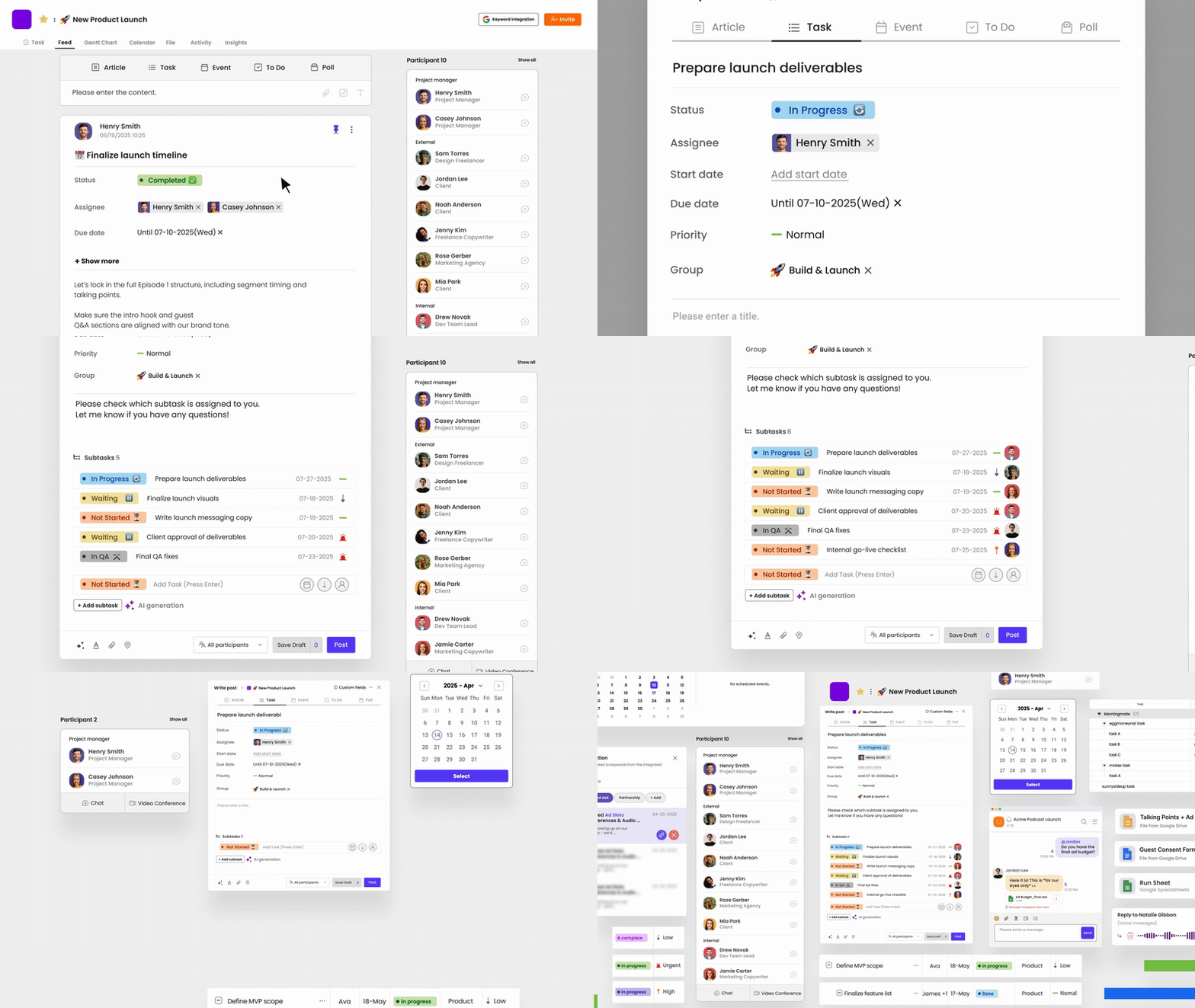
This is exactly the kind of problem Morningmate was built to solve. It gives teams a structured feed — organized by project or topic — where updates, files, and tasks live together in one place. Think of it like a social media feed, but for work: clean, chronological, and searchable. Nothing gets buried in a chat thread.
Your team’s accountability is inconsistent
When it’s unclear who owns what, deadlines slip quietly. Someone assumed the other person was handling it. A task got mentioned in passing but never formally assigned. A follow-up reminder got lost in a group chat.
Inconsistent accountability isn’t always a people problem. More often, it’s a systems problem. If your team doesn’t have a clear, shared place to assign tasks, set deadlines, and track progress, you’re relying entirely on individual memory and initiative — which isn’t a system at all.
Questions to ask your team
- Can every team member clearly see what they’re responsible for this week?
- Can you tell, at a glance, what’s on track and what’s falling behind?
- When a deadline is missed, is the reason usually “I didn’t know that was my task”?
If you answered yes to that last one more than once, your collaboration setup is failing you. Strong task management isn’t just about to-do lists — it’s about clarity on ownership, visibility on progress, and a shared understanding of what done looks like.
Remote or hybrid work has made things harder, not easier
Remote and hybrid work didn’t create collaboration problems — it exposed the ones that were already there. If your team’s coordination relied on hallway conversations and shoulder taps, losing those moments leaves a very visible gap.
Gallup’s research on the future of hybrid work highlights that the biggest challenge for distributed teams isn’t motivation — it’s maintaining connection and coordination across locations. That’s a tool problem as much as it is a culture problem.
If your remote or hybrid team constantly struggles to stay aligned, it’s worth asking whether your current tools were actually designed for distributed work — or whether they were designed for something else and pressed into service.
Signs your setup isn’t built for distributed teams
- Async updates get lost because there’s no structured place to post them
- Time zone differences mean people miss key decisions made in real-time chats
- Managers can’t easily see what remote team members are working on without scheduling a check-in
- New remote hires struggle to understand team workflows because nothing is documented
Morningmate is designed with async-first teams in mind. Its built-in chat works like WhatsApp — so onboarding is instant, even for non-technical teams — but unlike WhatsApp, conversations stay linked to the projects and tasks they belong to. No more context switching between personal apps and work systems.
Your leadership team doesn’t have visibility
For managers and business owners, the most frustrating collaboration failure isn’t chaos within teams — it’s the inability to see across them. When you have to chase updates, book extra meetings, or rely on status reports that are already out of date by the time you read them, your tools are failing you at the leadership level.
Visibility isn’t a luxury for growing teams — it’s what lets you catch problems early, allocate resources well, and make confident decisions. Without it, you’re managing in the dark.
What poor visibility costs you
- You find out about blockers after they’ve already caused delays
- You can’t accurately report on team progress without a manual data-gathering exercise
- Team leads give you different answers about the same project status
- Work gets duplicated because different parts of the team don’t know what the other is doing
This is a particularly common pain point for operations leads and business owners at growing companies. If your company has hit 20, 50, or 100 people and you’re still managing visibility through email, something needs to change. Work management tools built for growing teams should give leaders a real-time view of what’s happening across projects — without requiring everyone to update a separate dashboard.
Your team has stopped using the tool you already have
This is the most telling sign of all. If your team invested in a collaboration tool — whether it’s Slack, Asana, Trello, or anything else — and people have quietly drifted back to WhatsApp and email, the tool didn’t stick. And that’s worth examining honestly.
Sometimes tools fail because they’re too complex. Teams adopt platforms that were designed for software engineers or large enterprises, and then watch adoption crater because the learning curve is too steep for everyday use. A tool your team won’t use is worse than no tool at all, because it creates a false sense of having solved the problem.
What to look for in a replacement
When evaluating a new team collaboration tool, prioritize these qualities:
- Low onboarding friction — If your team needs days of training to get started, adoption will always struggle. Look for tools with interfaces people already recognize.
- All-in-one communication and task management — Switching between a chat app and a project tool creates the same fragmentation you’re trying to fix.
- Flexibility for different team types — Not every team is technical. Your tool should work equally well for marketing, operations, HR, and field teams.
- Clear structure without rigidity — Teams need organization, but overly rigid workflows cause workarounds. Look for tools that guide without constraining.
Morningmate checks these boxes specifically for non-technical and mixed teams. With 550,000 teams using it worldwide, it’s built to be picked up quickly — the familiar feed interface and WhatsApp-style chat mean most people feel at home within minutes, not days. And because task management and communication live in the same platform, there’s no gap between talking about work and actually tracking it.
How to make the switch without disrupting your team
Recognizing you need a new collaboration tool is one thing. Making the transition smoothly is another. Here’s a straightforward approach that works for most teams.
- Audit your current pain points first. Before evaluating tools, get specific about what’s not working. Is it task visibility? File management? Communication silos? Your answer shapes what you should prioritize.
- Involve your team in the decision. The people who will use the tool daily have the clearest sense of what’s broken. A short survey or team conversation goes a long way toward getting buy-in later.
- Run a pilot with one team or project. Don’t try to migrate your entire organization at once. Test a new tool on a contained project first so you can identify friction before it affects everyone.
- Set clear norms early. A new tool won’t fix broken habits. Define where different types of communication should go — updates in the feed, quick questions in chat, task details in the task card — and communicate that clearly from day one.
- Give it at least four weeks. New tools always feel awkward at first. Resist the urge to judge adoption after one week. If things aren’t improving after a month, revisit your setup.
Switching tools feels disruptive, but staying with a broken system is its own kind of disruption — just slower and quieter. If the signs in this article sound familiar, it’s worth taking the step. Your team’s time, focus, and sanity are worth the effort of getting the infrastructure right.