If your team is still juggling email chains, WhatsApp groups, and sticky notes to stay aligned, you are not alone. A huge number of small and mid-sized teams delay switching to a proper workspace tool simply because they assume anything good must be expensive. The good news: some of the best free team workspace tools available right now are genuinely powerful — not just stripped-down demos.
The challenge is that “free” covers a wide range. Some tools give you just enough to get frustrated before hitting a paywall. Others offer a surprisingly complete experience that can serve a team of 20 or even 50 without ever needing an upgrade. Knowing the difference before you commit saves your team weeks of wasted setup time.
This comparison breaks down the most widely used free team workspace tools in 2026, what each one actually does well, where each one falls short, and which types of teams tend to get the most value from each option. No fluff — just the practical stuff you need to make a confident call.
Why Teams Are Rethinking Their Workspace Tools Right Now
The shift toward leaner, more intentional tooling is real. According to Gartner, employees spend a significant portion of their workweek simply searching for information that should already be accessible. That cost compounds fast when your team grows.
At the same time, many teams that adopted complex project management platforms during the remote work boom are now scaling back. Tools that require dedicated admins to maintain, or that non-technical staff refuse to engage with, create more friction than they solve. The appetite for simple, organized, and free team workspace tools has never been higher.
The Tools: A Side-by-Side Look
Below are six of the most commonly considered free team workspace tools, evaluated honestly across the factors that matter most: ease of use, free tier limits, communication features, task management depth, and fit for non-technical teams.
Morningmate
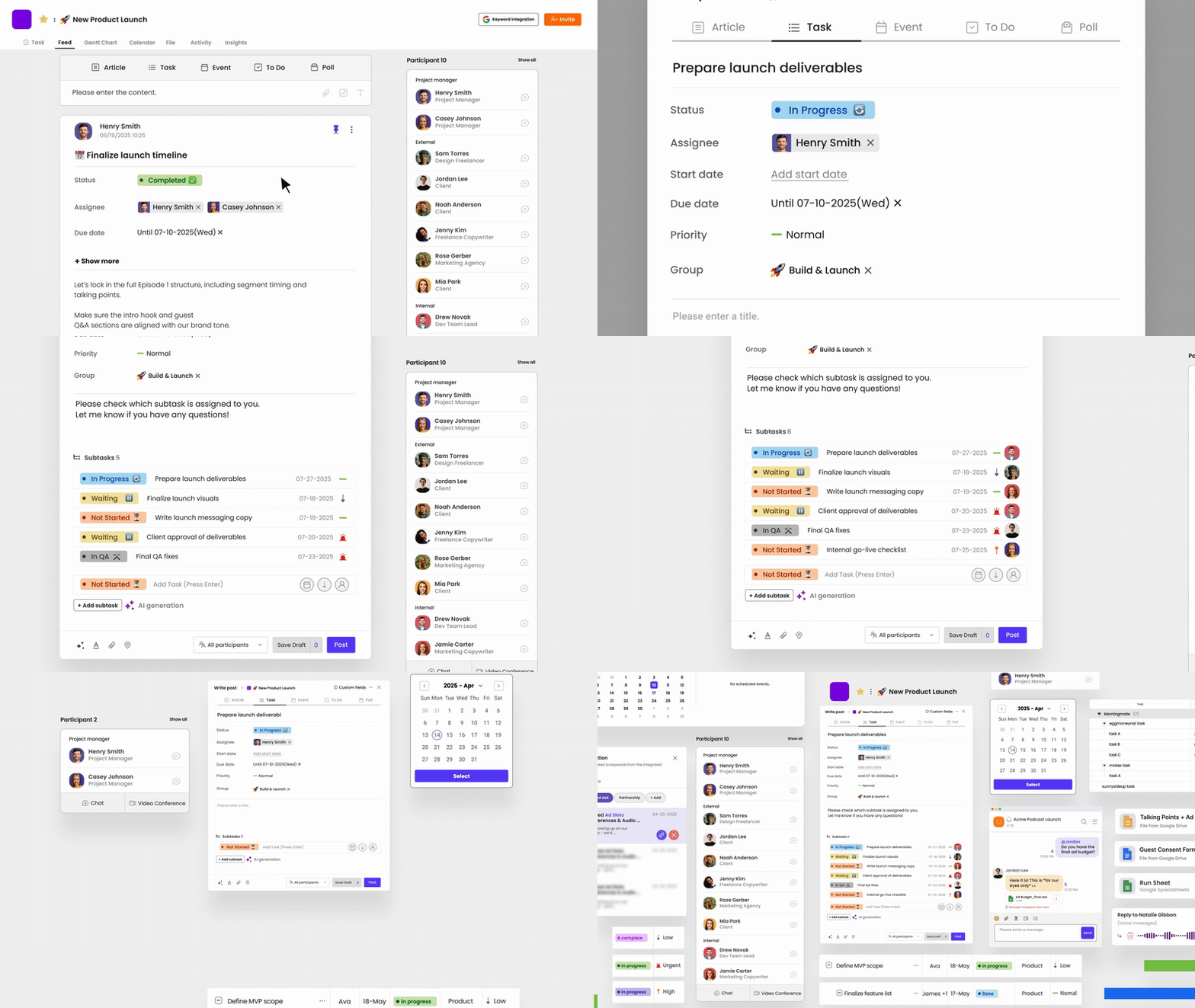
Morningmate is a lightweight work management tool built around two ideas: a social media-style Feed where work updates are easy to follow, and a built-in chat that works like WhatsApp — familiar enough that anyone on your team can use it on day one without training. It is used by over 550,000 teams globally and is particularly strong for hybrid and remote teams that want one organized place for tasks, files, and communication.
The free tier is genuinely usable. You get task management, team chat, file sharing, and the Feed view without hitting a wall every few days. For a team manager tired of chasing updates across three different apps, Morningmate consolidates that into one clean workspace. It sits in a sweet spot: more structured than WhatsApp, far less intimidating than Jira or Asana.
Best for: Small to mid-sized teams, non-technical departments, teams currently relying on personal messenger apps or email for coordination.
Trello
Trello is one of the most recognized names in free team workspace tools. Its Kanban board interface is visual and approachable, making it a decent starting point for teams new to task management. Cards move across columns, which gives a clear sense of workflow progress.
The free plan limits you to 10 boards per workspace and offers limited automation. There is no built-in chat, so your team still needs a separate communication tool running alongside it. For simple project tracking, Trello works. For anything more layered — like tracking work across multiple teams or managing async communication — it starts to show gaps quickly.
Best for: Solo users or very small teams with straightforward, linear projects.
Notion
Notion is a flexible workspace that blends documents, databases, and wikis into one tool. Its free tier is reasonably generous for individuals or small teams, and the block-based editor gives you a lot of creative control over how you structure information. Many teams use it as a company knowledge base.
The downside is the same thing that makes it appealing: flexibility. Notion requires significant setup time and someone willing to maintain the structure. Teams without a dedicated “Notion builder” often end up with a disorganized workspace that is harder to navigate than the email threads they were trying to escape. It also lacks native task workflows and has no real-time chat.
Best for: Teams that primarily need documentation and knowledge management rather than task tracking or communication.
ClickUp
ClickUp markets itself as an all-in-one platform, and in terms of raw features, it lives up to that claim. The free tier includes tasks, docs, whiteboards, goals, and even a basic chat view. For a team that wants depth, it delivers.
That depth comes at a cost though — complexity. New users regularly report a steep learning curve, and non-technical team members often resist adoption. Harvard Business Review has noted that tool adoption failure is often less about features and more about whether people actually use them consistently. ClickUp struggles here more than most. If your team has the bandwidth to invest in onboarding, it can be powerful. If not, you may be paying in productivity what you saved in subscription fees.
Best for: Tech-savvy teams with a project manager who can own the tool setup and maintenance.
Asana (Free Tier)
Asana’s free plan supports up to 15 users and covers basic task and project management with list, board, and calendar views. It is clean and relatively intuitive compared to ClickUp, and it integrates well with tools like Slack and Google Workspace.
The 15-user cap and the absence of key features like timeline view, reporting, and workflow automation on the free plan make it feel like a preview rather than a full product. Once your team grows or your workflow matures, you will likely be looking at a paid plan. No built-in chat either, so communication still lives elsewhere.
Best for: Teams of under 15 who already have a communication tool and just need basic task tracking.
Microsoft Teams (Free)
If your organization already runs on Microsoft 365, the free tier of Teams gives you group chat, video calls, and basic file sharing through SharePoint. It is a strong communication platform, especially for larger organizations already embedded in the Microsoft ecosystem.
Task management is not where Teams shines. You will need to bolt on Microsoft Planner or a third-party integration to get anything resembling a real workflow. For companies outside the Microsoft ecosystem, the onboarding friction is real. It is a communication tool first, not a workspace tool built around how work actually gets done.
Best for: Organizations already on Microsoft 365 that need team communication and do not need deep task management.
How to Choose the Right Free Team Workspace Tool
Before you test anything, answer these four questions about your team. They will eliminate most of the wrong options before you waste time on demos and setups.
- Where does communication currently break down? If updates get lost in email or personal apps, you need a tool with built-in communication — not just task lists.
- How technical is your team? A tool no one uses is worse than no tool at all. If you manage a field team, a logistics crew, or a non-technical department, simplicity is non-negotiable.
- Do you need visibility across multiple teams or projects? If yes, you need more than a basic board. Look for tools that offer cross-project views or a Feed-style overview.
- What does your growth timeline look like? A free tool that forces you to rebuild your entire workflow the moment you hire your 16th person is not actually free — it costs you migration time.
If your answers point toward a tool that handles both communication and task management without requiring a technical setup lead, the shortlist gets short fast. That is where tools like Morningmate earn their place — the Feed and chat combination means your team does not need two separate apps, and the interface is familiar enough that onboarding takes hours, not weeks.
What “Free” Really Costs You
Free tools are not always free in practice. The hidden costs show up in a few predictable ways.
- Integration tax: If your “free” workspace tool does not handle communication, you are paying for Slack or another messaging app on top of it. Stack two or three tools together and you are back to scattered information.
- Setup and maintenance time: Tools that are endlessly customizable demand someone to own that customization. That person’s time has value.
- Adoption failure: McKinsey research on organizational collaboration consistently points to low adoption as the primary reason collaboration tools fail to deliver ROI. A tool your team avoids using is a sunk cost, not a saving.
- Migration costs: When a free tier runs out of room, switching to a new platform mid-project is expensive in both time and context. Factor that into your decision now.
The real question is not which free team workspace tool has the most features. It is which one your whole team will actually open every morning — and keep using six months from now.
Quick Comparison Summary
Here is a fast reference to help you compare the tools covered above:
- Morningmate: Task management + built-in chat + Feed view. Best all-in-one free option for non-technical and hybrid teams. Simple, familiar interface.
- Trello: Visual Kanban boards. Good for simple workflows, no chat, limited free boards.
- Notion: Excellent for documentation and knowledge bases. Requires setup effort. No real-time chat or task workflows.
- ClickUp: Feature-rich but complex. Strong free tier on paper, high learning curve in practice.
- Asana: Clean task management, 15-user cap, no chat, limited free features.
- Microsoft Teams (Free): Strong for communication inside the Microsoft ecosystem. Weak on task management without additional tools.
Choosing the right free team workspace tool comes down to fit, not features. A tool that matches how your team already communicates and thinks about work will always outperform a technically superior tool that nobody logs into. Start with one, run it for two weeks with real work, and let actual usage tell you what your team needs next. That is faster than any comparison chart — including this one.