Google Workspace has long been the go-to suite for small teams that need email, documents, and video calls under one roof. But as teams grow and work becomes more complex, many managers are realizing that Gmail threads and shared Google Docs just don’t cut it anymore. Work gets lost, accountability disappears, and nobody can find that file from three weeks ago.
If you’re running a small team and starting to feel that friction, you’re not alone. A growing number of businesses are actively searching for Google Workspace alternatives — tools that offer better collaboration, clearer task ownership, and less inbox chaos. The good news is there are solid options out there, and the best one for your team depends on how you actually work.
This guide breaks down the most practical alternatives to Google Workspace for small teams, what each one does well, and how to figure out which fits your workflow — without overcomplicating things.
Why Small Teams Are Moving Away from Google Workspace
Google Workspace is a powerful productivity suite, but it was built around documents and email — not around how modern teams actually coordinate work. When your team grows past a handful of people, you start running into real problems: tasks get buried in email chains, project updates scatter across Drive folders, and nobody has a clear view of what’s actually happening.
According to Harvard Business Review, knowledge workers spend an average of 28% of their workweek managing email — time that could go toward actual work. For small teams operating with lean resources, that kind of waste adds up fast.
There’s also the visibility problem. As an operations lead or team manager, you need to know what’s done, what’s in progress, and what’s stuck — without having to message five people to find out. Google Workspace doesn’t give you that out of the box.
What to Look for in a Google Workspace Alternative
Before jumping to a tool, get clear on what’s actually missing from your current setup. Most small teams switching away from Google Workspace are looking for one or more of the following:
- Task management with accountability — clear ownership, due dates, and progress tracking
- Team communication in one place — no more jumping between email, WhatsApp, and Slack
- File and knowledge management — easy to find, easy to share, attached to the right context
- Simplicity — a tool your whole team will actually use, including non-tech folks
- Reasonable pricing — small teams can’t justify enterprise-level costs
Keep that list in mind as you evaluate the options below. A tool that checks all five boxes for your team is worth far more than one with a hundred features nobody uses.
The Best Google Workspace Alternatives for Small Teams
1. Morningmate — For Teams That Want Simplicity Without Sacrificing Structure
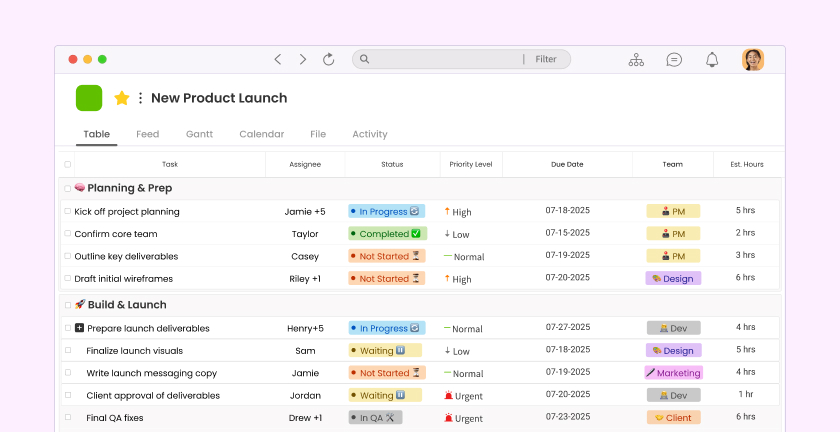
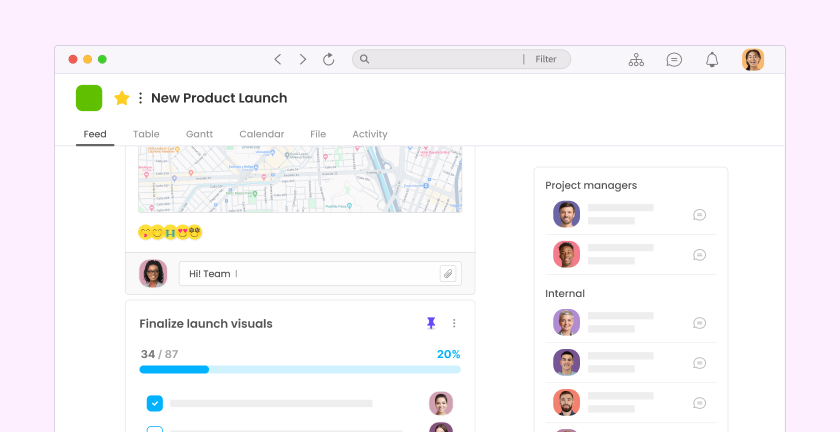
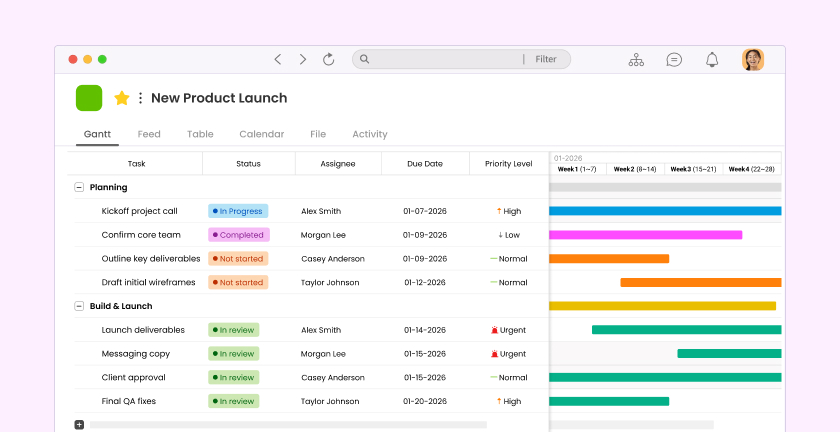
If your team is still relying on WhatsApp group chats and email threads to coordinate work, Morningmate is worth a serious look. It’s a lightweight work management tool that combines task management, built-in team chat, and file sharing in one clean workspace — without the steep learning curve of tools like Asana or Jira.
What makes Morningmate different is its Feed view, which works like a social media timeline. Team updates, tasks, and files all appear in a familiar, scrollable format that even non-technical team members pick up instantly. Pair that with a built-in chat that mirrors the WhatsApp interface your team already knows, and adoption becomes remarkably easy.
For small teams that need to replace scattered communication and bring work into one place — without overwhelming anyone — Morningmate hits the right balance. Over 550,000 users worldwide use it for exactly that reason.
2. Microsoft 365 — For Teams Already in the Microsoft Ecosystem
Microsoft 365 is the most direct like-for-like swap if you’re leaving Google Workspace. You get Word, Excel, PowerPoint, Outlook, and Teams — a full suite that covers email, documents, and video meetings. If your clients or partners are heavy Microsoft users, this transition will feel natural.
The downside for small teams is complexity. Microsoft Teams alone has a reputation for being dense and hard to navigate. If your team isn’t particularly tech-savvy, expect a longer onboarding period. It’s powerful, but power comes with a learning curve.
3. Notion — For Teams That Live and Die by Documentation
Notion is a flexible workspace that lets you build wikis, databases, project boards, and docs — all in one place. It’s become a favorite among small startups and creative teams that want to centralize their knowledge base and project planning without committing to rigid structures.
That flexibility is also its biggest weakness. Notion requires real setup time and a clear system, otherwise it turns into a beautiful mess of half-finished pages. It also lacks native team chat, so you’ll still need a separate communication tool alongside it.
4. ClickUp — For Teams That Want Everything in One Place
ClickUp markets itself as the “everything app” for work — and it lives up to that in terms of sheer feature volume. Task management, docs, goals, time tracking, automations — it’s all there. For teams with complex workflows, ClickUp can genuinely replace multiple tools.
The caveat is that “everything” can feel overwhelming. Small teams often report that ClickUp’s interface feels cluttered and that it takes weeks to configure properly. If you need something your team can use on day one, ClickUp may require more patience than it’s worth upfront.
5. Basecamp — For Remote Teams That Prioritize Async Communication
Basecamp has been a trusted name in remote team management for years, and its 2026 version continues to hold up well for small teams. It organizes work around projects, with message boards, to-do lists, file storage, and a group chat (Campfire) all bundled together per project.
Basecamp works especially well for teams that are fully remote and prefer asynchronous communication. Its flat pricing — one fixed fee for unlimited users — is also a genuine advantage for growing teams. The tradeoff is that it’s not strong on granular task management or reporting, so if you need detailed visibility into workloads, you might feel limited.
How to Choose the Right Tool for Your Team
Switching tools is a real investment of time and energy, so it’s worth making the right call the first time. Here’s a simple framework to help you decide:
Step 1 — Define Your Biggest Pain Point
Start by naming the one thing that’s broken right now. Is it that tasks fall through the cracks? That communication happens across three different apps? That files are impossible to find? Your biggest pain point should drive your tool selection — not feature lists.
Step 2 — Audit Your Team’s Tech Comfort Level
A tool is only as good as its adoption rate. A McKinsey report on workplace collaboration found that improving communication and collaboration through technology can raise productivity by 20–25% — but only when people actually use the tools. If your team includes people who aren’t naturally tech-forward, prioritize simplicity over features.
Step 3 — Run a Two-Week Trial with Real Work
Don’t evaluate a tool with dummy data. Pick an active project, migrate it into your shortlisted tool, and run it for two weeks. Pay attention to how often people actually log in, whether they need hand-holding, and whether the tool reduces or creates confusion.
Step 4 — Check Integration and Migration Needs
If your team uses specific apps — a CRM, an accounting tool, a calendar — make sure your new workspace integrates with them. Also consider how painful it will be to migrate existing files and data. Some tools make this easy; others require a full weekend of manual work.
Signs Your Team Has Outgrown Google Workspace
Not sure if now is the right time to switch? Here are clear signals that your team needs more than what Google Workspace offers:
- Team members are using personal WhatsApp or Telegram for work updates
- Important decisions are buried in email threads with no clear record
- Nobody knows the status of a project without sending a check-in message
- Files are spread across multiple Drive folders with no consistent naming system
- New hires struggle to find information and context for ongoing work
- You, as the manager, lack visibility into what your team is actually working on
If three or more of those sound familiar, it’s time to make a move. The longer you wait, the more those inefficiencies compound — especially as your team grows.
Making the Transition Smooth
Switching tools mid-stream is never painless, but it doesn’t have to be chaotic either. A few things that help:
- Announce the switch early — give your team context on why you’re changing tools, not just instructions on how to use the new one
- Migrate one team or project first — avoid a company-wide rollout on day one; start small and learn
- Set clear expectations — define where work lives, how tasks get assigned, and how communication happens in the new tool
- Designate a point person — someone who can answer questions and keep adoption on track
- Archive, don’t delete — keep your Google Drive accessible during the transition in case anyone needs to reference old files
Tools like Morningmate make this transition easier than most because the interface is immediately familiar — the Feed view and chat feel like things your team already uses every day. That lowers the barrier to adoption significantly, especially for teams that have historically resisted new software.
The right Google Workspace alternative won’t just replace what you had — it’ll give your team a cleaner, clearer way to work. That’s what makes the switch worth it.