If you have been using xTiles to organize your team’s work, you already know what it does well — visual boards, flexible tile layouts, and a clean interface that makes brainstorming feel effortless. But if you have also hit its limits as a collaboration tool for a real working team, you are not alone. Many team leads and operations managers find that xTiles works beautifully for personal productivity but starts to crack under the pressure of coordinating multiple people, tracking shared tasks, and keeping communication organized in one place.
The reality is that most teams outgrow single-person productivity tools faster than they expect. When you are managing five, fifteen, or fifty people, you need more than a visual canvas — you need a system where tasks are assigned, progress is visible, and conversations are tied to actual work, not buried in a separate chat app or email thread.
This guide breaks down what to look for in an xTiles alternative for teams, what the common pitfalls are when switching tools, and which options actually solve the right problems for collaborative work environments.
Why Teams Start Looking for an xTiles Alternative
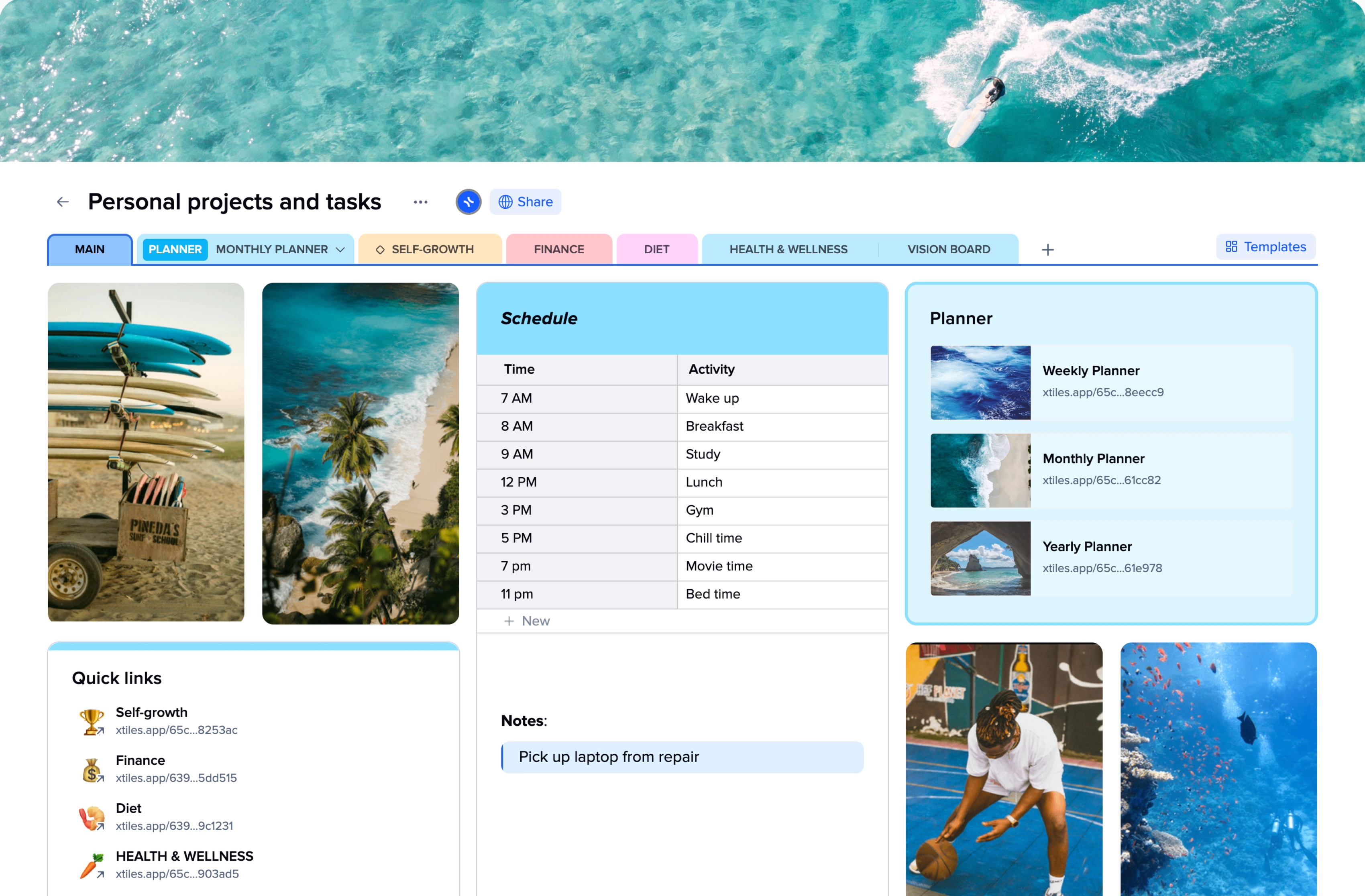
xTiles is designed with individual knowledge workers in mind. Its tile-based layout is great for capturing ideas and organizing personal notes, but it lacks the structured task management, team permissions, and integrated communication that growing teams depend on daily.
Here are the most common reasons teams move on from xTiles:
- No built-in team chat or messaging — communication still happens in WhatsApp or email
- Limited task assignment and deadline tracking across team members
- No clear way to see what everyone on the team is working on at a glance
- File sharing is scattered and not tied to specific tasks or projects
- Hard to onboard non-technical teammates who are not used to tile-based layouts
According to McKinsey’s research on organizational effectiveness, employees spend nearly 20 percent of their workweek just searching for information or tracking down colleagues for updates. That number climbs when teams rely on a patchwork of disconnected tools — and it is exactly the kind of problem a good xTiles alternative should solve.
What to Look for in an xTiles Alternative for Teams
Not every tool that positions itself as a “team collaboration” solution actually delivers on that promise. Before committing to a new platform, evaluate it against these criteria.
Task Management That Tracks Real Work
You need more than a checklist. Look for tools that let you assign tasks to specific people, set due dates, track status, and see a team-wide view of who is working on what. Without this, you end up chasing updates manually — which defeats the entire purpose of switching tools.
Built-In Communication — Not a Third App
One of the biggest hidden costs of using multiple tools is context switching. When your task manager and your chat app are separate, important decisions get made in Slack or WhatsApp and never make it back to where the work lives. The best xTiles alternatives keep communication and tasks in the same space.
This is one area where Morningmate stands out clearly. Morningmate is a lightweight work management tool that combines task management with a built-in team chat — the chat interface feels familiar, similar to WhatsApp, so even non-technical teammates adopt it quickly. Instead of jumping between apps, your team discusses work and tracks it in one place.
Simplicity That Does Not Sacrifice Functionality
There is a real risk in replacing xTiles with something like Jira or Asana if your team is not a technical software development group. Tools built for engineering teams introduce complexity — sprints, story points, complex permission trees — that slows down non-tech teams rather than helping them. The ideal xTiles alternative is powerful enough for real work management but simple enough that a field operations team or a sales team can use it without a training program.
Visibility Across the Whole Team
Managers and operations leads need to see what is happening across projects without having to ask. Look for tools with a clear team feed or project overview that surfaces updates automatically, so you spend less time in status meetings and more time on actual decisions.
Top xTiles Alternatives for Teams in 2026
Here is an honest look at the most relevant options — including who each one is best suited for and where it falls short.
Morningmate — Best for Teams That Want One Simple Workspace
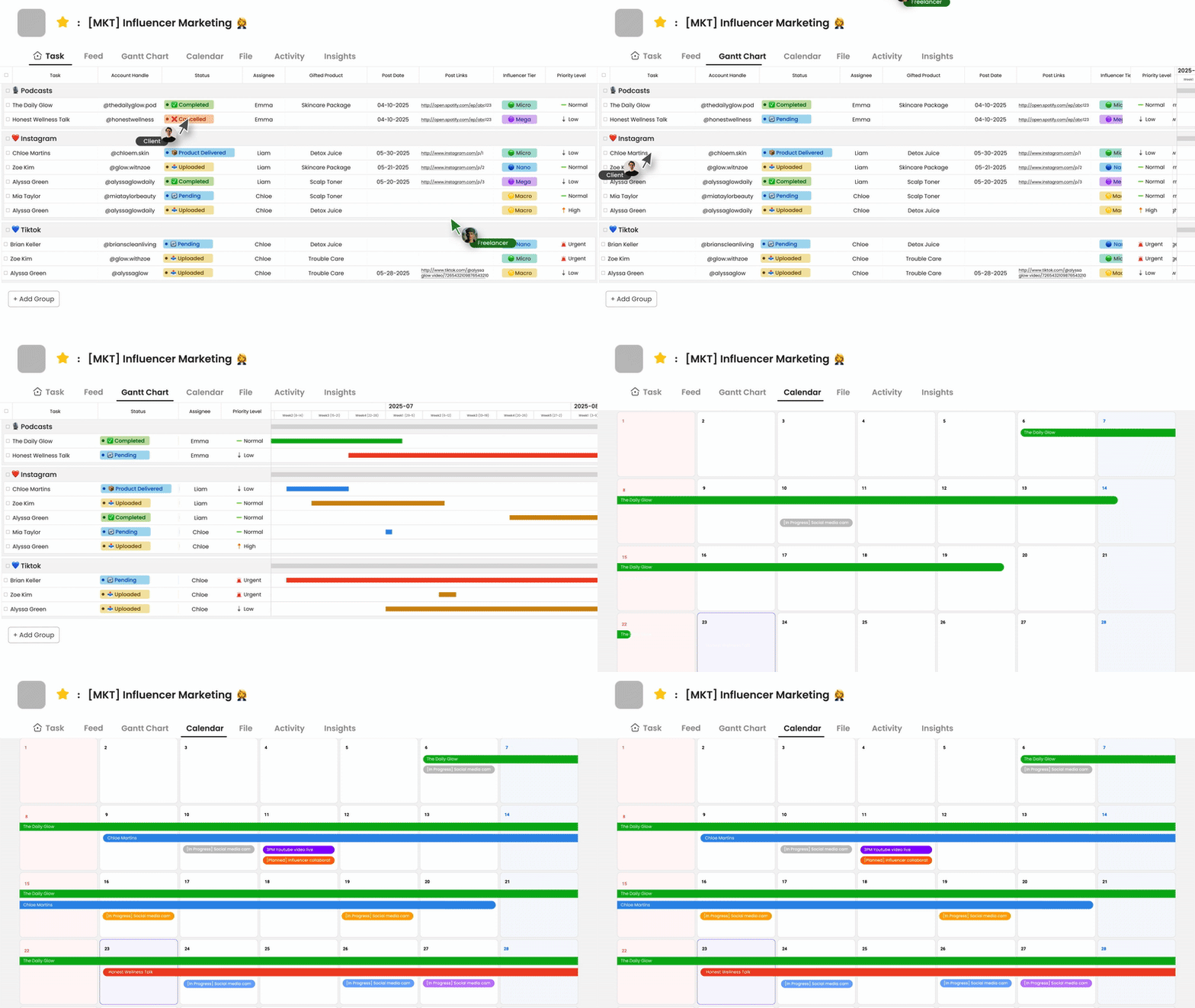
Morningmate is used by over 550,000 teams worldwide and is built specifically for the kind of team that does not want complexity — but cannot afford chaos either. Its Feed view works like a social media timeline, surfacing task updates, posts, and file shares in a familiar, scrollable format. That means your team does not have to learn an entirely new mental model just to track their work.
Key features that make it a strong xTiles alternative for teams:
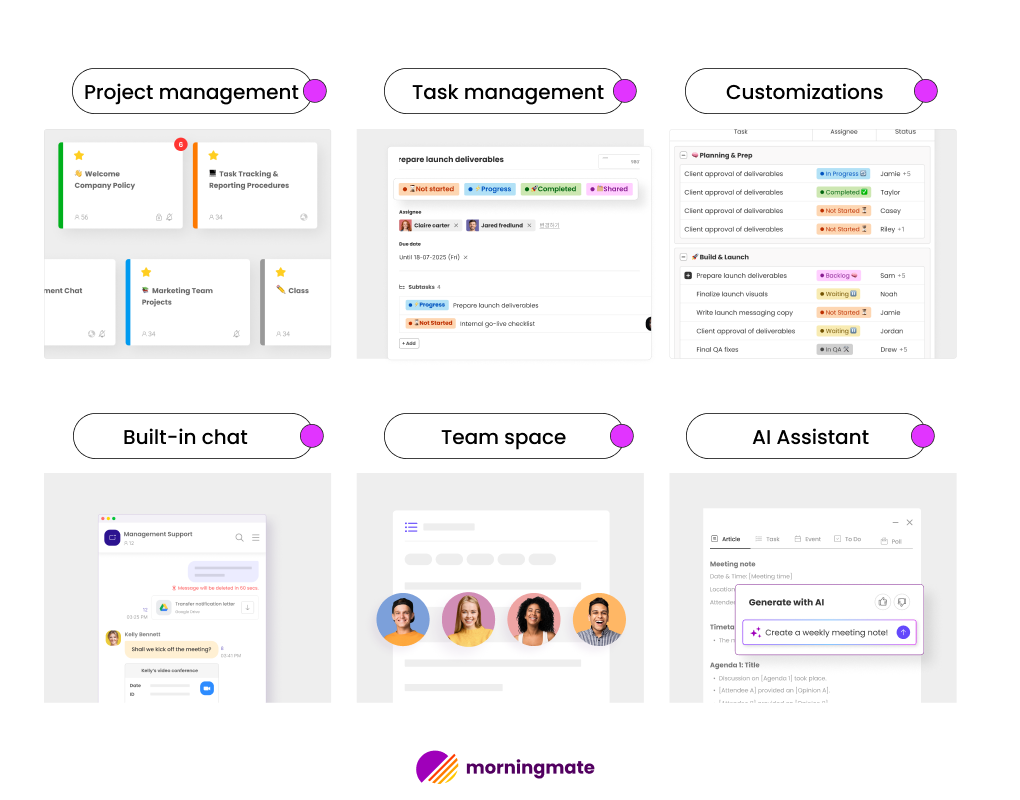
- Task management with assignments, due dates, and status tracking
- Built-in chat that mirrors the WhatsApp interface — familiar from day one
- File management tied directly to tasks and projects
- Feed view for team-wide visibility without a separate reporting dashboard
- Lightweight enough for non-tech teams, including operations, retail, and field service teams
If your team currently relies on email threads or personal messenger apps to coordinate work, Morningmate is specifically designed to replace that habit without making things more complicated. See how it compares to other lightweight tools in this roundup of task management tools for small teams.
Notion — Best for Knowledge-Heavy Teams
Notion is a popular choice for teams that work heavily with documentation, wikis, and structured knowledge bases. It offers flexible databases and page structures that xTiles users often find familiar. However, Notion’s task management is secondary to its document features, and its built-in communication tools are limited. For teams that primarily need to manage work and coordinate people — not just store information — Notion can feel like overkill in some areas and underbuilt in others.
Trello — Best for Visual Thinkers on Simple Projects
Trello’s Kanban board layout is easy to understand and works well for simple project tracking. It is a reasonable step up from xTiles for teams that want visual task management. That said, Trello’s free tier is limited, and it does not include built-in chat, which means your team will still be bouncing between Trello and Slack or email. For growing teams, this quickly becomes a bottleneck.
ClickUp — Best for Teams That Need Advanced Features
ClickUp positions itself as an all-in-one platform and backs that claim up with an enormous feature set. If your team needs time tracking, custom automations, and detailed reporting, ClickUp delivers. The downside is the learning curve. Many teams — especially those outside the tech sector — find ClickUp overwhelming, and adoption rates suffer as a result. Harvard Business Review has noted that tool complexity is one of the top reasons collaboration software fails to stick in organizations.
How to Switch from xTiles Without Disrupting Your Team
Switching tools is always a moment of risk. Get it wrong and your team reverts to old habits within two weeks. Here is a practical transition checklist that minimizes disruption.
- Audit what you are actually using xTiles for. List the specific workflows — project tracking, meeting notes, brainstorming — and identify which ones you actually need a team tool to handle versus which are purely personal.
- Choose your new tool based on your most urgent team pain point. If the biggest problem is scattered communication, prioritize tools with built-in chat. If it is task visibility, prioritize structured project boards.
- Run a two-week pilot with one project or one team. Do not migrate everything at once. Let one group test the new tool on a real project and gather honest feedback before rolling out company-wide.
- Set a communication norm on day one. Decide where work-related messages will live — in the new tool, not in WhatsApp — and make this explicit from the start. Adoption fails when the rule is unclear.
- Archive, do not delete, your xTiles content. Keep access to old boards for reference during the transition period. Teams often go back to look for notes or decisions made before the switch.
The Bigger Picture: Why Your Tool Choice Matters More Than You Think
The tool your team uses every day shapes how they think about work. A scattered, app-switching setup trains people to think of work as fragmented — tasks in one place, conversations in another, files somewhere else entirely. A unified workspace, by contrast, builds habits that reduce cognitive load and improve coordination over time.
Gallup’s workplace research consistently shows that employees who feel informed and aligned with their team perform better and stay longer. The right collaboration tool is not just a productivity decision — it is a team culture decision.
If you are managing a team that is growing past the point where personal productivity apps can keep up, the move to a structured, team-first workspace is not optional — it is overdue. The question is just which tool fits your team’s actual working style, not the working style of a Silicon Valley engineering team.
For most non-technical teams, the answer is usually something simpler than they expect. Take stock of where the real friction is — and choose accordingly. If the friction is scattered communication layered on top of untracked tasks, a tool like Morningmate gives you both without asking your team to learn a new system from scratch. That is often the difference between a tool your team actually uses and one that collects digital dust after the first month.