
If your team is still juggling WhatsApp group chats, long email threads, and the occasional sticky note to keep work moving, you’re not alone. Most small businesses don’t start out with a communication strategy — they just use whatever is convenient. And for a while, that works. But at some point, things start to slip through the cracks, and you realize the problem isn’t your team. It’s the tools.
Finding the best team chat app for small business doesn’t have to mean adopting the most feature-heavy platform on the market. In fact, for most small teams, the opposite is true. What you need is something your whole team will actually use — something that feels familiar, keeps conversations organized, and doesn’t require a two-week onboarding process to get going.
This guide breaks down what to look for, what to avoid, and which tools genuinely fit the way small businesses work in 2026.
Why Small Businesses Have Unique Communication Needs
Small business teams don’t have a dedicated IT department to manage tool rollouts. They don’t have weeks to train staff on a new platform. And they can’t afford to fragment communication across five different apps just because each one does one thing well.
According to Harvard Business Review, employees lose significant time every week switching between tools and searching for information across scattered platforms. For a small team, that friction adds up fast — and it often shows up as missed deadlines, duplicated work, or decisions that never get made because the right people weren’t looped in.
What small businesses actually need from a team chat app is pretty specific. Here’s a quick checklist to guide your decision:
- Easy enough for non-technical team members to adopt quickly
- Keeps conversations organized by project or topic — not just by person
- Connects chat to actual work, not just talk
- Works well on both desktop and mobile
- Doesn’t require heavy IT setup or admin overhead
What to Look for in a Team Chat App
Not every chat app is built with small businesses in mind. Some are designed for enterprise teams with dedicated operations staff. Others are so stripped-down that they create new problems instead of solving old ones. Here’s what actually matters.
Organized Conversations That Don’t Require Maintenance
The best team chat apps keep conversations structured without requiring you to manually maintain that structure. Look for tools that let you group chats by project, department, or topic — so team members can quickly find the conversation they need without scrolling through a wall of messages.
This is one of the most common pain points for small teams moving away from WhatsApp. Group chats work fine until you have three active projects running at once. Then everything blurs together.
Integration With Task Management
Chat alone isn’t enough. The best small business tools connect conversations to action items. When something gets discussed in a chat, you should be able to turn it into a task without leaving the app. Otherwise, decisions get made in chat and then forgotten because no one owns the follow-up.
This is where many standalone chat apps fall short. They’re great for talking, but they don’t close the loop between conversation and execution. That’s a real gap for small teams where everyone is wearing multiple hats.
Simplicity That Doesn’t Sacrifice Function
There’s a version of “simple” that just means limited. That’s not what you want. You want a tool that is genuinely intuitive — one that a warehouse manager, a sales rep, or a part-time contractor can pick up without needing a tutorial. The interface should feel familiar, not foreign.
Gallup research consistently shows that employee engagement is tied to how well teams communicate. Tools that create friction — even slightly — reduce the likelihood that people will actually use them consistently. And an unused tool solves nothing.
The Best Team Chat Apps for Small Business in 2026
There’s no shortage of options, but most small businesses will find they fit into one of a few categories: purpose-built collaboration tools, general messaging apps repurposed for work, or enterprise tools that are too complex for the team size. Here’s an honest breakdown.
Morningmate — Best for Teams That Want Chat and Work Management in One Place
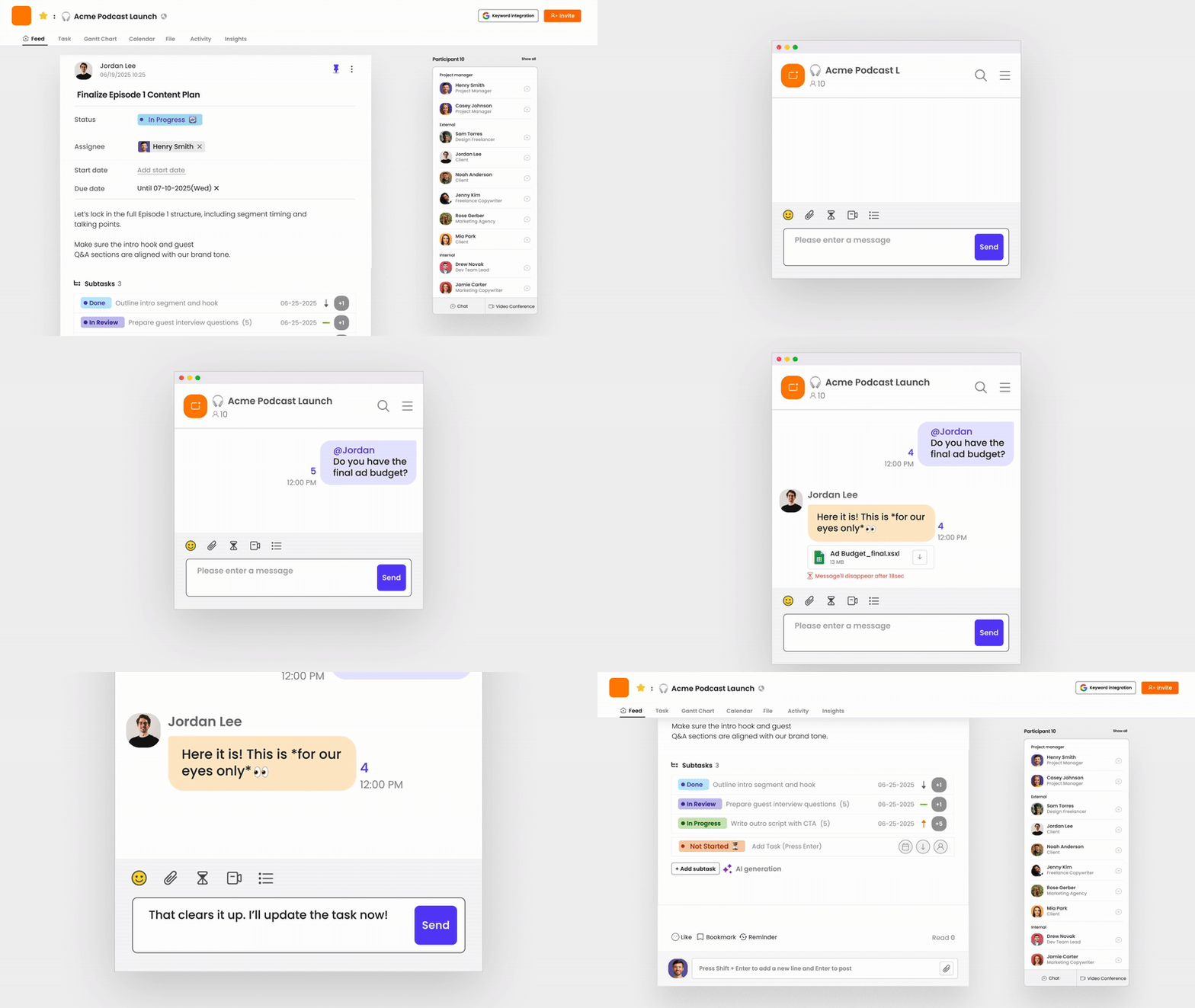
Morningmate is a lightweight work management tool built around the idea that your team chat and your task management should live in the same place. It includes a built-in chat that feels similar to WhatsApp — so adoption is fast, even for non-technical teams — alongside a Feed view that organizes project updates in a familiar, social-media-style layout. This means your team gets structured communication without needing to learn an entirely new way of working.
One of the standout features for small businesses is the ability to move seamlessly from a chat conversation to a task or project post. You’re not just messaging — you’re actually managing work. For a team of 10 to 50 people juggling multiple projects, that continuity is a real advantage. Morningmate is used by over 550,000 teams worldwide and is specifically designed to replace the chaos of scattered personal messaging apps without the complexity of tools built for large enterprise teams.
If you’re currently running your team out of WhatsApp or email, Morningmate is a natural next step. You can explore more in our guide on how to move team communication off WhatsApp.
Slack — Best for Tech-Comfortable Teams With Integration Needs
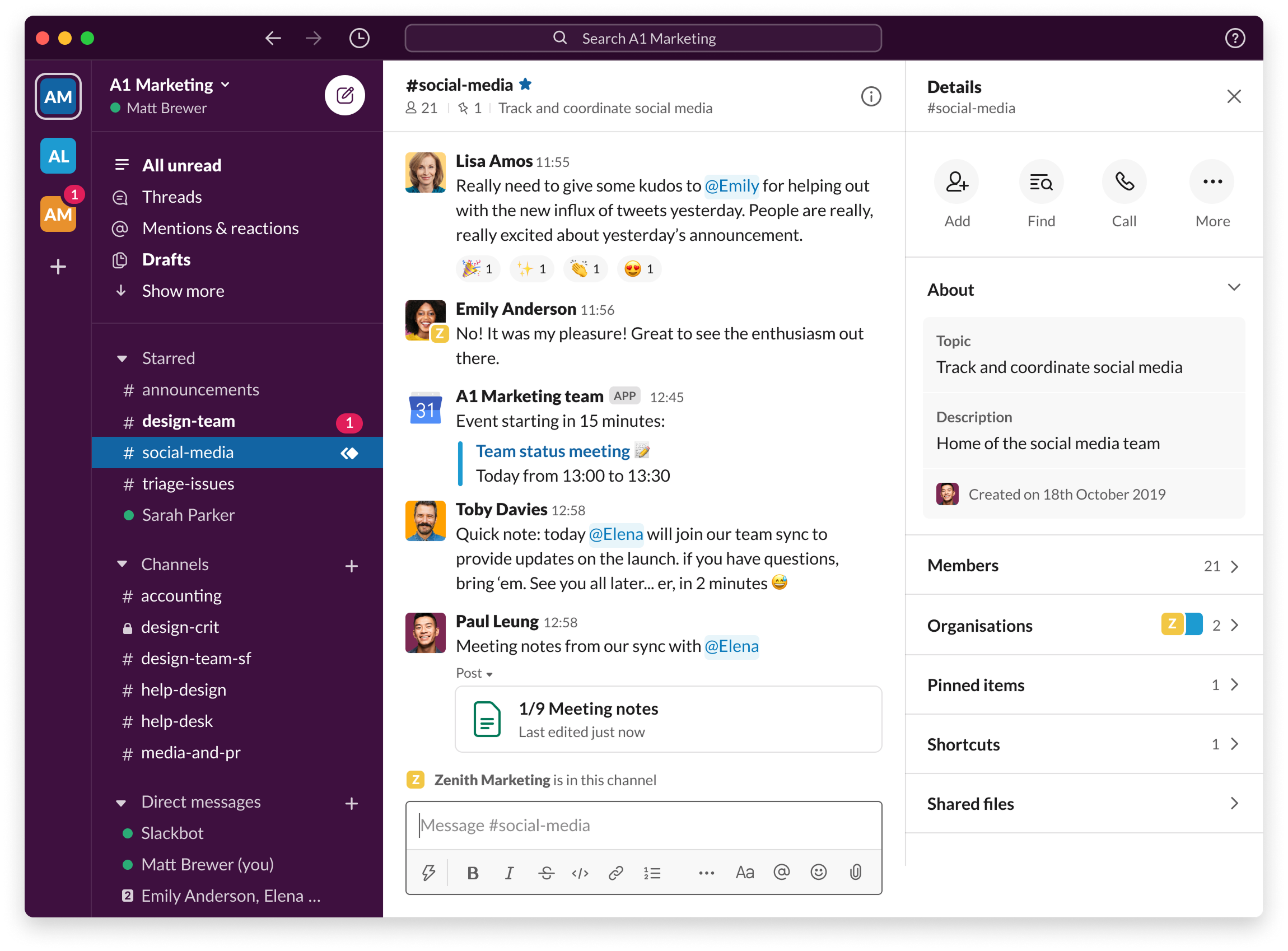
Slack remains one of the most widely used team chat tools, and for good reason. It’s powerful, highly customizable, and integrates with hundreds of other apps. For small businesses where most of the team is comfortable with tech, it can work well.
The downside for smaller teams is cost and complexity. Slack’s free plan has limitations, and the paid tiers can add up quickly. It also tends to become noisy fast — channels multiply, notifications pile up, and without discipline, it creates its own version of inbox chaos. It’s worth noting that Slack doesn’t include native task management, so you’ll need additional tools to connect conversations to action.
Microsoft Teams — Best for Businesses Already in the Microsoft Ecosystem
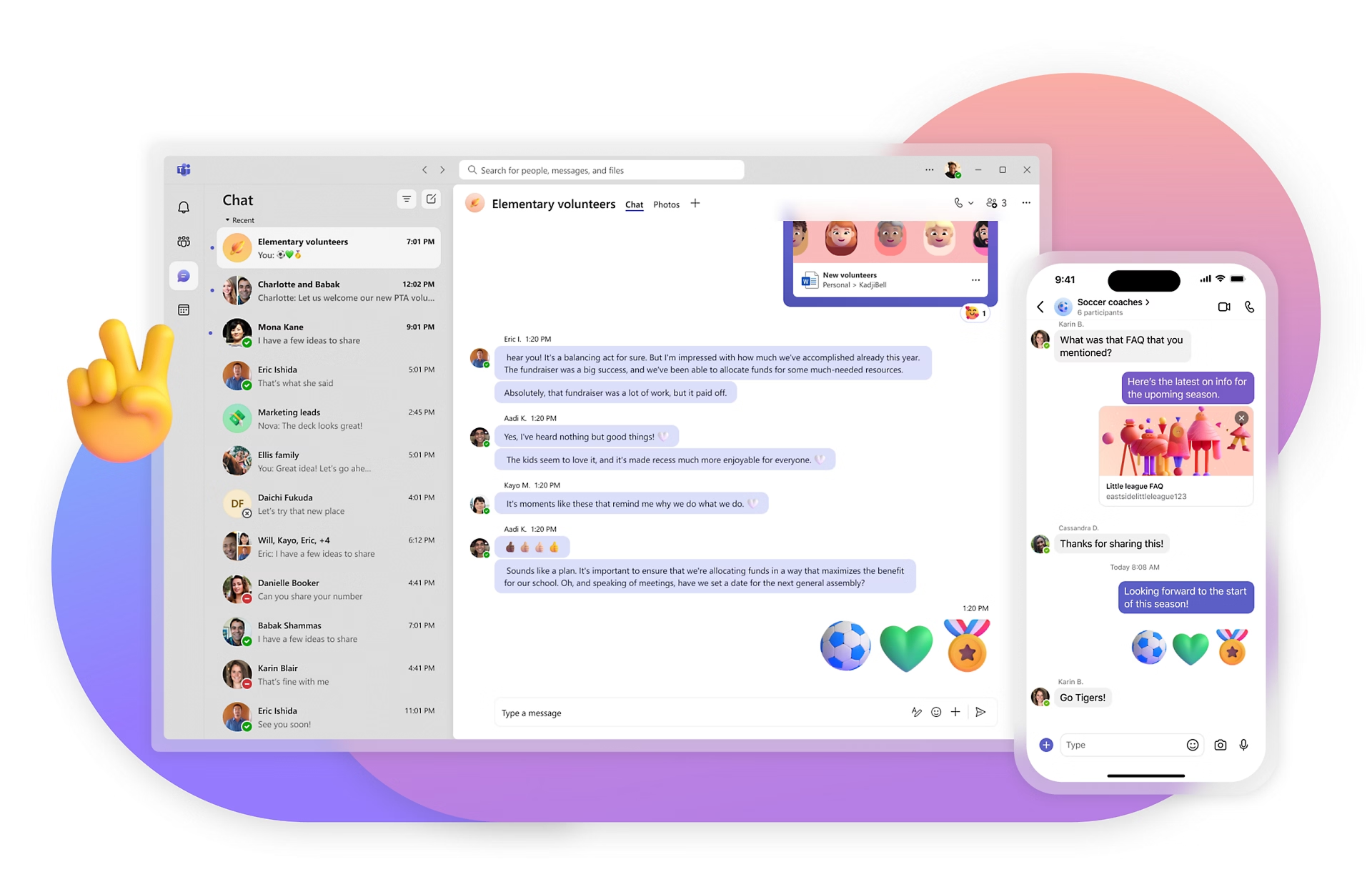
If your business already uses Microsoft 365, Teams is an obvious choice. The integration with Word, Excel, and Outlook is tight, and the pricing makes sense if you’re already paying for the suite. For small businesses in industries like finance, legal, or consulting — where Microsoft Office is standard — Teams can be a practical fit.
That said, Teams has a reputation for being heavy. New users often find it overwhelming. For non-technical teams or businesses outside the Microsoft ecosystem, the learning curve isn’t worth the payoff.
Google Chat — Best for Google Workspace Users
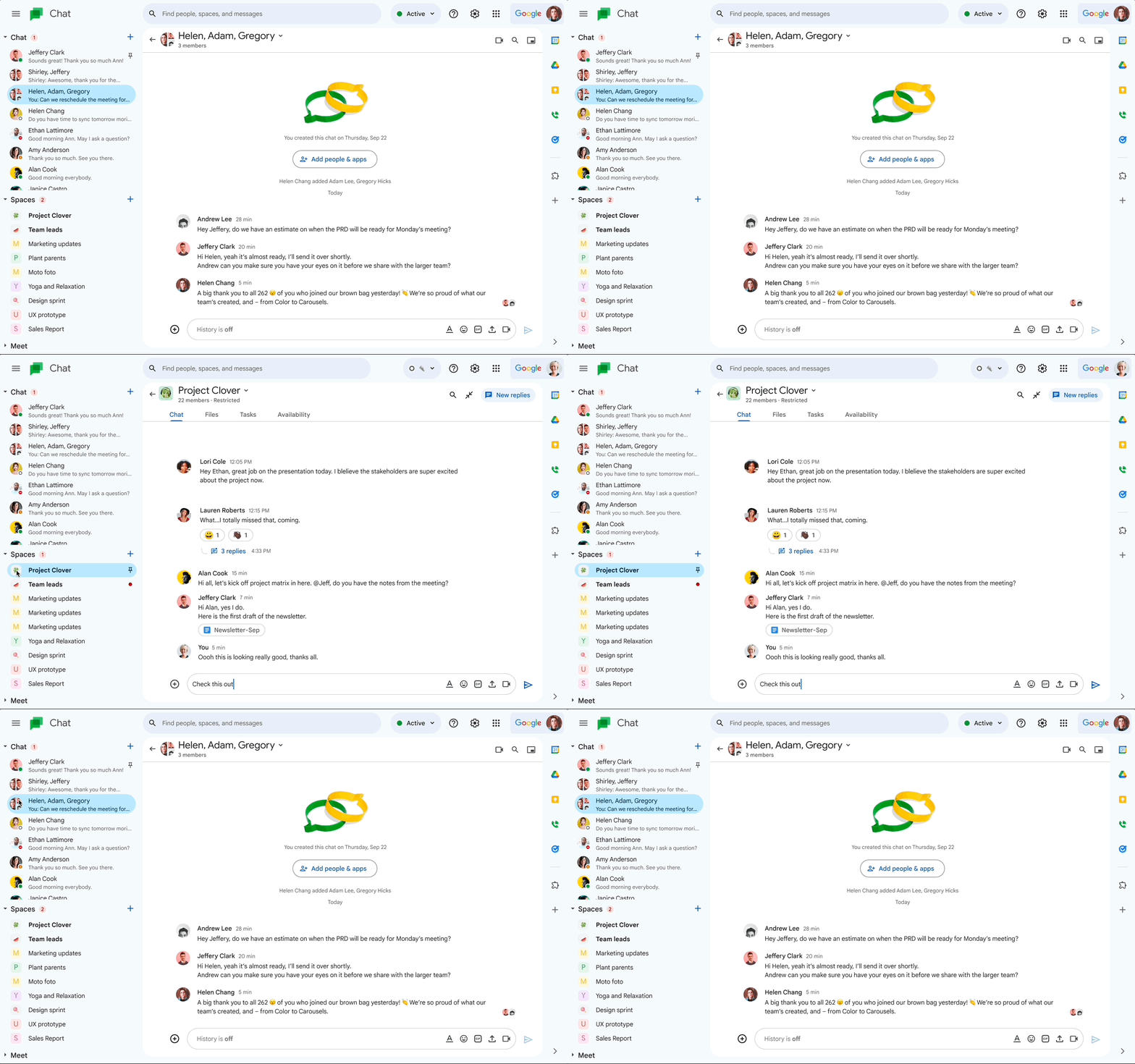
Similar logic applies to Google Chat. If your team lives in Gmail, Google Docs, and Google Drive, the integration is seamless. It’s clean, simple, and free with Google Workspace. For very small teams with basic needs and strong Google habits, it covers the basics.
Where it falls short is depth. Google Chat doesn’t offer much in the way of structured project communication or task management. It’s chat, and mostly just that.
Common Mistakes Small Businesses Make When Choosing a Chat App
Picking the wrong tool isn’t just a minor inconvenience — it can set a communication culture that’s hard to undo. Here are the mistakes worth avoiding.
Choosing Based on Features Alone
A feature list can be impressive and still produce a tool nobody uses. The real question is whether your team — including the least tech-savvy person on it — will actually open the app every day. Adoption rate matters more than feature count for small teams.
Separating Chat From Work Management
Using one app for chat and another for tasks creates a split-brain problem. Decisions made in chat don’t automatically become tasks. Tasks assigned in a project tool don’t connect back to the conversation that created them. Over time, this gap creates confusion about what was agreed, who owns what, and where to find updates.
This is one of the core reasons teams end up evaluating project management tools that include built-in communication, rather than treating the two as separate problems.
Underestimating the Cost of Switching Later
Every time a team switches tools, there’s a cost — not just in money, but in lost conversation history, disrupted habits, and re-onboarding time. Choosing a tool that can grow with your team, rather than one that just solves today’s problem, is worth the extra thought upfront.
How to Roll Out a New Team Chat App Without Disrupting Your Business
Even the right tool fails if the rollout is clumsy. Here’s a simple approach that works for most small business teams.
- Start with a pilot group. Pick one team or project and run the new tool there first. Work out the kinks before rolling it out company-wide.
- Migrate one communication channel at a time. Don’t try to move everything at once. Start with a single project or department and build from there.
- Set basic communication norms early. Which conversations belong in chat versus email? How quickly should people respond? Clear expectations prevent the tool from becoming just another notification source.
- Get buy-in from at least one skeptic. Every team has someone who resists new tools. If you can get them on board early, the rest of the team usually follows.
- Review after 30 days. Check whether the tool is actually reducing friction or just adding a new layer. Adjust your setup based on what you observe.
According to McKinsey’s research on social tools in the workplace, teams that communicate effectively using the right digital tools can improve productivity meaningfully — but only when the tools match how the team actually works, not how an IT team wishes they would work.
The Bottom Line
The best team chat app for small business is the one your whole team will actually use, consistently, without being reminded to. It should make communication easier to track, connect naturally to the work you’re doing, and not require a dedicated admin to keep it running.
For teams that are still relying on personal messaging apps or email, the jump to a proper work communication tool is one of the highest-leverage changes you can make. Tools like Morningmate are built specifically for this transition — combining familiar chat with real work management features, so your team gets organized without getting overwhelmed. The right tool doesn’t just replace WhatsApp. It replaces the whole messy system underneath it.