Running a small business means wearing a dozen hats before lunch. You’re managing people, chasing deadlines, answering messages across three different apps, and somehow still expected to have visibility on everything. If that sounds familiar, you’re not alone — and the right collaboration tools can genuinely change how your team works together.
The good news is that 2026 has brought a wave of capable, free tools designed specifically for smaller teams. You don’t need an enterprise budget or an IT department to get organized. What you do need is the right stack — tools that fit how your team actually works, not tools that require a week of onboarding just to send a task.
This guide breaks down the best free collaboration tools for small business in 2026, what each one is actually good for, and how to pick the right combination without overcomplicating things.
Why Small Businesses Need Dedicated Collaboration Tools
Email threads and WhatsApp group chats feel convenient — until they aren’t. A client update gets buried under memes. A task gets assigned in a DM and forgotten. Nobody knows what’s actually done and what’s still pending. Sound familiar?
According to McKinsey research, employees spend nearly 20% of their workweek searching for internal information or tracking down colleagues for updates. For a small team, that’s hours you simply can’t afford to lose. Dedicated collaboration tools fix this by giving information a home — and giving your team a shared source of truth.
Beyond productivity, there’s a culture argument too. Harvard Business Review has consistently noted that teams with clear communication structures report higher engagement and lower burnout. The tool you choose shapes the habits your team builds — and habits compound over time.
The Best Free Collaboration Tools for Small Business in 2026
Below are the top tools worth considering, grouped by what they do best. Most offer a free tier that’s genuinely usable — not just a teaser to force an upgrade.
1. Morningmate — Best Lightweight Workspace for Non-Tech Teams
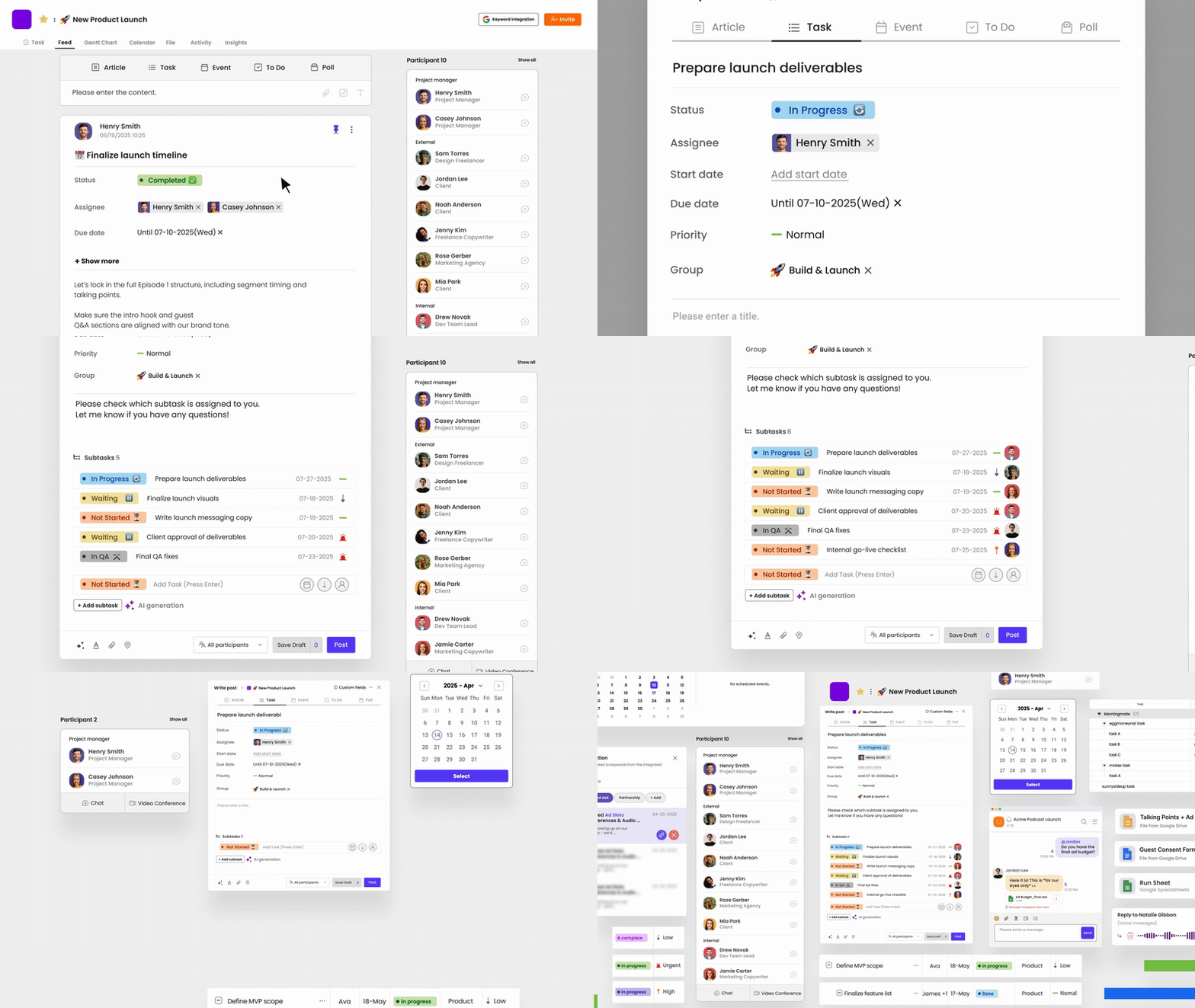
If your team spends half its time bouncing between a task app, a chat app, and email, Morningmate is worth a serious look. It’s a lightweight work management tool that combines task management, team chat, and file sharing in one place — without the steep learning curve of tools like Jira or Asana.
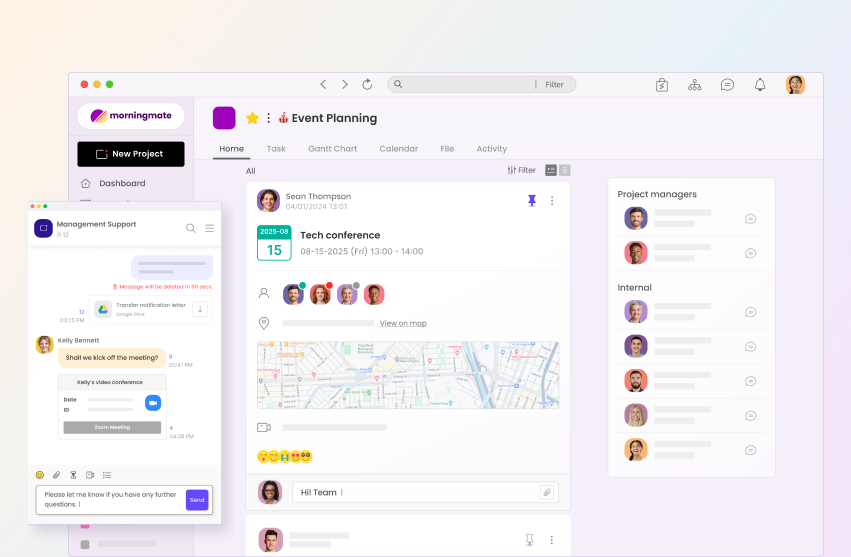
What makes it stand out for small businesses is the Feed view. It works like a social media feed, showing project updates, task progress, and team activity in a familiar scroll format. Your team doesn’t need training to understand it — they already know how it works from daily life. The built-in chat mirrors the interface of WhatsApp, so even teams with zero technical background get up to speed fast.
Morningmate is used by over 550,000 teams worldwide and is especially well-suited for hybrid or remote teams that need one organized workspace instead of five scattered apps. It’s a strong starting point if you’re looking to consolidate without overwhelming your team. See how Morningmate compares to email-based workflows here.
2. Google Workspace (Free Tier) — Best for Document Collaboration
Google Docs, Sheets, and Drive remain the gold standard for real-time document collaboration. The free tier covers most small business needs — shared drives, live co-editing, and comments that keep feedback organized and in context.
It works best as part of a broader stack rather than a standalone solution. Pair it with a task management tool like Morningmate, and your team has a clean setup: tasks and communication in one place, documents and files in another — linked together and easy to find.
3. Notion — Best for Knowledge Management
Notion’s free plan is generous and works well for teams that need a centralized knowledge base. SOPs, onboarding docs, meeting notes, team wikis — Notion handles all of it in a clean, flexible interface.
The caveat: Notion can become a black hole if nobody maintains it. It works best when one person owns the structure and keeps it tidy. If your team is disciplined about documentation, Notion is excellent. If not, it can add clutter rather than remove it.
4. Slack (Free Tier) — Best for Chat-First Teams
Slack’s free plan gives you 90 days of message history and basic channel organization. For small teams that thrive on quick, informal communication, it works well. The integrations ecosystem is massive, which means it connects easily with other tools in your stack.
That said, the free plan’s message limit can be a real constraint for teams that rely on historical context. And Slack alone doesn’t solve task tracking — you’ll still need something alongside it to manage work, not just talk about it.
5. Trello (Free Tier) — Best for Visual Task Boards
Trello’s Kanban-style boards are intuitive and visual, making them a good fit for teams managing projects with clear stages — to do, in progress, done. The free plan includes unlimited cards and up to 10 boards per workspace.
Where Trello falls short is in cross-project visibility. When you have multiple boards running, getting a high-level view of everything requires manual effort. For business owners or ops leads who need to see across teams, this can be a real frustration.
6. Zoom (Free Tier) — Best for Video Meetings
Zoom’s free plan still covers most small business video needs — 40-minute group meetings, unlimited one-on-ones, and solid screen sharing. For teams that hold regular syncs, it’s reliable and widely understood.
The 40-minute limit on group calls is the main friction point, but for structured teams with tight agendas, it’s often more than enough. Pair it with an async tool so not every conversation needs to be a call.
How to Choose the Right Combination for Your Team
No single tool does everything perfectly. Most small businesses end up with a small stack of two to three tools that cover different needs. Here’s a practical framework for building yours.
Start With Your Biggest Pain Point
Don’t try to solve everything at once. Identify where your team loses the most time or makes the most mistakes. Is it missed tasks? Lost files? Too many chat platforms? Start with the tool that solves that one problem well.
For most small businesses, the biggest pain point is scattered communication — tasks assigned in WhatsApp, updates buried in email, no single place to check status. If that’s your situation, start with a work management tool that has built-in communication, rather than adding a separate chat app on top of an existing one.
Keep the Stack Small
More tools don’t mean better collaboration. According to Gallup’s State of the Global Workplace report, employee disengagement often correlates with fragmented workflows and unclear processes. Adding five tools without clear ownership of each creates more noise, not less.
Aim for a stack that covers three functions: communication, task tracking, and file or knowledge management. If one tool covers two of those, that’s a win. Less switching means more focus.
Prioritize Adoption Over Features
The best collaboration tool is the one your team actually uses. A feature-rich platform your team avoids is worse than a simple one they use every day. When evaluating tools, run a short trial with your actual team — not just the most tech-savvy person — and see what sticks.
This is where Morningmate tends to win for non-tech teams. The familiar social-feed interface and WhatsApp-style chat mean there’s almost no resistance to adoption. People understand it on day one, which is often the hardest hurdle to clear.
A Simple Stack Recommendation by Team Type
Here’s a quick guide based on common small business setups.
- Remote team, 5–20 people: Morningmate (tasks + chat) + Google Drive (files) + Zoom (calls)
- Hybrid team, 20–50 people: Morningmate (central workspace) + Notion (knowledge base) + Google Workspace (documents)
- In-person team, low tech comfort: Morningmate (tasks + communication) + Google Drive (files)
- Project-heavy team: Trello (visual boards) + Slack (chat) + Google Workspace (docs)
These aren’t rigid rules — they’re starting points. Your team’s workflow will tell you what’s missing after a few weeks of use.
What to Watch for in Free Plans
Free tiers are genuinely useful, but they come with trade-offs. Before committing to any tool, check these common limitations.
- User limits: Some free plans cap team size at 5 or 10 users.
- Storage limits: File-heavy teams will hit storage walls quickly on free plans.
- Message or activity history: Tools like Slack limit how far back you can search in free plans.
- Integrations: Many integrations are locked behind paid tiers.
- Guest access: Working with clients or freelancers may require a paid plan for external users.
Read the free plan details before building your workflow around a tool. The last thing you want is to switch platforms six months in because you hit an invisible wall.
The Bottom Line
The best free collaboration tools for small business in 2026 aren’t necessarily the most powerful ones — they’re the ones that reduce friction, get used consistently, and give your team a shared space to work. Start simple, solve your biggest pain point first, and build from there.
Whether you need a single all-in-one workspace or a lightweight stack of two or three tools, there’s no shortage of strong free options available right now. The key is picking something your whole team will actually open every morning — and stick with.