Managing tasks across a remote team sounds simple until it isn’t. Someone misses an update buried in a WhatsApp thread. A deadline slips because no one was sure who owned the task. A project status lives in someone’s head, not somewhere the whole team can see. Sound familiar?
Task management for remote teams is one of the most common — and costly — operational challenges for growing companies. When your team is spread across cities, time zones, or even just different floors of a building, the systems that worked for a five-person crew start to crack under pressure.
The good news: the problem is solvable. It just requires the right structure, habits, and tools. This guide walks you through what actually works — practically, not theoretically.
Why Remote Task Management Breaks Down
Most remote teams don’t fail because people are lazy or disorganized. They fail because the systems they use were never designed for distributed work. Email threads become graveyards of decisions no one can find later. Personal messenger apps blur work and personal life while making it nearly impossible to track progress.
Harvard Business Review has documented how remote workers frequently experience what researchers call “coordination overhead” — the extra time and energy spent just figuring out who is doing what, by when, and whether it’s on track. That overhead eats directly into your team’s productive hours.
The root causes usually come down to a few patterns:
- Tasks living in too many places — chat, email, spreadsheets, verbal conversations
- No clear ownership assigned to individual tasks
- Status updates that require someone to ask, rather than being visible by default
- No shared understanding of priorities across the team
Once you can name the problem, you can fix it.
The Core Pillars of Effective Remote Task Management
Before jumping into tools or tactics, it helps to understand the foundations. Effective task management for remote teams rests on four pillars: clarity, visibility, accountability, and communication. Get these right, and most other problems sort themselves out.
Clarity: Every Task Needs an Owner, a Deadline, and a Definition of Done
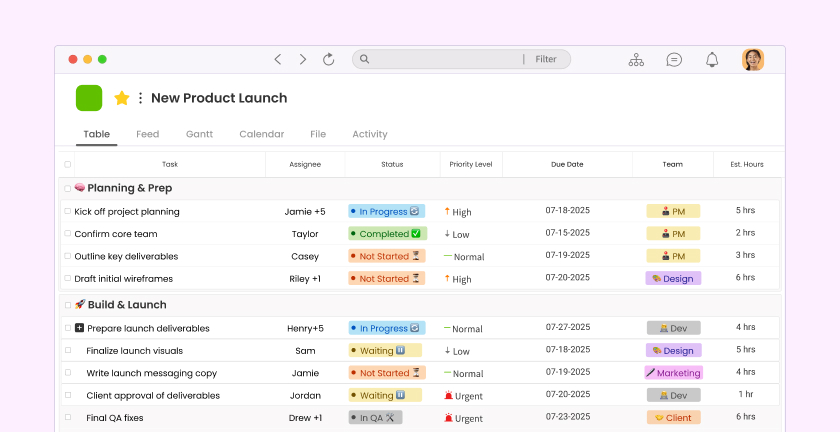
Vague tasks produce vague results. “Work on the proposal” means something different to everyone. “Draft the first two sections of the client proposal by Thursday EOD” leaves no room for interpretation.
When creating tasks for your remote team, build a habit of including three things: who is responsible, when it’s due, and what “complete” actually looks like. This alone eliminates a significant portion of follow-up conversations and missed handoffs.
Visibility: Progress Should Be Seen, Not Chased
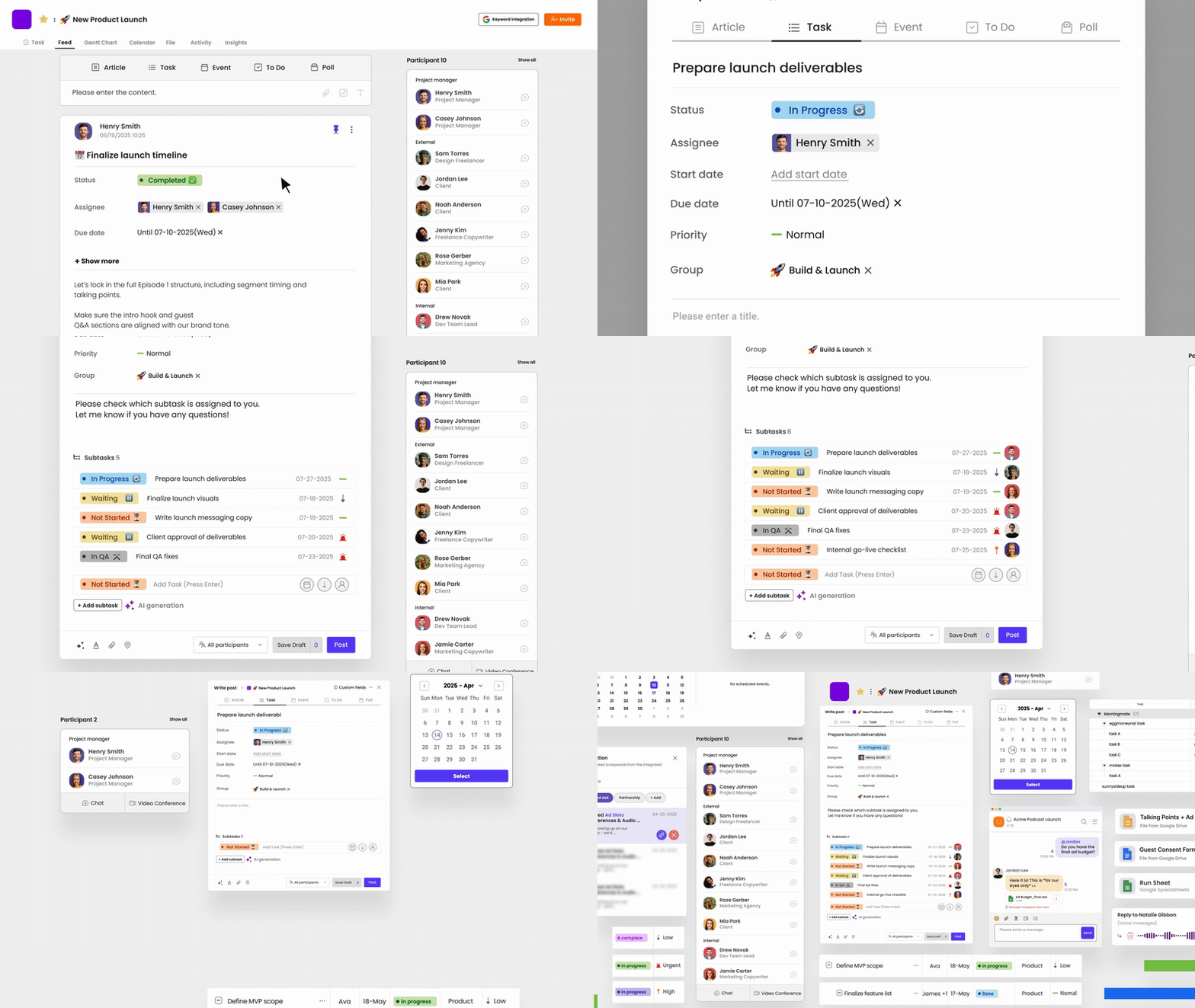
A manager shouldn’t have to send “any update on this?” messages every day. When task progress is visible to everyone by default — on a shared board, a project feed, or a status tracker — the team moves faster and trust builds naturally.
This is where a tool like Morningmate makes a real difference. Its Feed view works like a social media timeline — team members post updates, share files, and log progress in a shared stream that everyone can scroll through. There’s no inbox to dig through and no status meeting required just to know where things stand.
Accountability: Ownership Without Micromanagement
Accountability in remote teams isn’t about surveillance — it’s about making ownership visible. When a task has one named person responsible for it, it’s far less likely to fall through the cracks than when it “belongs to the team.”
Set up a simple norm: every task has one primary owner. That person is responsible for either completing it or flagging blockers early. This culture of ownership, when paired with the right tools, makes your team dramatically more self-sufficient.
Communication: Async-First, But Not Async-Only
McKinsey research consistently shows that high-performing distributed teams default to asynchronous communication — but they also know when a quick call saves an hour of back-and-forth. The key is reducing unnecessary real-time interruptions while keeping communication connected to the work itself.
Task-related conversations should live next to the task, not scattered across a dozen different channels. When context is attached to the work, new team members can get up to speed faster and decisions don’t get lost.
A Practical Framework for Remote Task Management
Here’s a straightforward framework you can implement with your team starting this week. It doesn’t require expensive software or a full process overhaul — just consistent habits applied to whatever tools you already use.
Step 1 — Centralize All Tasks in One Place
Pick one system and commit to it. Whether it’s a project management tool, a shared board, or a lightweight workspace, the rule is simple: if a task doesn’t exist in the system, it doesn’t exist. This sounds obvious but it’s the step most teams skip, which is why work keeps leaking into email and chat.
Step 2 — Structure Tasks With Consistent Fields
Every task in your system should consistently include:
- Title — clear and action-oriented (e.g., “Submit Q2 budget report” not “Budget”)
- Owner — one person, not a team name
- Due date — specific, not “ASAP”
- Priority level — high, medium, or low
- Status — not started, in progress, blocked, complete
- Notes or attachments — anything needed to actually complete the work
It takes thirty extra seconds to fill this out properly. It saves thirty minutes of follow-up later.
Step 3 — Run Weekly Team Syncs Around the Task Board, Not Instead of It
Your weekly team meeting should be a walkthrough of the task board, not a verbal download of what everyone did last week. When the board is kept current, the meeting becomes faster, more focused, and more useful. You spend time making decisions, not recapping status.
Aim for meetings under 30 minutes. The task board does the heavy lifting — the meeting handles exceptions, blockers, and decisions that need real-time input.
Step 4 — Keep Work Conversations Attached to Tasks
Every time a decision or update gets made in a separate chat and never recorded on the task itself, you create debt. Future you — or your teammates — will waste time searching for context that should have been one click away.
Morningmate’s built-in chat is designed to sit alongside your task management rather than replace it. Teams can discuss work, share files, and tag colleagues in a clean, WhatsApp-style interface that feels familiar — so adoption is fast even for non-technical team members. Learn more about async communication best practices for remote teams.
Common Mistakes Remote Teams Make (And How to Fix Them)
Even teams with the right intentions make predictable mistakes when it comes to remote task management. Here are the most common ones — and the fixes that actually stick.
Mistake 1 — Using Too Many Tools
Slack for chat. Email for approvals. Trello for tasks. Google Docs for notes. Zoom for meetings. Each tool makes sense in isolation, but together they create a fragmented system where work gets scattered and people stop checking half the channels.
The fix is consolidation, not perfection. You don’t need to find the single best tool — you need to reduce the number of places where work lives. Aim for two or three tools maximum, each with a clear and distinct purpose.
Mistake 2 — Treating All Tasks as Equal Priority
When everything is high priority, nothing is. Remote teams especially suffer from this because there’s no manager walking the floor to signal urgency through body language or tone. It all looks the same in a list.
Build a simple tiering system and stick to it. A three-tier model — critical, standard, and low-priority — is enough for most teams. Review priorities weekly and be willing to downgrade tasks that no longer matter.
Mistake 3 — Skipping the Retrospective
Remote teams often skip the “what worked, what didn’t” conversations because there’s no natural water-cooler moment to have them. This means the same coordination problems repeat month after month.
Schedule a brief monthly retrospective — even 20 minutes — focused specifically on how the team manages work, not just what they delivered. Small process improvements compound over time into significantly better team performance. Check out our guide on building a high-productivity remote team for more on this.
Choosing the Right Task Management Tool for Your Remote Team
The right tool isn’t necessarily the most powerful one — it’s the one your team will actually use consistently. A beautifully built Jira board that only the project manager updates defeats its own purpose.
Gallup’s State of the Global Workplace findings point to employee engagement as one of the key drivers of team performance — and engagement drops when people find their tools frustrating or overcomplicated. Tool simplicity isn’t a nice-to-have. It directly affects how well your team functions.
When evaluating tools, look for these characteristics:
- Low learning curve — can a new team member use it on day one?
- Clear task ownership and status tracking built in
- Notifications that don’t overwhelm people
- File sharing and communication that connects to the work itself
- Works well on mobile for team members who aren’t always at a desk
Morningmate was built with exactly this user in mind — not the power user who lives in dashboards, but the operations lead, the business owner, or the team manager who needs visibility into work without spending an hour configuring filters. Over 550,000 teams use it to replace the email-and-WhatsApp chaos with one organized workspace that feels intuitive from the first login. See how it compares in our breakdown of the best task management tools for remote teams.
What Great Remote Task Management Actually Looks Like
Picture this: your team starts Monday with a shared workspace where every active task is visible, owned, and prioritized. During the day, teammates post updates and flag blockers in the same feed where the work lives. By Friday, you can look at the board and know — without sending a single “quick check-in” message — exactly what shipped, what’s in progress, and what needs attention next week.
That’s not an unrealistic ideal. It’s what happens when you apply the right structure consistently. Remote teams can absolutely outperform co-located ones — not in spite of their distributed nature, but because distributed work, when managed well, forces the kind of clarity and documentation that benefits everyone.
Start with one change this week: pick one place where all tasks will live, and make sure every task has a name, an owner, and a due date. That single habit, applied consistently, will do more for your team’s productivity than any new tool or methodology you could introduce.