Small teams don’t struggle because they lack discipline — they struggle because their tools demand more structure than they can realistically maintain. When everyone wears multiple hats, task management needs to be lightweight, clear, and fast to adopt.
That’s why choosing the right task management tool matters more for small teams than for large ones. The wrong tool creates friction, low adoption, and abandoned boards. The right one quietly supports daily work without becoming another thing the team has to manage.
In 2026, task management tools vary widely in complexity, pricing, and assumptions about how teams work. Understanding what small teams actually need — and what they don’t — is key to choosing a tool that supports productivity instead of slowing it down.
User-Friendly Interface
The usability of task management tools is vital, especially for small teams. An intuitive interface can enhance user adoption and decrease the time spent on training. When evaluating a tool, consider its ease of navigation and simplicity in performing key functions. Look for software that offers drag-and-drop functionalities, easy-to-read dashboards, and straightforward task creation processes.
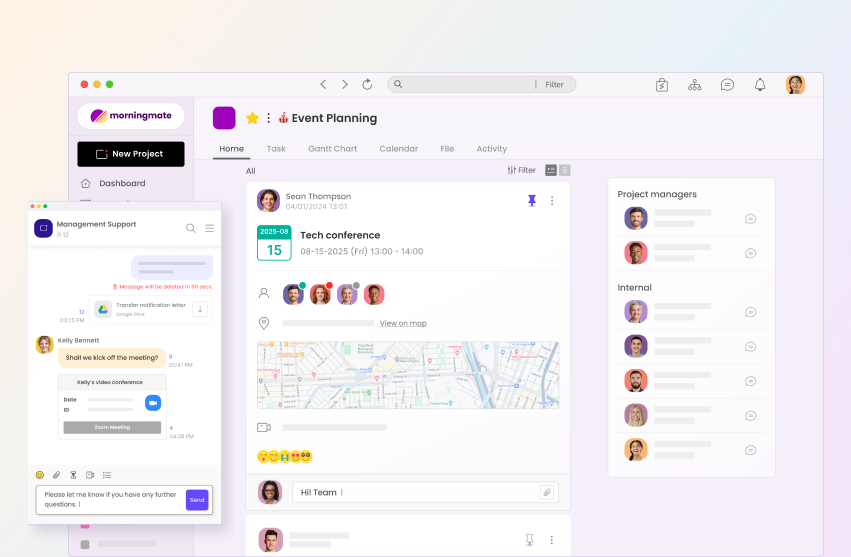
Morningsmate, for example, offers a seamless experience with its user-friendly design, making task management easier for team members to navigate without a steep learning curve. A simple, yet effective interface ensures that team members can focus on what truly matters—getting their tasks done efficiently.
Collaboration Features
Collaboration is key to the success of small teams. Task management tools should facilitate communication and coordination among team members. Features like real-time chat, file sharing, and collaborative document editing are essential. These features ensure that all team members stay in the loop, can provide input promptly, and are aligned with project goals.
When everyone is on the same page, tasks are completed more efficiently and accurately. Choose tools that integrate seamlessly with other software platforms your team might be using, such as email, calendar apps, and file storage systems, to enhance communication and collaboration efforts.
Customization and Flexibility
Every team has unique needs, and a one-size-fits-all approach rarely works when it comes to task management. Look for tools that allow for customization in terms of fields, dashboards, and workflows. The ability to tailor the tool to reflect your team’s specific processes can greatly enhance efficiency.
Tools that offer flexibility in terms of customizable templates and workflow adjustments can help teams respond swiftly to changing project demands. This adaptability is especially beneficial in dynamic environments where priorities can shift rapidly.
Integration Capabilities
In today’s interconnected digital workspace, the ability to integrate seamlessly with other software is a must-have feature for any task management tool. Integration capabilities enable teams to synchronize their work across multiple platforms, streamlining processes and reducing duplication of efforts.
Check if the task management tool can integrate with your existing tools like CRM systems, accounting software, and customer support platforms. This not only saves time but also prevents data silos, ensuring that your team has a holistic view of ongoing projects and tasks.
Scalability for Future Growth
While your team may be small now, it’s essential to consider future growth. A scalable task management tool can support your team as it expands in size and complexity. Look for tools that offer various package tiers or can handle increased users without compromising performance.
Scalability not only pertains to user capacity but also to functionality. The tool you choose should have features that cater to a growing team’s needs, like advanced analytics, reporting, and project tracking capabilities. Investing in a scalable tool ensures that your task management system evolves alongside your team.
Cost-Effectiveness
Budget constraints are a reality for many small teams. Therefore, cost-effectiveness is an important factor when evaluating task management tools. Many tools operate on a subscription-based model, offering various pricing plans to accommodate different needs and budgets.
Take advantage of free trials to test the tool’s features before committing to a purchase. Comparing the cost relative to the features and benefits provided is crucial in ensuring you’re getting the best value. Don’t forget to consider the potential ROI that effective task management can bring to your team’s productivity.
Mobile Accessibility
With remote work and on-the-go lifestyles becoming more prevalent, mobile accessibility is a critical feature in task management tools. A tool that offers a mobile app or a responsive mobile website can greatly enhance productivity, allowing team members to manage tasks from anywhere.
Ensure that the mobile version of the task management tool is as robust and user-friendly as the desktop version, enabling users to access all necessary features without limitations. This can be an invaluable feature for team members who need to update task statuses, check schedules, or communicate with the team while away from their desks.
Analytics and Reporting
Analytics and reporting features provide insights into team performance and project progress. Select a task management tool that offers detailed reporting capabilities, allowing you to assess team efficiency, track project timelines, and identify areas for improvement.
Robust reporting tools can support data-driven decision-making by showcasing historical data and trends. This information can empower managers to allocate resources more effectively and devise strategies that enhance productivity and team dynamics.
Security and Privacy Features
Maintaining data security and privacy is paramount, particularly when dealing with sensitive business information. Ensure that the task management tool you choose offers strong security features such as data encryption, regular updates, and user access controls.
Evaluate the tool’s compliance with data protection regulations and its track record in safeguarding user information. Peace of mind in terms of data security can not only prevent breaches but also build trust within your team and with clients.
Conclusion: Making the Right Choice
Choosing the right task management tools for small teams is a pivotal decision that can streamline operations and bolster productivity. By focusing on features such as user-friendly design, collaboration capabilities, customization, and cost-effectiveness, teams can identify a tool that meets their specific needs.
Morningmate presents itself as an excellent option for small teams seeking a comprehensive solution. Its intuitive interface, strong collaboration features, and scalability make it a top contender in the crowded market of task management tools. Embark on a free trial today to experience how it can transform your team’s workflow.