Task management tools are no longer confined to a single device. Some teams plan, organize, and track work primarily on desktop applications, while others rely heavily on mobile apps to stay responsive throughout the day. The question isn’t simply which platform is better—it’s how teams actually use them in real work scenarios.
Desktop and mobile task management apps serve different purposes. Desktops tend to support deeper planning, visibility, and complex coordination, while mobile apps prioritize speed, accessibility, and quick updates. Understanding these differences—and how they affect productivity, collaboration, and workflow consistency—helps teams choose tools that align with how work gets done, not just how it’s designed.
This article examines the strengths and limitations of desktop and mobile task management applications, explores real-world usage patterns, and explains why many teams find the most success by combining both rather than choosing one over the other.
The Rise of Task Management Applications
As digital transformation reshapes work environments, task management applications have become indispensable. Desktop and mobile platforms offer distinct advantages that cater to various user preferences and requirements. Understanding the rise of these tools is key to appreciating their impact and deciding which platform best serves your team.
Desktop applications typically offer a robust set of features, benefiting from large screens and powerful hardware. They are ideal for complex projects requiring detailed planning and analysis. Conversely, mobile applications provide on-the-go accessibility, crucial for teams that need flexibility and immediate access to updates, particularly in industries like sales or field services.
Desktop Task Management Applications: Advantages and Challenges
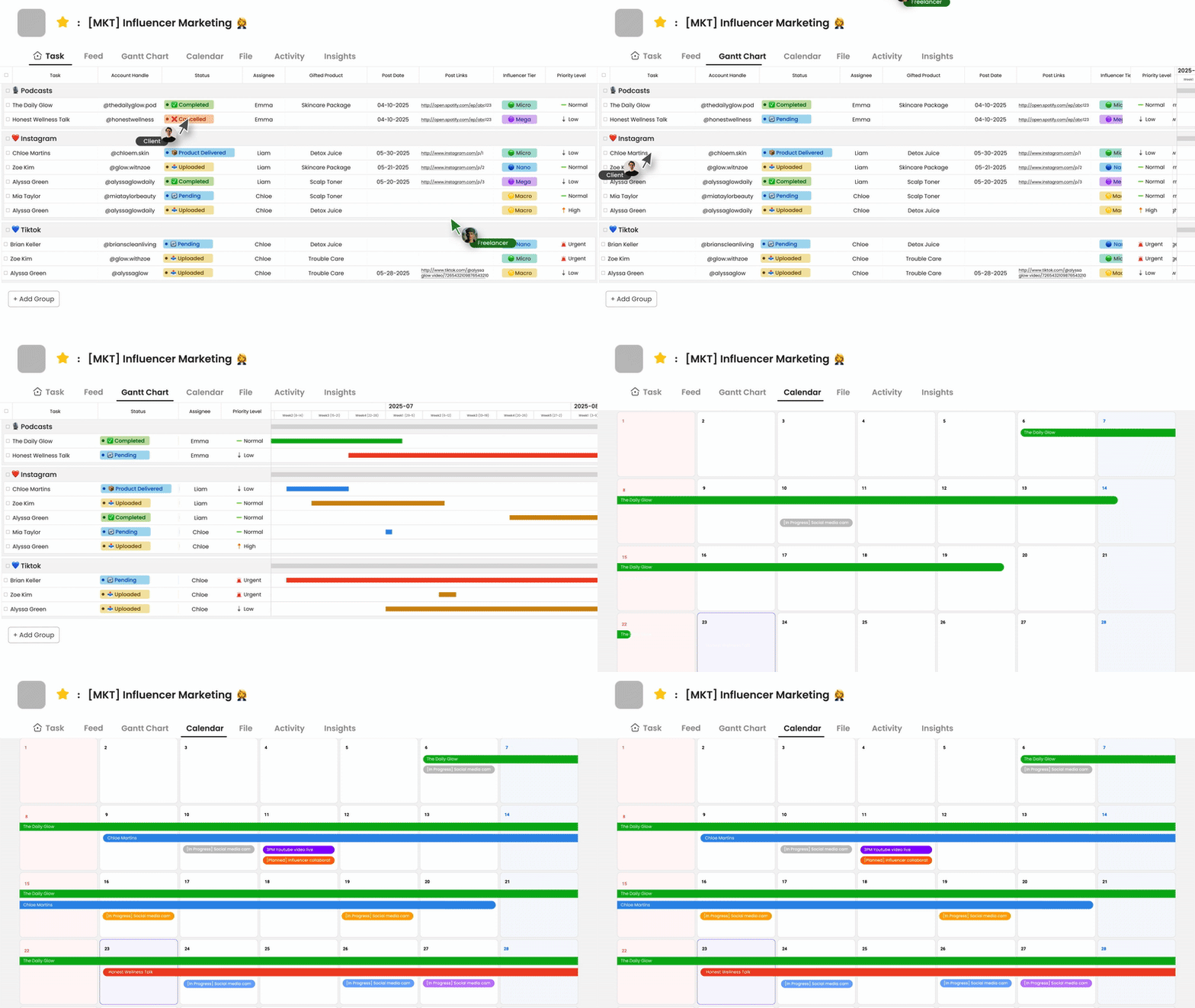
Desktop task management applications are cherished for their comprehensive functionality and ease of data manipulation. These platforms allow users to manage vast amounts of information with greater visibility, which is invaluable for project managers overseeing large teams or projects.
- Advanced features such as Gantt charts and resource allocation tools.
- Better multitasking capabilities with multiple open windows and drag-and-drop features.
However, desktops are not without their challenges. They require a stable internet connection and can be cumbersome for remote or field workers who move frequently. Furthermore, the necessity of physical workspace limits accessibility, which can hinder productivity outside the traditional office environment.
Mobile Task Management Applications: Flexibility and Connectivity
Mobile task management applications provide unparalleled accessibility, allowing team members to check tasks, update statuses, and communicate with colleagues from virtually anywhere. Their user-friendly interfaces make them an attractive choice for today’s mobile-centric workforce.
Key advantages of mobile task management applications include:
- Immediate access to updates and notifications, enhancing team responsiveness.
- Simplified interfaces designed for quick interactions on smaller screens.
Nonetheless, mobile apps can suffer from limited functionality compared to desktop versions. Intuitive design often comes at the expense of deep-dive project management capabilities, which can be a drawback for more complex tasks. Additionally, the reliance on battery life and mobile data can pose challenges during extended use.
What Teams Really Use: Bridging the Gap
The choice between desktop and mobile task management applications should not be seen as mutually exclusive. Many teams adopt a hybrid approach, leveraging the strengths of both platforms to create a cohesive workflow that suits their operational needs. Morningmate, for instance, enables seamless transitions between desktop and mobile, ensuring users can maintain productivity across diverse contexts.
For many teams, the key to successful task management lies in flexibility. By integrating both mobile and desktop applications, teams can optimize their workflows, accessing powerful tools on the desktop while benefiting from the mobility of smartphone apps. This balanced strategy ensures comprehensive task oversight and immediate team communication.
Implementing a Hybrid Task Management Strategy
To implement a hybrid task management strategy effectively, teams should assess their particular work processes and identify areas where each platform excels. Here’s a step-by-step guide to balance and leverage both desktop and mobile applications:
- Identify tasks that require detailed input and analysis—assign these to desktop applications.
- Delegate tasks needing urgent responses and updates to mobile applications.
- Regularly review and update task priorities using both platforms to ensure consistency.
- Encourage synchronization of data between desktop and mobile to maintain accurate records.
- Provide training to team members on optimizing the use of both app types efficiently.
Embracing a hybrid approach not only boosts technical agility but also enhances team morale by providing flexibility in how and where team members work.
Morningmate’s Role in Advancing Task Management
Understanding the benefits of both desktop and mobile task management applications can transform how teams operate. Morningmate provides a platform that supports this dual capability, offering robust solutions tailored to the needs of modern businesses. Whether managing complex projects on a desktop or keeping track of urgent tasks on the go, Morningmate ensures continuity and efficiency.
For organizations seeking an adaptable task management solution, Morningmate delivers powerful tools and continuous innovation. Explore how Morningmate can help your team stay connected and productive across all devices.