In the fast-paced world of business, effective task management tools are essential for collaboration and productivity. As companies strive for efficiency, integrating task management with file storage becomes crucial. Google Drive, as a widely used cloud storage service, comes with its own set of advantages for organizing files and sharing documents. However, files often need context to fully realize their potential in project management. Bridging the gap between task management and file storage can streamline processes, boost productivity, and improve team collaboration.
Task management isn’t just about checking off to-do lists — it’s about understanding the relationship between various tasks and documents. In this landscape, files stored in Google Drive can sometimes remain isolated without contextual links to tasks. The ability to attach context to files is vital for effective teamwork, allowing projects to move forward seamlessly. This article delves into why providing context to files in Google Drive is essential and how it can enhance task management strategies.
The Importance of Context in Task Management
Task management involves more than just assigning duties and tracking progress. It also includes ensuring that all team members understand the “why” behind their tasks. When files in Google Drive are linked to specific tasks, it provides a narrative that connects each document to a broader project objective. This context helps users quickly grasp the significance of each file and its relevance to ongoing projects.
- Enhanced understanding of project goals.
- Facilitated collaboration through clearly defined tasks.
By connecting files with task management systems like Morningmate, teams can reduce miscommunication and improve the overall flow of information. This integration leads to efficient task execution and reduces the chances of important files being overlooked or misused.
How Google Drive Integrates with Task Management Tools
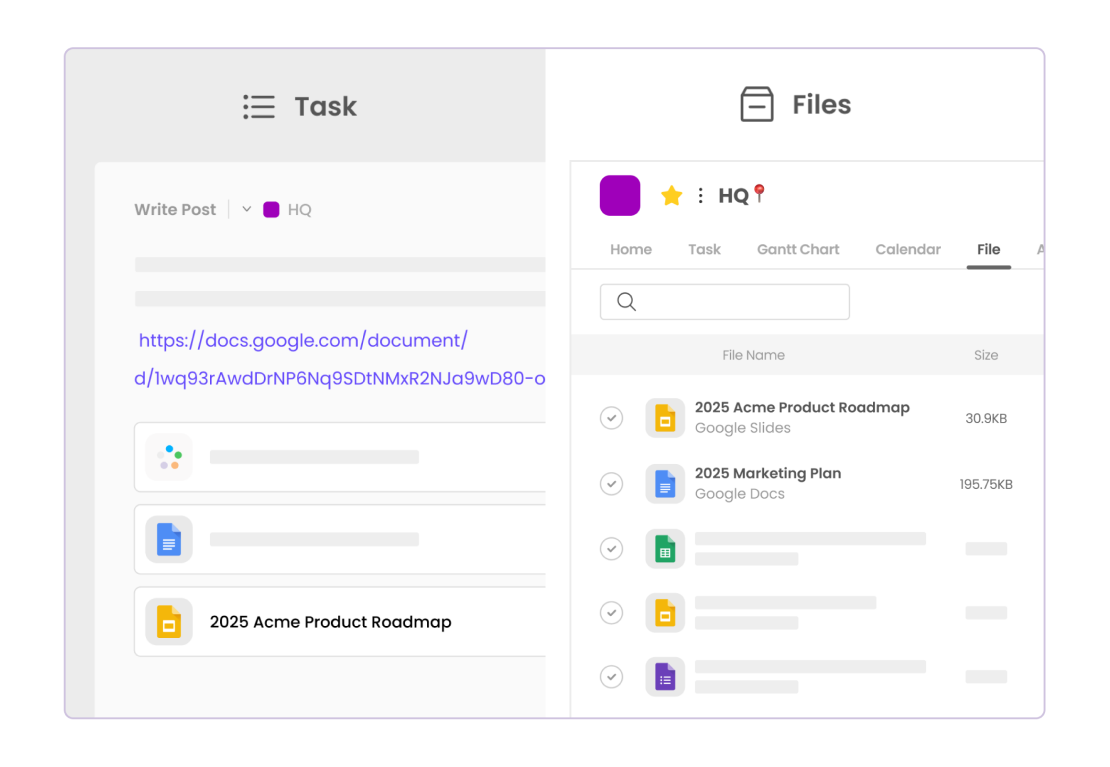
Google Drive, with its ability to store wide-ranging document types, serves as an effective repository for company resources. However, to maximize its efficiency, Drive needs to be integrated with robust task management systems. Such integrations automate the linking of relevant documents to specific tasks or projects, providing clarity and context.
Many tools facilitate a seamless integration with Google Drive, allowing tasks or projects within these platforms to directly associate with Drive files. This automatic connection gives team members easy access to necessary resources without having to hunt through folders.
Would you like to see how this integration could work for your team? Consider trying Morningmate, where task assignments naturally link with Google Drive files, making collaboration intuitive and straightforward.
How Morningmate integrates with Google Workspace →
The Benefits of Linking Files to Tasks
Linking files to specific tasks or projects brings multifaceted benefits to any organization. This practice has become vital for companies managing vast amounts of data and working across different regions and time zones.
- Improves team alignment with shared understanding of objectives.
- Simplifies document retrieval during project updates and meetings.
- Reduces duplicate work by promoting re-use of existing resources.
Research indicates that companies using integrated systems for task and document management report higher productivity levels. This is because team members spend less time switching between applications or searching for necessary documents.
Efficient Practices for File Management with Context
To maximize the benefits of file-task linkage, businesses can adopt certain best practices. One effective approach is to establish a standardized naming convention within Google Drive, ensuring files are easily identifiable at a glance. When files have descriptive names, their relevance to specific tasks becomes more apparent.
Moreover, organizations should encourage the tagging of files with project-specific keywords. This practice aids in quick retrieval and provides additional context when a file is shared within a project management tool.
Additionally, periodic audits of Google Drive can help weed out outdated or redundant files, keeping the repository lean and relevant. Maintaining an organized drive complements the contextual linking of files, ensuring teams have the most pertinent information at their fingertips.
Real-World Example: A Tech Company Ties It Together
Consider a tech company that develops innovative software solutions. For each software release, they create myriad documents stored in Google Drive — design mockups, testing logs, marketing plans, and legal papers. By linking these documents to a Planning and Rollout task in their project management tool, they maintain a coherent narrative across teams.
As each department updates their respective files, the linked task reflects these changes, giving everyone access to the latest information. This minimizes redundant discussions and empowers teams to focus on strategic initiatives rather than logistics.
The Role of Context in Future Task Management Strategies
As we move towards 2026, the demand for cohesive task and file management strategies will only grow. Contextual information not only boosts productivity but also inspires innovation by providing a comprehensive understanding of objective alignment across projects.
Organizations seeking to thrive in a highly competitive landscape should invest in technologies that seamlessly integrate with Google Drive. Tools like Morningmate can provide this capability, ensuring that all team members are not just working together, but working together intelligently.
Ready to elevate your task management processes? Try out Morningmate and see how integrating Google Drive files with tasks can transform your project workflows.