In the fast-evolving digital landscape of 2026, effective team communication is increasingly crucial. As businesses embrace remote and hybrid work, leveraging advanced team communication tools can make a significant difference. Companies worldwide are seeking tools that enhance collaboration, streamline workflows, and bridge the gap between distributed teams. This comprehensive guide explores how team communication tools compare and what to consider when choosing the best one for your organization.
With the explosive growth of cloud-based solutions, a plethora of team communication tools have emerged, each with unique features and offerings. Understanding these tools can help businesses drive productivity and foster cohesive work environments. We’ll delve into a detailed comparison of the leading tools, providing insights for optimal decision-making.
Efficient communication is more than just exchanging messages; it is about building a connected workforce that works towards common goals. By comparing various team communication tools, this guide aims to arm you with the knowledge necessary to enhance your organization’s internal communication strategies effectively.
Understanding Team Communication Tools
Team communication tools facilitate the seamless flow of information within an organization. They encompass various features, from instant messaging and video conferencing to file sharing and task management. These include software like Slack, Microsoft Teams, and Zoom, each serving different organizational needs.
Choosing the right tool involves assessing your team’s specific requirements, including the size of the team, the complexity of projects, and the nature of tasks. The right tool can significantly enhance productivity and employee satisfaction. A simple integration with existing workflows, security features, and user-friendly interfaces are other critical factors to consider.
Key Features of Leading Team Communication Tools
To effectively compare team communication tools, it is essential to focus on key features that enable superior collaboration. Although each has distinguishing characteristics, some features are universally essential for effective communication.
Messaging and Video Conferencing
Instant messaging and video calls are the mainstays of team communication. Tools such as Slack offer real-time messaging with threads that keep conversations organized. Microsoft Teams integrates video conferencing effortlessly, supporting presentations and meetings with large audiences.
Integration Capabilities
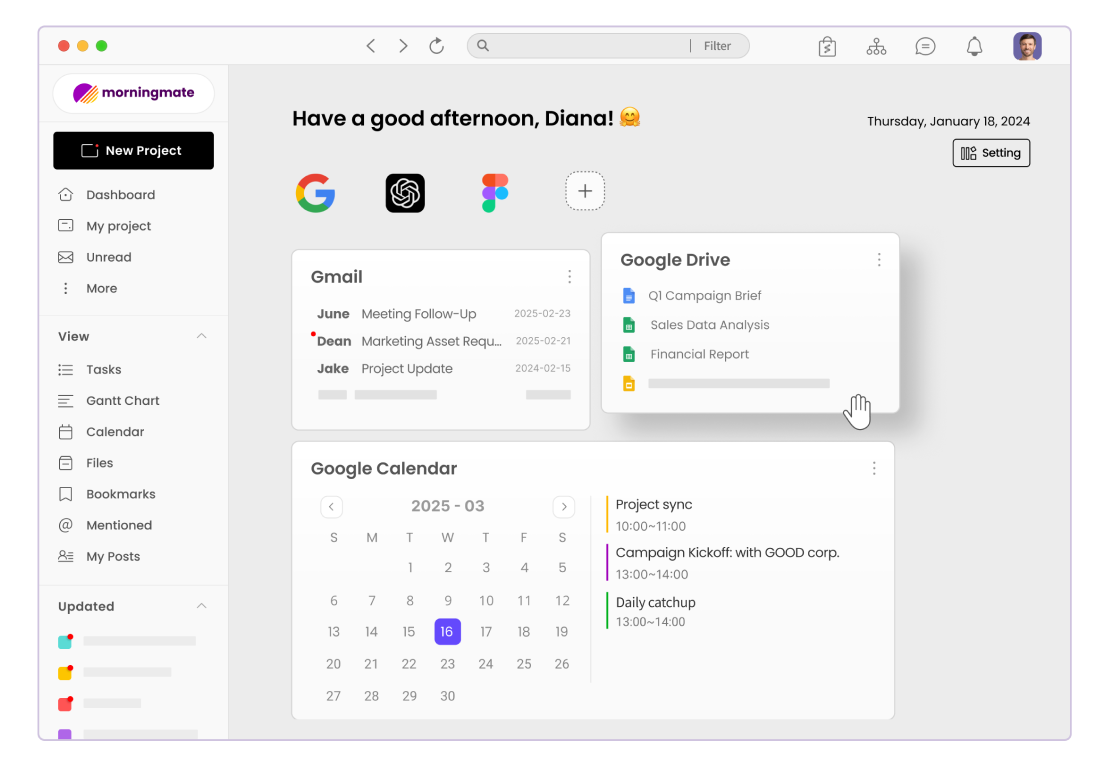
Seamless integration with other software is vital. Tools like Morningmate are designed to integrate with popular applications such as Google Workspace and Dropbox, ensuring seamless workflows. This reduces the need to switch between different platforms, saving time and effort.
Interested in learning more about how Morningmate can enhance your team’s productivity? Explore its features and discover the efficiency it brings to team communication.
Security and Privacy
As data breaches become more common, securing your team conversations is critical. Tools like Microsoft Teams offer robust encryption and privacy controls, ensuring your communication remains secure. Security features should include data protection measures, access controls, and compliance with data regulations.
Comparing Popular Team Communication Tools
Next, we will compare popular communication tools to see how they stack up against each other in terms of functionality, ease of use, and cost-effectiveness. This will help you decide which tool aligns best with your organizational needs.
Slack vs. Microsoft Teams
Slack and Microsoft Teams dominate the team communication landscape, each with distinct advantages. Slack is revered for its straightforward interface and extensive integrations. Microsoft Teams offers a comprehensive suite of collaboration tools, especially valuable for organizations already invested in the Microsoft ecosystem.
- Slack: Known for intuitive design and third-party app integrations.
- Microsoft Teams: Part of Office 365, superior for document collaboration.
Zoom vs. Google Workspace
Zoom has become synonymous with video conferencing, offering exceptional video quality and meeting capacities. Google Workspace integrates communication with productivity apps like Google Drive and Calendar, offering a cohesive suite for businesses.
- Zoom: Leading in video conferencing capabilities and user experience.
- Google Workspace: Offers an integrated approach to communication and collaboration.
Making the Right Choice for Your Team
When deciding among team communication tools, consider factors like team size, workflows, budget, and the technology infrastructure already in place. A small, agile team might favor Slack for its dynamic communication style, whereas a larger organization could benefit from Microsoft Teams’ comprehensive collaboration tools.
Evaluating Costs
Budgeting is crucial when selecting a communication tool. While some solutions offer free versions with limited functionalities, others require a subscription for full usage. Determine the cost-benefit ratio by evaluating the features each tool offers and its impact on your overall productivity.
Trial and Feedback
After narrowing down choices, utilize free trials to test various tools. Gathering feedback from your team on usability and satisfaction can aid in making informed decisions. Ensure the tool offers scalability to match your team’s growth over time.
Elevating Team Communication in 2026
The landscape of team communication tools in 2026 presents dynamic solutions tailored to diverse business needs. By understanding and comparing these tools, businesses can foster better collaboration and drive success. Investing time in researching and choosing the right tool will yield long-term benefits in efficiency and employee engagement.
Discover how Morningmate can integrate seamlessly into your existing workflow to maximize your team’s communication potential. Start enhancing collaboration across your organization today!