Picking a team collaboration tool sounds simple until you’re three months in, your team hates using it, and you’re back to chasing updates over WhatsApp. The wrong tool doesn’t just waste money — it creates friction, splits your communication across platforms, and quietly erodes the visibility you need to lead effectively.
The market is crowded. There are tools built for software engineers, tools built for enterprises with dedicated IT teams, and tools that promise to do everything but end up doing nothing particularly well. If you’re a manager, operations lead, or business owner trying to bring your team onto one platform, you need a framework for choosing — not just a list of popular names.
This guide walks you through exactly how to evaluate and choose the right team collaboration tool for your team’s size, structure, and working style — without overcomplicating the process.
Why Most Teams End Up With the Wrong Tool
The most common mistake is choosing a tool based on brand recognition rather than fit. A team of 15 people coordinating field operations does not need the same platform as a 200-person engineering department. Yet many teams default to whatever they’ve heard of, implement it poorly, and wonder why adoption stalls.
According to Harvard Business Review, one of the biggest barriers to hybrid and remote team performance is tool fragmentation — when communication happens in one place, tasks live in another, and files are scattered across email threads and personal drives. The tool you choose either solves that fragmentation or adds to it.
There’s also the adoption problem. A tool that requires significant onboarding or technical knowledge will see low usage, especially in non-technical teams. Your field staff, operations coordinators, or client-facing employees are not going to spend two hours learning a new interface — and you shouldn’t expect them to.
Start With Your Team’s Actual Problems
Before you look at a single product page, get clear on what’s actually breaking down in your current setup. This sounds obvious, but most teams skip it and end up buying features they don’t need while missing the ones they do.
Ask yourself — and your team — these questions:
- Where do updates and decisions get lost most often?
- How does your team currently assign and track tasks?
- Is the problem real-time communication, async communication, or both?
- Do people struggle to find files or past decisions?
- Are there team members who are consistently out of the loop?
The answers will point you toward the category of tool you actually need — whether that’s a project management platform, a team chat app, a document collaboration tool, or something that combines several of these into one workspace.
Map Your Team’s Working Style
A fully remote team with members across time zones needs strong async communication features — threaded updates, clear task ownership, and a way to follow along without being online at the same time. A hybrid team in the same office three days a week might need lighter structure but stronger visibility across departments.
Don’t assume your team’s needs match your own. Talk to the people who will use the tool daily. Their friction points are the ones that matter most for long-term adoption.
The Key Criteria for Choosing a Team Collaboration Tool
Once you know what problems you’re solving, evaluate tools against these core criteria. Weight them based on your team’s priorities — not every factor carries equal importance for every team.
1. Ease of Use and Adoption
A tool only works if people actually use it. Look for an interface that feels intuitive without heavy training. If your team already uses WhatsApp for personal messaging, a chat interface that mirrors that experience will get picked up far faster than something with a steep learning curve.
This is one of the reasons Morningmate — a work management tool used by over 550,000 teams — has seen strong adoption in non-technical teams. Its built-in chat interface resembles what people already use day-to-day, and its Feed view displays team updates in a familiar social media-style format that requires almost no onboarding to understand.
2. Task Management Capabilities
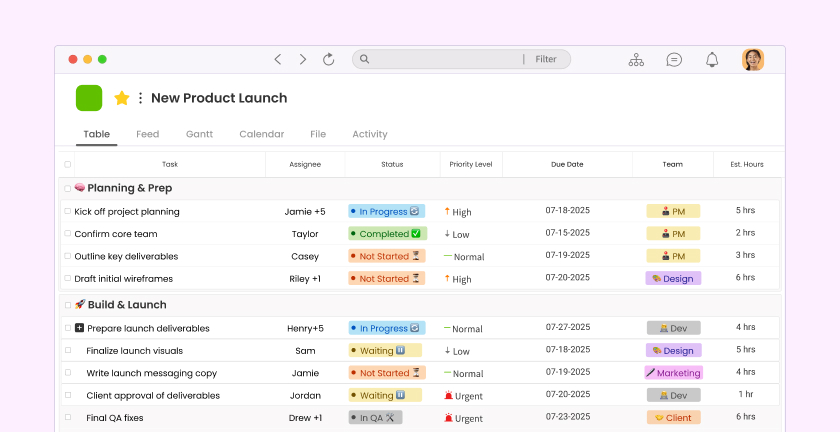
Your collaboration tool should give you a clear answer to: who is doing what, and by when? Look for the ability to create tasks, assign owners, set due dates, and track progress without building a complex system from scratch.
Be cautious of tools that are either too simple (just a shared to-do list) or too complex (requiring project managers to configure workflows before anyone can start working). The right tool should fit how your team actually assigns and tracks work — not force a new methodology on top of your existing process.
If your team currently struggles with task visibility and accountability, prioritize this feature heavily in your evaluation.
3. Communication — Real-Time and Async
The best collaboration tools handle both synchronous and asynchronous communication in one place. When chat, tasks, and updates are separated across different apps, context gets lost constantly — someone sends a message in Slack, attaches a file over email, and creates a task in Asana, and suddenly no one has the full picture.
McKinsey research consistently shows that teams with clearer communication structures outperform those relying on informal channels. A single workspace that keeps conversations, tasks, and files together reduces the cognitive load on your team and prevents the inevitable “I didn’t see that message” problem.
4. File and Knowledge Management
Think about how often someone on your team asks: “Where’s that document?” or “Can you resend the brief from last month?” If that happens regularly, file management is a core need — not a nice-to-have.
Look for tools that attach files directly to tasks or conversations, making context searchable and accessible later. This is especially important for growing teams where institutional knowledge can easily disappear when someone leaves or a project wraps up.
5. Visibility for Leadership
If you’re a business owner or operations lead, you need more than a tool that helps your team chat. You need to see what’s progressing, what’s stalled, and where bottlenecks are forming — without having to ping each person individually for a status update.
Evaluate whether the tool gives managers and executives a consolidated view of work across teams. This is often where lightweight tools fall short and where the right tool can genuinely change how you lead. Morningmate’s Feed view, for example, lets team leads and managers see project updates and task progress in a single scrollable stream — similar to checking a social feed, but for work.
6. Scalability Without Unnecessary Complexity
The tool you choose at 20 people should still serve you at 80. But scalability doesn’t mean you need enterprise-grade complexity from day one. Look for tools that can grow with you — adding users, projects, and structure — without requiring a full migration or a dedicated administrator to manage.
This is especially relevant for growing companies where workflows are still being defined. A rigid, overly structured tool can actually slow you down during a growth phase when flexibility matters more than process.
Questions to Ask Before You Commit
Before signing up for a paid plan or rolling a tool out across your team, run through this checklist:
- Can your least tech-savvy team member use this without a training session?
- Does it replace at least two of your current tools, or does it add another layer?
- Can you see all active tasks and their status at a glance?
- Is communication tied directly to tasks and projects, or is it separate?
- Does it have a free trial or free tier that lets you test with a real team before committing?
- What does the mobile experience look like? (Critical for non-desk teams)
- How is data stored and is it compliant with your region’s requirements?
If a tool fails more than two of these, it’s worth continuing your search regardless of how good the marketing looks.
The Hidden Cost of Switching Tools Repeatedly
Every time your team switches platforms, there’s a productivity dip. People lose historical context, have to relearn habits, and — critically — trust in management’s decisions erodes slightly. Gallup’s research on employee engagement highlights that frequent operational disruptions, including tool changes, negatively affect team morale and confidence in leadership.
This is why the evaluation phase matters so much. Spend more time choosing carefully upfront and you’ll spend far less time managing fallout from a poor fit later. Involve the people who will use the tool in the decision — even a quick survey or a pilot with one team can save months of frustration.
When Simpler Is Actually Better
There’s a common assumption that more features equal more value. In practice, the opposite is often true. Teams that use a focused, easy-to-navigate tool consistently outperform those using bloated platforms where half the features go untouched.
If your team’s core needs are task tracking, team communication, and file sharing — and you don’t need Gantt charts, resource allocation, or sprint planning — then a lightweight tool will serve you better than an enterprise platform. Tools like Morningmate are built specifically for this middle ground: robust enough to replace email and personal messenger apps, simple enough that your whole team will actually use them from day one.
Not every team needs Jira. Not every team needs Slack plus Asana plus Google Drive. If your goal is to get everyone working from one organized place, start with what solves the actual problem — and resist the temptation to over-engineer it.
How to Run a Proper Tool Pilot
Once you’ve shortlisted one or two tools, run a structured two-week pilot before making any company-wide decisions. Here’s a simple approach:
- Choose a real project — don’t test with dummy tasks. Use an actual active workstream.
- Involve a cross-functional group — include people from different roles and comfort levels with technology.
- Set clear success criteria — what does “this is working” look like? Fewer Slack messages? Tasks completed on time? Fewer status meetings?
- Collect feedback at the midpoint and end — ask about friction, not just satisfaction.
- Make a decision and commit — if it works, roll it out fully. If not, move to your second option with clearer criteria.
A disciplined pilot saves you from the cycle of endless evaluation that many teams fall into. Two weeks of real use will tell you more than any product demo.
Choosing the right team collaboration tool is one of the highest-leverage decisions a team lead or business owner can make. Get it right and your team communicates clearly, works with accountability, and stops losing information in the gaps between apps. Get it wrong and you add another layer of noise to an already noisy workday. Take the time to evaluate honestly — your team’s output, and your own peace of mind, will reflect it.