If your team is constantly asking “wait, where are we on that?” — you already know the problem. Work gets scattered across email threads, chat messages, and spreadsheets that nobody updates. Visual project management tools exist to fix exactly that: they turn scattered to-dos and vague timelines into something everyone can actually see and act on.
The shift toward visual work management isn’t just a preference thing — it reflects how people actually process information. A study highlights that the human brain processes visuals significantly faster than text, which means a well-structured visual board can cut down the time your team spends figuring out what’s happening and who’s responsible.
But not every visual tool fits every team. Some are built for software engineers who live and breathe sprint cycles. Others are so simple they fall apart the moment your project gets complex. Finding the right fit means understanding what visual project management actually offers — and what to look for before you commit.
What Visual Project Management Actually Means
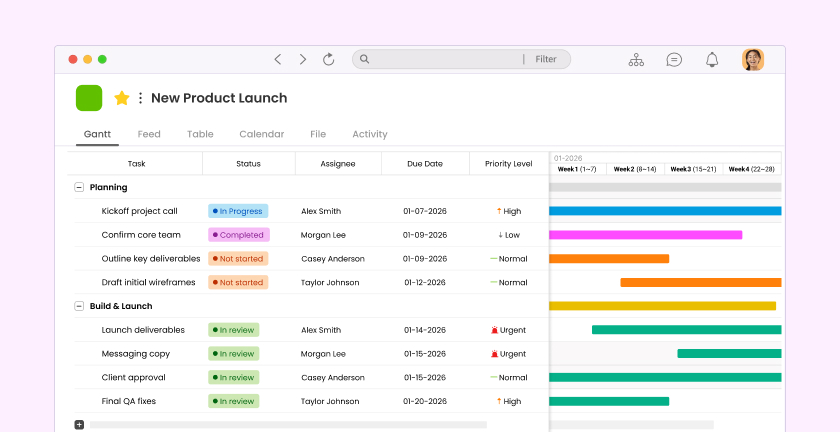
At its core, visual project management is about representing work in a format that’s faster to read than a list of text. Instead of scrolling through email chains or sitting through status meetings, your team can look at a board, timeline, or card layout and instantly understand what’s in progress, what’s blocked, and what’s done.
This matters especially for hybrid and remote teams. When you’re not in the same room, visual structure becomes the shared language that keeps everyone aligned without constant check-ins. According to Gallup’s State of the Global Workplace report, employee engagement and clarity around roles are directly linked — and visual tools play a practical role in delivering that clarity.
Common Visual Formats You’ll Encounter
Different teams gravitate toward different views depending on how they work. Here are the most widely used formats:
- Kanban boards — Cards move across columns like “To Do,” “In Progress,” and “Done.” Great for ongoing workflows and visualizing bottlenecks at a glance.
- Gantt charts — Timeline-based views that show task duration and dependencies. Useful for projects with strict deadlines and sequenced deliverables.
- List views with status labels — A structured list enriched with priority flags, assignees, and due dates. Familiar, scannable, and easy for non-technical teams to adopt.
- Feed or card-based views — Posts and updates displayed in a social-media-style feed, letting teams share context alongside tasks without switching tools.
- Calendar views — Work mapped against dates, ideal for content teams, HR, or any team that manages recurring deadlines.
Most teams don’t need all of these — they need the one or two views that match how their work actually flows. The mistake is choosing a tool based on how many views it offers rather than how quickly your team will actually use it.
Why Teams Are Moving Away From Email and Chat Apps
Email wasn’t designed for project tracking. Neither was WhatsApp. Yet millions of teams still rely on both to manage work, and the result is predictable: important updates get buried, nobody can find the latest file version, and accountability becomes a guessing game.
A McKinsey Global Institute report found that workers spend a significant portion of their week just searching for information and communicating status updates — time that visual project management tools are specifically designed to reclaim. When work is visible and organized, you stop repeating yourself and start moving faster.
This is where tools like structured work management platforms become genuinely useful. Rather than patching together a messaging app with a shared spreadsheet, you get one place where tasks, updates, and files live together.
The Hidden Cost of Scattered Communication
It’s not just about lost messages. When your team uses personal messenger apps for work, you lose institutional knowledge every time someone leaves. Work decisions that happened in a private WhatsApp thread vanish. New team members have no context. And managers end up spending more time chasing updates than actually managing.
Visual project management tools solve this by making work inherently documented. A task card shows who created it, what the brief was, who it’s assigned to, and what happened along the way. That context stays searchable long after the project closes.
What to Look For in a Visual Project Management Tool
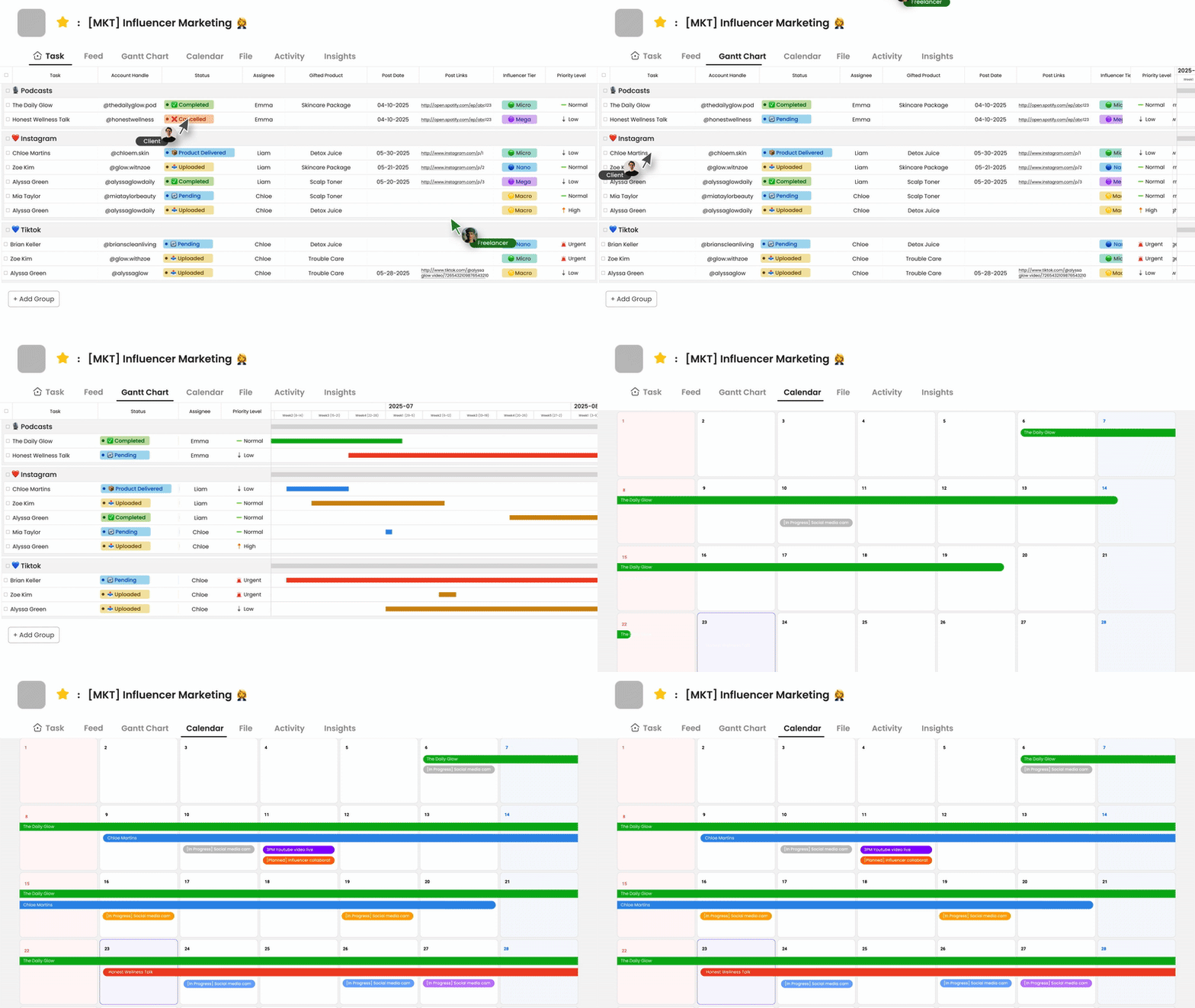
Choosing a tool for your team isn’t about finding the one with the most features. It’s about finding the one your team will actually open every morning. Here’s a practical checklist to guide your decision:
- Ease of adoption — If your team needs a two-day training session to get started, you’ve already lost. Look for interfaces that feel intuitive on day one, especially for non-technical team members.
- Task management depth — Can you assign tasks, set due dates, add priority levels, and attach files? These basics need to work reliably before anything else matters.
- Built-in communication — Switching between a project tool and a separate chat app creates friction. Tools with built-in messaging keep context in one place.
- Multiple views — Your team should be able to see work the way that makes sense to them, whether that’s a board, a list, or a timeline.
- Lightweight enough to scale — A tool that becomes a burden as your team grows isn’t the right tool. Look for something that handles complexity without becoming complicated.
When Simpler Is Actually Better
There’s a common assumption that enterprise-grade tools like Jira or Asana are automatically the right choice for serious teams. But for many growing companies — especially those not running software sprints — that level of complexity creates more problems than it solves. Teams end up spending more time configuring the tool than doing the work.
Morningmate is built around this exact insight. It’s a lightweight work management tool that combines task management, a built-in chat, and file sharing in one place — without the steep learning curve. The interface borrows from what people already know: a social-media-style feed for updates and a chat layout similar to WhatsApp. That familiarity means teams get up and running fast, including non-tech teams that would struggle with more complex platforms.
How Different Teams Use Visual Project Management
Visual tools aren’t one-size-fits-all, but the principles transfer across industries. Here’s how different types of teams put them to work:
Remote and Hybrid Teams
For teams spread across time zones, visual project management replaces the morning stand-up that can’t happen synchronously. A shared board tells everyone where things stand without requiring a meeting. Tasks get updated asynchronously, and the status is always visible to whoever checks in next.
Morningmate’s feed view works particularly well for this use case. Teams post project updates, attach files, and comment in threads — all without leaving the platform. It keeps async communication structured rather than scattered across inboxes and chat histories.
Operations and Cross-Functional Teams
Operations leads often need visibility across multiple teams at once. Visual project management tools let them see bottlenecks, reassign workloads, and track deadlines across departments without chasing down each team lead individually.
This kind of cross-team visibility is one of the strongest arguments for consolidating onto a single platform. When marketing, sales, and operations all use the same tool, handoffs become cleaner and nothing falls between the cracks.
Growing Companies With a New Manager or C-Level Lead
When a business starts scaling — more people, more projects, more complexity — the informal systems that worked for a 10-person team stop working. Founders and executives suddenly need visibility they can’t get from a group chat. Visual project management tools create the structure that makes growth manageable.
Used across more than 550,000 teams globally, Morningmate is built for exactly this transition — giving leaders a clear view of work in progress without forcing the whole team to learn a complicated new system. Task boards, deadlines, and team communication all live in one place, which means less time spent asking for updates and more time spent making decisions.
Making the Switch: A Practical Starting Point
If you’re ready to move your team away from email threads and scattered messages, you don’t need to overhaul everything at once. Start with one project or one team, set up a visual board, and let people experience the difference firsthand. Adoption is usually faster than expected once people see how much easier it is to track progress without constantly asking for updates.
The goal isn’t a perfect system on day one. The goal is a shared space where work is visible, communication is connected to context, and your team spends less time managing information and more time actually getting things done. Visual project management tools — when chosen well — are how you get there.