You open your phone, check your to-do list app, tick off a couple of tasks, and feel productive. Then you get to work and realize three teammates are waiting on you, a deadline shifted overnight, and nobody updated the shared doc. Sound familiar? That gap — between a personal checklist and actual work coordination — is exactly where most teams lose time, miss context, and drop the ball.
The debate around task management vs to do list apps is more relevant than ever. As teams grow and work becomes more distributed, the tools you use to track work directly shape how well your team performs. But most people use these two terms interchangeably, and that confusion leads to real problems: teams using personal to-do apps for complex projects, or companies buying heavyweight project management software when a simple, structured tool would do the job better.
This article breaks down exactly what separates task management tools from to-do list apps, when each one makes sense, and how to choose the right fit for your team — without overcomplicating things.
What Is a To-Do List App?
A to-do list app is designed for individual productivity. It helps one person capture, organize, and check off tasks. Think of apps like Todoist, Apple Reminders, or Google Tasks. They are lightweight, fast, and built around a single user’s workflow.
These tools are great for personal use. If you need to remember to send an invoice, prep for a meeting, or buy office supplies, a to-do list app gets the job done. The experience is simple by design — you add a task, set a reminder, and move on.
Where To-Do List Apps Fall Short at Work
The problem starts when teams try to use personal to-do apps for collaborative work. These tools were never built to answer questions like: Who is responsible for this? What is the status? Does this task depend on something else being finished first?
When your team’s work lives in a collection of individual to-do lists, visibility disappears. Managers have no way to see what is in progress, what is blocked, or what is at risk. Work becomes siloed inside each person’s app — or worse, inside email threads and WhatsApp groups.
What Is Task Management?
Task management is a broader, team-oriented approach to organizing and executing work. A task management tool does not just help you list things — it helps your team assign ownership, track progress, communicate in context, and connect tasks to larger goals.
According to Harvard Business Review, managers today spend a significant portion of their time on coordination — not execution. The right task management system reduces that coordination overhead by making work visible and structured without requiring constant check-ins.
Core Features of a Task Management Tool
Task management tools typically offer a layer of structure and collaboration that to-do list apps simply do not. Here is what to look for:
- Task assignment — assign tasks to specific team members, not just yourself
- Due dates and priorities — set deadlines and flag what matters most
- Status tracking — move tasks through stages like To Do, In Progress, and Done
- Comments and context — discuss tasks directly on the task itself, keeping communication in one place
- File attachments — attach relevant documents or assets directly to a task
- Dependencies — link tasks so the team knows what needs to happen before something else can start
These features are the difference between a checklist and a coordination system. They are what allows a manager to have real visibility without micromanaging every step.
Task Management vs To Do List Apps: A Side-by-Side Comparison
Here is a direct comparison to make the distinction clear:
| Feature | To-Do List App | Task Management Tool |
|---|---|---|
| Primary user | Individual | Team |
| Task assignment | Self only | Any team member |
| Progress visibility | Personal only | Shared across team |
| Communication | None or external | Built in, per task |
| File management | Rarely included | Often included |
| Reporting or overview | No | Yes |
| Best for | Personal reminders | Team coordination |
Why Teams Keep Reaching for the Wrong Tool
Most teams do not make a deliberate choice about their tools — they default to what feels familiar. Personal apps get adopted because everyone already has them. Email and WhatsApp stick around because they require no setup. But familiarity is not the same as fit.
A McKinsey report found that workers spend a significant portion of their week searching for information and following up on tasks — time that structured task management tools can directly reduce. When work is scattered across apps, chat threads, and inboxes, everyone wastes energy just figuring out what is happening.
The other mistake teams make is swinging too far in the other direction — adopting complex project management platforms like Jira or Asana when their actual needs are much simpler. Not every team needs sprint planning, Gantt charts, or hundreds of configuration options. Overly complex tools create friction, reduce adoption, and ultimately get abandoned.
When a To-Do List App Is the Right Choice
To-do list apps absolutely have a place. If you are a freelancer, a solo founder, or someone managing purely personal tasks, they are perfect. Fast to set up, zero learning curve, and effective at keeping your own work on track.
They also work well as a complement to a team task management system. Many people keep a personal to-do list for their daily priorities while their team’s shared work lives in a more structured tool. These two layers can coexist — as long as you are not trying to use the personal layer for team coordination.
When You Need a Task Management Tool
If any of the following sounds like your situation, a proper task management tool is the right move:
- You manage a team of two or more people and need to assign work clearly
- You find yourself sending follow-up messages asking “what’s the status on this?”
- Important context and updates live in email threads or chat conversations that are hard to search
- Work gets duplicated because nobody knows someone else already started it
- Deadlines are missed because tasks fell through the cracks
- You are a manager who needs an overview of what your team is working on without scheduling a meeting to find out
If two or more of those are true for your team, you are already feeling the cost of under-tooling. The good news is that the right task management tool does not have to be complicated or expensive to get started.
What to Look for in a Task Management Tool for Your Team
The best task management tool for your team is the one your team will actually use. That means prioritizing ease of adoption over feature count. A tool with a hundred features that nobody uses is worse than a simpler one that becomes part of everyone’s daily routine.
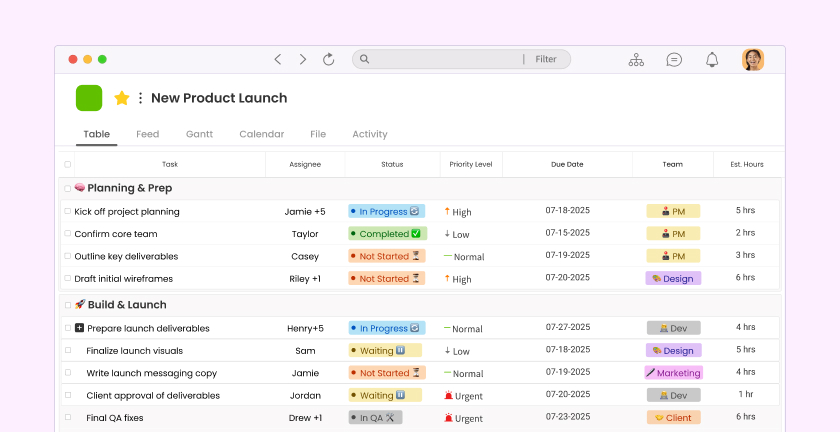
This is where tools like Morningmate stand out. Morningmate is a work management platform built specifically for teams who want structure without complexity. Its Feed view feels like a familiar social media timeline — posts, updates, and tasks all flow in one place — which means even non-technical team members get comfortable quickly. There is no steep learning curve, no weeks of onboarding, and no need to hire a tool administrator.
When evaluating any task management tool, ask these questions:
- Can I assign tasks to specific people and track their status?
- Is communication built into the tool, or does it push me back to email?
- Can I attach files directly to tasks so context stays together?
- Will my least tech-savvy team member be able to use this without training?
- Can a manager see an overview of all active work without digging around?
Built-In Chat Changes the Equation
One often-overlooked factor in the task management vs to do list apps debate is communication. To-do apps have none. Many task management tools treat it as an afterthought. But communication is inseparable from work — you cannot manage tasks in a vacuum.
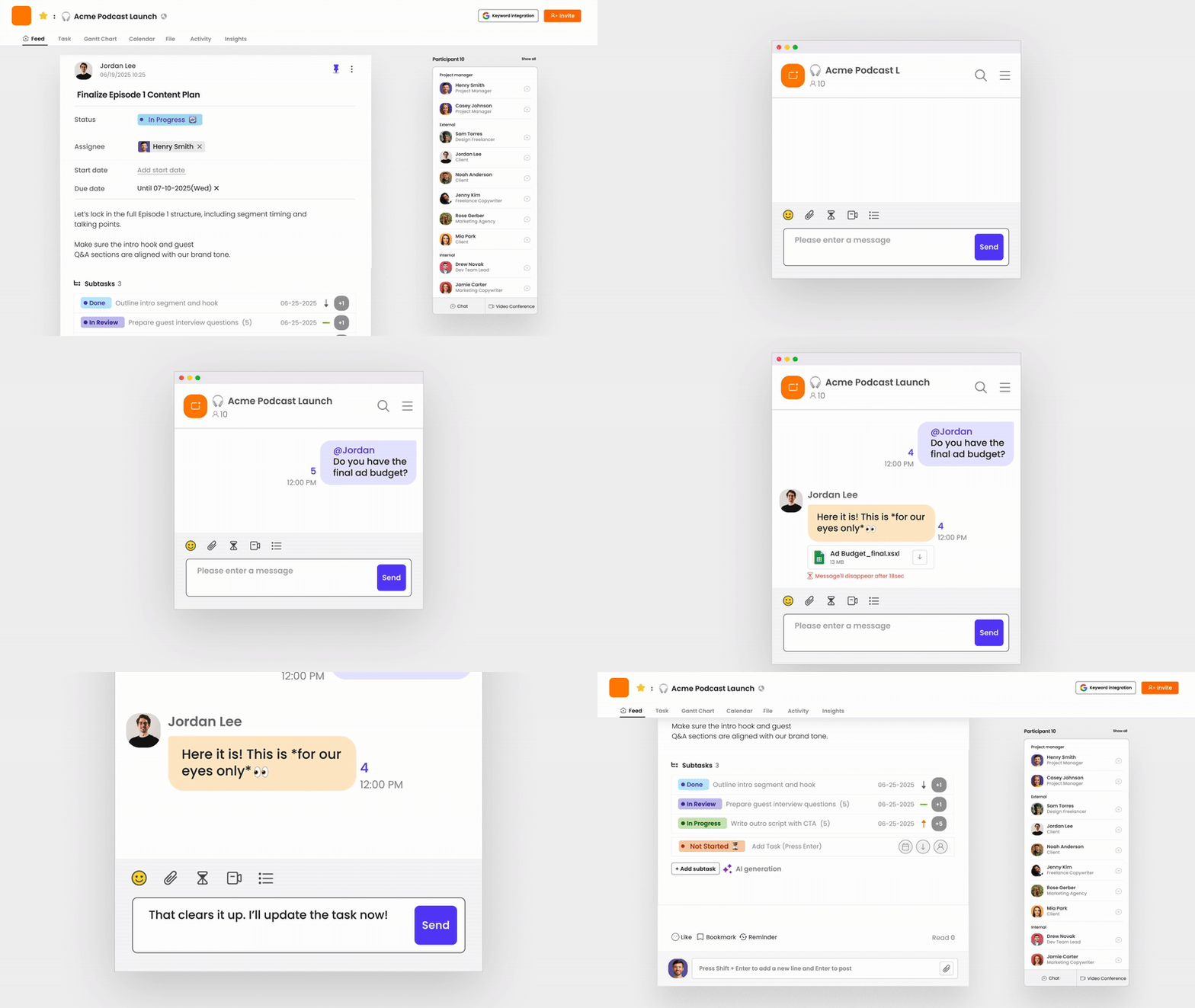
Morningmate includes a built-in chat with a familiar interface similar to WhatsApp, so team conversations happen inside the same tool as the work itself. That means fewer context switches, less searching across apps, and more of the important decisions happening where they can be referenced later. For teams currently relying on personal messenger apps for work, this alone is a significant upgrade.
If you are exploring how to bring your team communication and task tracking under one roof, this guide on team communication tools covers the tradeoffs in more depth.
The Real Cost of Using the Wrong Tool
Using the wrong tool is not just an inconvenience — it has measurable business impact. When people cannot find the information they need, do not have clarity on their responsibilities, or spend time chasing status updates, the work suffers.
For small and mid-sized teams especially, this problem compounds fast. One missed handoff can delay an entire project. One lost conversation in a WhatsApp thread means decisions get made twice — or not at all. And as teams grow, the chaos scales with them unless there is a proper system in place.
Upgrading from a to-do list app to a team task management tool is one of the highest-leverage operational changes a growing company can make. The investment in setup is minimal compared to the hours saved every week.
Making the Switch: A Simple Starting Point
If you are convinced it is time to move from scattered to-do lists to a real task management system, here is a practical way to start without overwhelming your team:
- Audit where work lives today. List every place tasks and updates currently live — email, WhatsApp, notes apps, spreadsheets. This makes the problem visible.
- Pick one team or project to start with. Do not try to migrate everything at once. Choose a small team or an ongoing project and move just that work into a new tool.
- Set a simple structure. Create a few task categories or stages (To Do, In Progress, Done) and assign clear ownership from day one.
- Move communication alongside tasks. If the tool has built-in chat or comments, use them. Every conversation that moves out of email or personal messenger is a win.
- Review after two weeks. Check what is working and what is not. Adjust before rolling out to the wider team.
The goal is not perfection on day one. The goal is giving your team a shared system that replaces chaos with clarity — one project at a time. Tools like Morningmate are designed with exactly this kind of gradual adoption in mind, which is why over 550,000 teams around the world use it to keep work organized without adding complexity.