
In the rapidly evolving world of team communication, businesses need tools that offer reliability, versatility, and efficiency. While WhatsApp is a popular choice for many, there are compelling reasons to explore alternatives designed specifically for team communication. These alternatives not only promise enhanced security and functionality but also provide features that cater to the unique needs of businesses.
As businesses grow and evolve, so too do their communication needs. Integrating a team-specific communication tool can improve collaboration and productivity. Whether you’re a small start-up or a large corporation, selecting the right tool can make all the difference in the world. In this article, we explore top WhatsApp alternatives that are making waves in team communication, and why they might be the perfect fit for your organization.
Assessing the right communication tool requires understanding your team’s unique needs. From robust security features to seamless integration with other platforms, the perfect alternative to WhatsApp is out there, and it’s time to discover the options that will transform your team’s communication dynamics.
Why Consider a WhatsApp Alternative?
While WhatsApp has served many businesses well, it was not developed with teams and businesses as primary users. Teams need more than just messaging capabilities; they need project management, integration with existing systems, and enhanced security protocols.
Security and Privacy Concerns
In a world where data breaches and privacy issues are increasingly prevalent, ensuring secure communication is necessary. Many WhatsApp alternatives offer end-to-end encryption and better user control over data, which is crucial for businesses handling sensitive information.
- End-to-end encryption
- Data ownership and privacy controls
Enhanced Functionalities
Companies often need more than just chat functionalities. Features like task management, video calls, file sharing, and integration with other business tools can enhance collaboration. Many alternatives offer these features natively, providing a seamless experience.
- Task assignments and tracking
- Video conferencing capabilities
Top Alternatives to WhatsApp for Team Communication
To find the best alternatives, consider tools that prioritize team collaboration, security, and efficiency. Let’s delve into some of the top contenders that are revolutionizing team communication.
Slack
Slack is renowned for its robust team communication features. It allows organizations to create channels for different topics, projects, or teams. This segmentation makes it easier to keep conversations organized and accessible.
- Integration with over 2,000 apps
- Customizable notifications
If you’re looking for ease of use and powerful integration, Slack could be a brilliant option for your team, offering features that cater well to both small and large enterprises.
Microsoft Teams
For businesses already immersed in the Microsoft Office ecosystem, Microsoft Teams is a natural fit. It seamlessly integrates with Outlook, OneDrive, and other Microsoft services, offering a comprehensive suite for team communication.
- Real-time collaboration on Microsoft documents
- Advanced security features
Microsoft Teams excels in environments where collaborative document editing and meeting scheduling are crucial components of daily operations.
Zoom
While known primarily for video conferencing, Zoom has enhanced its chat features, making it an impressive option as a communication platform. It shines in scenarios where video meetings are a staple of daily routine, and where reliable, high-quality calls are non-negotiable.
- High-definition video calls
- Webinars and video conferencing
Choosing Zoom means prioritizing video communication, ideal for teams that require frequent face-to-face interactions across distances.
Morningmate
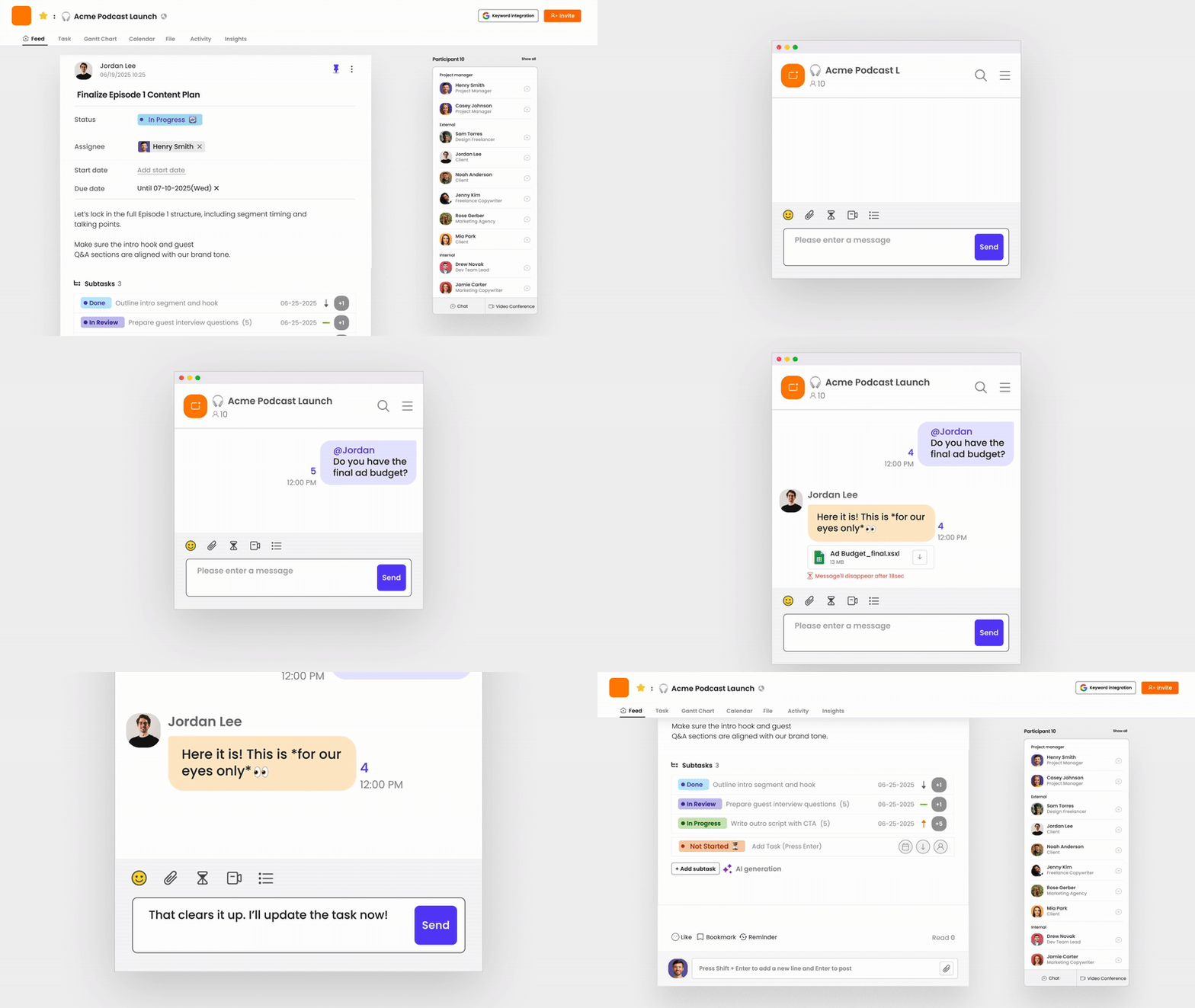
For teams seeking a blend of communication and project management, Morningmate offers an integrated space for team interactions, task handling, and project execution. Its intuitive design and functionality cater to teams that value collaborative efficiency.
- Centralized project management
- Varied integration capabilities
Morningmate is particularly suited for businesses aiming to streamline their operations and enhance productivity through an all-in-one platform approach.
Factors to Consider When Choosing an Alternative
Before transitioning to a new communication platform, it’s crucial to evaluate what matters most to your team. Consider these factors to ensure that your chosen platform meets your needs:
Ease of Use
The adoption of a new tool depends heavily on ease of use. A platform with a steep learning curve can hinder productivity instead of helping it. Opt for alternatives that offer intuitive design and user-friendly interfaces.
- Quick setup and onboarding process
- Clear and accessible user documentation
Integration Capabilities
Integration with existing tools and platforms is essential for creating a seamless workflow. The chosen tool should fit well within your organization’s IT infrastructure, enhancing rather than disrupting current processes.
- Support for existing business applications
- APIs for custom integrations
Scalability
As your business grows, the communication tool should adapt to the increasing scale and complexity of operations. Scalability will ensure that the tool remains useful even as your team expands or changes.
- Ability to handle larger user groups
- Expandable features and storage capacity
Implementing a New Communication Tool
Implementing a new communication tool requires a well-thought-out strategy to ensure a smooth transition. Here’s a step-by-step guide to help your team move from WhatsApp to a more fitting alternative.
Prepare Your Team
Start by engaging with team members to understand their communication needs and preferences. Preparing your team involves transparent discussions about why the change is happening and what benefits it will bring.
Phased Rollout
Implement the new tool in phases, starting with a small team to troubleshoot any issues. Gather feedback and make necessary adjustments before a company-wide launch.
- Trial runs with selected teams
- Gathering and acting on user feedback
Training and Support
Invest in training sessions and ongoing support to ensure all team members are comfortable using the new tool. Provide resources such as tutorials, FAQs, and a dedicated support team to assist with any hurdles.
Choosing the right WhatsApp alternative for team communication can be transformative. Explore tools like Morningmate that offer robust functionality tailored for team efficiency. Sign up for a trial today and experience the difference it can make in your team’s productivity.