The Email That Costs You the Account
You have been working with a client for eight months. The rebranding project is going well—your team has delivered three rounds of concepts, navigated two rounds of stakeholder feedback, and the final brand guidelines are almost ready. Then you get the email:
| “We’ve decided to go in a different direction for Phase 2. Thank you for your work.” No warning. No discussion. No opportunity to address whatever concern led to this decision. The client is gone, and with them, the Phase 2 retainer you had already factored into your quarterly forecast. |
You call your account manager. She is stunned. “They seemed happy in our last check-in call.” You dig through email threads to find any sign of trouble. There are 247 messages across 14 threads. The approval on the second concept took 11 days. The client’s marketing director—who joined midway through—had asked three times for a “status overview,” which your team answered each time with a long email and an attached Excel WBS.
The truth hits you: your client did not leave because your work was bad. They left because they could not see what you were doing. They felt out of the loop. They felt like they were chasing information instead of receiving it. And when their new marketing director arrived and could not immediately understand where the project stood, the trust deficit was too large to recover.
The Agency Visibility Crisis: Why Great Work Is Not Enough
If you run a design studio, a consulting practice, a PR firm, or a marketing agency, you already know that winning clients is hard. But here is what the data increasingly shows: losing clients is usually not about the quality of your deliverables. It is about the quality of the experience around those deliverables.
A 2025 survey by the Association of National Advertisers found that 59% of brands select agencies based on cost and process efficiency—not creative quality alone. Clients are looking for agencies that are transparent, organized, and easy to work with. In other words, they want visibility.
Yet most agencies still operate with a communication stack that was designed for a world before remote work, distributed teams, and clients who expect real-time access to everything:
1. Email: Where Project History Goes to Die
| The handoff problem Your primary client contact gets promoted. Her replacement, James, sends you an email: “Could you bring me up to speed on where we are?” You spend two hours compiling a summary because the project history lives in 200+ emails between four people—two of whom have already left the company. James reads your summary, but the nuance is gone. The context behind key decisions is lost. He starts questioning choices that were already settled months ago. |
Email was designed for one-to-one correspondence. It was never meant to be a project management system. Yet for most agencies, it is the de facto repository of client communication, approvals, feedback, and decisions. When people leave—on either side—the institutional memory leaves with them.
2. Excel WBS and PDF Reports: The Illusion of Transparency
| The stale snapshot problem Every Monday, your project manager exports the WBS from Excel, converts it to PDF, attaches it to an email, and sends it to the client. By Wednesday, the status has already changed. The client sees a document that is two days old and thinks nothing has happened. They send a “just checking in” email. Your PM responds with an update. The client’s finance director asks for the same update but in a different format. Another hour lost. |
Static documents create the illusion of transparency without delivering actual transparency. The moment you export a file, it becomes a snapshot that is immediately out of date. Your team is making progress every day, but the client only sees it in weekly batches—if they remember to open the attachment at all.
3. WhatsApp and Personal Messaging: The Professionalism Gap
| The boundary problem Your creative director and the client’s brand manager have been exchanging quick updates via WhatsApp. It started as convenience—“just a quick question”—but now the client sends messages at 10 PM on Sundays. Feedback comes as voice notes that nobody else on the team hears. When the creative director leaves your agency, all of those conversations—including critical design decisions—leave with her personal phone. |
Personal messaging apps blur the boundary between professional and personal communication. They create invisible channels that bypass your team’s processes, make information unsearchable, and are impossible to hand off when team members change.
What Your Clients Actually Want (But Will Not Tell You Directly)
When clients say “we’re going in a different direction,” what they often mean is one or more of these:
| What they say | What they actually mean |
| “We need more regular updates.” | I cannot see what your team is working on between our calls. |
| “We’re concerned about the timeline.” | I have no real-time view of progress vs. deadline. |
| “Our new director needs to get up to speed.” | There is no single place where project history lives. |
| “We want to explore other partners.” | Working with you feels opaque and high-effort. |
| “Can you send us a progress report?” | I should not have to ask. I should be able to see it myself. |
The common thread is clear: clients want self-serve visibility. They want to be able to check on the project status without sending an email and waiting for a reply. They want to onboard new stakeholders without a two-hour briefing call. They want to feel like a partner, not a customer waiting for a weekly download.
The Solution: Transparent Collaboration That Clients Can See, Touch, and Trust
The answer is not sending more emails or producing more reports. The answer is giving your clients direct, real-time access to the work itself—in a structured, professional, and controlled way.
This is where modern collaboration platforms fundamentally change the agency-client dynamic. Instead of describing what is happening in a project, you let the client see it for themselves. Instead of exporting and attaching files, you share a live workspace. Instead of rebuilding context every time a contact person changes, the entire project history lives in one permanent, searchable, and organized space.
How It Works in Practice: Budget Tracking and Project Oversight
Imagine your client asks: “Where are we on the budget?” In the old world, your finance manager pulls data from three spreadsheets, formats a report, and emails it 48 hours later. In the new world, the client simply opens their project dashboard:
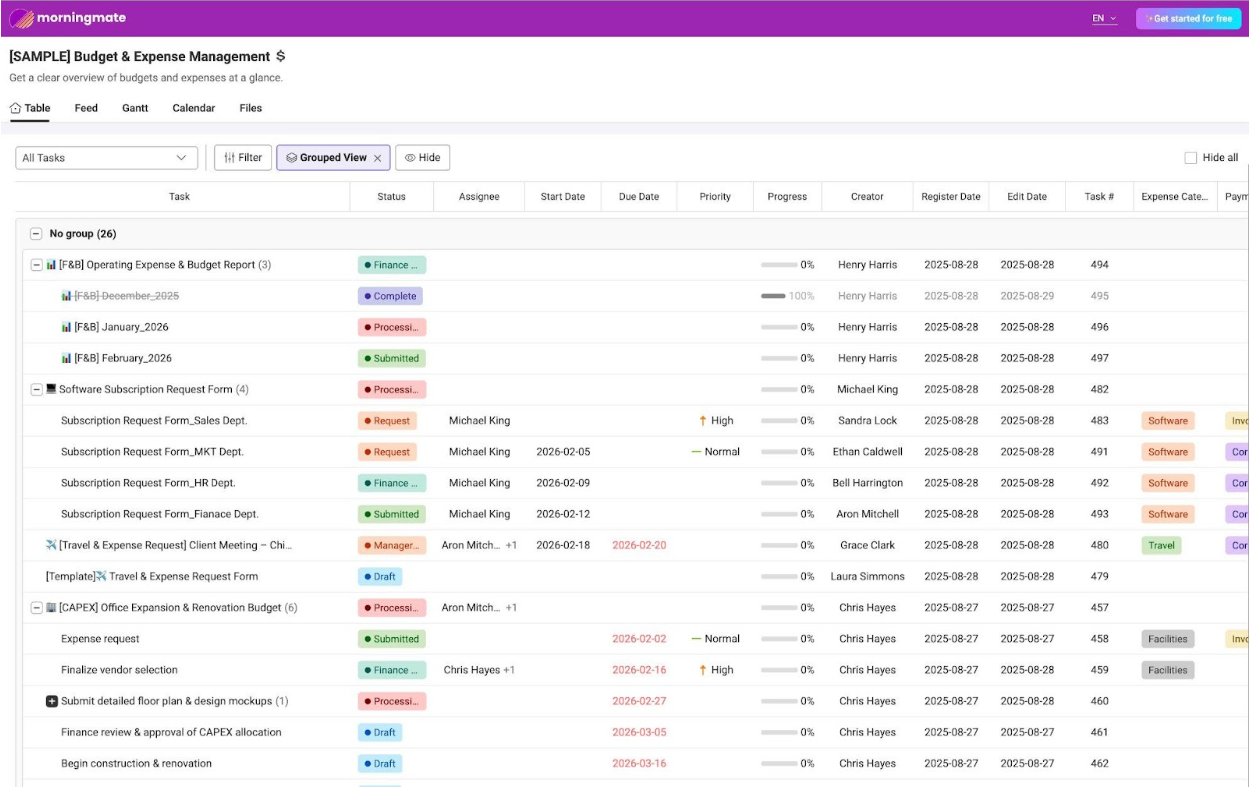
Look at what this screenshot reveals. The agency’s finance team manages multiple workstreams in a single, organized board: monthly F&B operating expense reports tracked by status (Complete, Processing, Submitted), software subscription requests routed through a clear approval workflow (Request → Finance Review → Submitted), travel and expense claims with visible due dates and priority flags, and a full CAPEX renovation project broken into phases from vendor selection through construction—each with assigned owners and deadline tracking.
When the client’s CFO needs to know where the budget stands, they do not need to email anyone. They can see it themselves. Every line item has a status. Every task has an owner. Every deadline is visible. This is not a weekly report—it is a live system of record.
For agencies, this transparency is transformative. It eliminates the “just checking in” emails. It reduces the friction of client reviews. And most importantly, it builds the kind of trust that leads to project renewals and long-term retainers.
How It Works in Practice: Cross-Team Knowledge Sharing and Creative Collaboration
Now imagine your client’s brand manager wants to see what your marketing team is researching for the next campaign. In the old world, your team compiles a deck and schedules a presentation. In the new world:
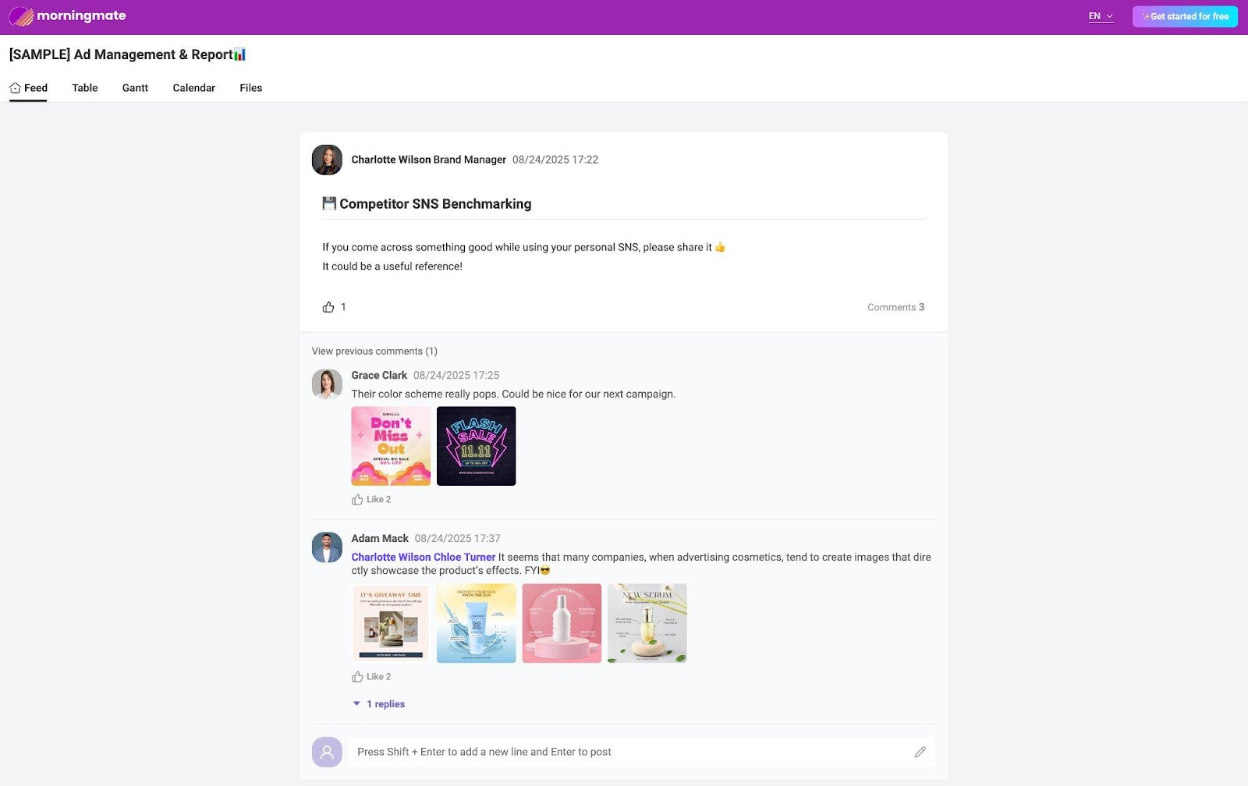
This screenshot shows something that email and WhatsApp can never replicate: organic, contextual collaboration. Charlotte Wilson, the Brand Manager, posts a competitor SNS benchmarking request. Grace Clark responds with visual references of promotional materials that caught her eye, noting “Their color scheme really pops. Could be nice for our next campaign.” Adam Mack tags two colleagues and shares cosmetics advertising examples, building on the conversation with visual evidence. The thread has likes, replies, and image attachments—all organized under a single topic, searchable, and permanent.
When a new team member joins the account six months later, this entire creative research history is there—organized by date, fully searchable, with every image, comment, and decision preserved. No one needs to ask “where did we save those reference images?” or “why did we go with this direction?” The reasoning lives in the thread.
For the client, this is equally powerful. If their marketing director changes, the new person can scroll through the feed and understand the creative evolution of the project in 30 minutes—without scheduling a single briefing call. That continuity is what separates an agency that gets renewed from one that gets replaced.
Four Features That Change the Agency-Client Dynamic
1. External Guest Access: Bring Clients into the Work
| The game-changer Invite clients or external partners directly into specific project boards—with controlled permissions. They can view progress, leave comments, and access files without seeing your internal discussions or other client projects. No app installation required on their end. |
This single feature eliminates the biggest friction point in agency-client collaboration: the information asymmetry. Your client does not need to wait for your next weekly update. They can check the project board whenever they want. They see task statuses, deadlines, file attachments, and discussion threads—all in real time.
2. Open Project URL: Zero-Friction Visibility for Any Stakeholder
| For the stakeholder who just needs to see Generate a shareable project URL that anyone can access—no account creation, no login, no app download. Perfect for when your client’s CEO needs a quick project overview before a board meeting, or when a new procurement director needs to verify deliverable status. |
This is the feature that agency owners dream about. The client’s stakeholder clicks a link, sees the Gantt chart, the task progress, and the latest deliverables. They close the tab. No friction. No onboarding. No “can you send me the login details” email. Just pure, instant visibility.
3. Built-in Chat: Professional Communication, Separated from Personal Life
| Work stays at work Morningmate’s built-in messenger keeps all project communication inside the platform—no more WhatsApp threads that blur the line between work and personal life. When a team member leaves, the conversation history stays. When a client contact changes, the new person can see the full context. |
For agencies that operate globally, this is critical. Your London team, your client’s Singapore office, and your freelance photographer in Berlin can all communicate in one place—with multilingual chat translation built in. The conversation is always linked to the project context, never lost in a personal messaging app.
4. Persistent Project History: The End of “Bring Me Up to Speed”
| Every decision. Every file. Every conversation. Searchable. Permanent. Unlike email, where history fragments across inboxes when people leave, Morningmate keeps the complete project record in one place. Task history, status changes, file versions, discussion threads, and approval decisions—all preserved and searchable, regardless of team changes on either side. |
This is the feature that pays for itself on the first client contact transition. Instead of spending 10+ hours reconstructing project context for a new stakeholder, you send them a link. The entire story is there.
The Business Impact: From Invisible Agency to Indispensable Partner
When you move from email-and-Excel to a transparent collaboration platform, the business impact goes far beyond efficiency. It fundamentally changes how clients perceive your agency:
| Metric | Before (Email + Excel) | After (Collaboration Platform) |
| Client status requests | 3–5 per week | Near zero (self-serve) |
| Contact person transition | 10–20 hours to rebuild context | 30 min (send a link) |
| Project renewal rate | Industry avg: 60–70% | Transparent agencies: 80–90%+ |
| Internal time on reporting | 5–8 hours/week per account | < 1 hour (dashboard is live) |
| Team member handoff | Weeks of catch-up | Days (history is permanent) |
| Client perception | “Good work, hard to work with” | “Great work, great to work with” |
The most powerful row in that table is the last one. Agency reputation is built on two things: the quality of your output and the quality of the experience. When a client says “they’re great to work with,” they are not talking about your typography or your media strategy. They are talking about how easy it was to collaborate with you, how quickly they could find information, and how much trust they felt throughout the engagement.
That reputation is what generates referrals. It is what drives renewals. And it is what separates a project-based vendor from a long-term strategic partner.
How to Start: The 3-Week Agency Transformation Playbook
Week 1: Pick Your Highest-Value Client
Do not try to migrate every client at once. Start with one—ideally the client with the most complex project or the one most likely to renew. Set up their project board in Morningmate with all current tasks, deadlines, and files. Invite them as an external guest.
Week 2: Replace the Weekly Report with a Live Dashboard
Stop sending the Excel WBS. Instead, send the client a link to their project board. Walk them through it on your next call. Show them how to check status, leave comments, and access files. Most clients will be delighted—they have been wanting this level of access and did not know it was possible.
Week 3: Move Conversations Off WhatsApp and Into the Platform
Start routing all client communication through the built-in chat and project feed. When a quick question comes in via WhatsApp, reply: “Great question—I’ve posted my answer in our project board so the whole team can see it.” Within days, the client will start going directly to the platform. The WhatsApp thread dies naturally.
By the end of three weeks, you will have a fully transparent, real-time collaboration environment for your most important client. The time savings will be immediate. The client’s satisfaction will be measurable. And you will have a template to roll out across every other engagement.
Stop Describing Your Work. Start Showing It.
The agency industry in 2026 is being reshaped by a simple truth: clients have more choices than ever, and they are choosing partners who make collaboration feel effortless. The firms that will thrive are not necessarily the ones with the most awards or the biggest teams. They are the ones that have mastered the art of visible, transparent, and frictionless client engagement.
Email gave us a way to communicate with clients. Excel gave us a way to track projects. WhatsApp gave us a way to be responsive. But none of these tools were designed to do all three at once—and the gaps between them are where trust erodes, history disappears, and clients quietly decide to find someone easier to work with.
The shift from describing your work to showing your work is not a technology upgrade. It is a business strategy. It is the difference between an agency that wins projects and an agency that keeps them.
Your clients deserve to see what they are paying for. Your team deserves tools that make collaboration effortless. And your agency deserves to be remembered as the one that was not just talented—but brilliant to work with.
Ready to make your agency impossible to leave?
Give your clients real-time project access. Build trust that turns into renewals.