In today’s digital-first business environment, managing documents efficiently is essential for staying organized and productive. Whether you’re a small business overwhelmed with paperwork or part of a large enterprise handling files across departments, the right document management system (DMS) can dramatically improve how you manage and access information.
As businesses move away from paper-based filing systems, DMS solutions have evolved beyond basic storage. Modern platforms now offer features like workflow automation, version control, and intelligent search—tools designed to streamline collaboration and reduce operational friction. Especially in remote or hybrid work settings, cloud-based DMS tools ensure secure, anytime access to critical files.
What Is a Document Management System (DMS)?
A document management system (DMS) is software that stores, organizes, and tracks digital documents in a centralized, secure environment. Unlike simple file storage, a true DMS provides structured organization, metadata tagging, access controls, and workflow automation. These capabilities help teams eliminate scattered files and manual processes, enabling faster, more reliable access to the documents they need.
Document Management vs. Enterprise Content Management
While document management and enterprise content management (ECM) are often used interchangeably, they serve different roles within an organization’s information strategy. Document management focuses specifically on the lifecycle of documents—from creation and storage to retrieval and disposal. In contrast, ECM encompasses a broader range of functions, including web content management, digital asset management, and business process management.
For most small to medium-sized businesses, a robust document management system provides sufficient functionality without the complexity and cost associated with full ECM implementations. However, larger enterprises may benefit from ECM solutions that integrate document management with broader content strategy initiatives.
Benefits of Going Digital with Document Workflows
Transitioning from paper-based to digital document workflows offers significant benefits across various business dimensions. One of the most immediate advantages is cost reduction, with organizations typically saving 30-50% on document-related expenses through decreased printing, storage, and administrative costs.
Security improvements are equally important. Digital document management systems provide detailed access controls, encryption, and audit trails that surpass the security capabilities of physical document storage. Backup and disaster recovery features protect against data loss, ensuring business continuity even during unexpected events.
Key Features to Look for in a Document Management System
Cloud Accessibility and Scalability
Cloud accessibility is now a fundamental requirement for modern document management systems. The ability to access documents from any device, anywhere, at any time ensures business continuity and supports flexible work arrangements. Cloud-based systems eliminate the need for on-premise infrastructure while providing automatic updates and maintenance.
Performance optimization features, such as content delivery networks and regional data centers, ensure fast document access regardless of geographic location. These capabilities are essential for organizations with distributed teams or global operations.
Version Control and Audit Trails
Version control prevents confusion and errors that can occur when multiple people work on the same document. Advanced DMS solutions automatically track document versions, maintaining complete revision histories while preventing conflicts. Users can easily compare versions, restore previous iterations, and understand the evolution of critical documents.
Audit trails provide detailed records of all document activities, including who accessed files, when changes were made, and what modifications occurred. This functionality is crucial for compliance with regulations like HIPAA, SOX, and GDPR, which require organizations to maintain detailed records of information access and modifications.
Permissions and Access Management
Granular permission systems ensure that users can only access documents relevant to their roles and responsibilities. The best document management systems offer role-based access control, allowing administrators to define user groups with specific permissions rather than managing individual user access.
Dynamic permissions can automatically adjust based on document lifecycle stages, project status, or user role changes. For example, draft documents might be accessible only to authors and editors, while published documents become available to broader user groups.
Search Functionality and Metadata Tagging
Powerful search capabilities turn document retrieval from a time-consuming task into an instant process. Advanced search features should include full-text search, metadata filtering, and Boolean search operators. Optical character recognition (OCR) technology enables searching within scanned documents and images.
Metadata tagging systems provide structured information about documents, making them easier to categorize, search, and manage. Automated metadata extraction can populate fields like author, creation date, and document type, while custom metadata fields support organization-specific classification schemes.
Workflow Automation and Approval Routing
Automating workflows removes the need for manual document routing and approval steps, which helps to decrease processing times and minimize human mistakes. The top Document Management System (DMS) solutions provide visual workflow builders that enable users to design intricate approval processes without requiring technical skills. Automated alerts keep all parties updated on changes in document status, outstanding approvals, and reminders for deadlines, while integration with email and messaging platforms ensures notifications are delivered through preferred channels.
Types of Document Management Solutions
Cloud-Based DMS vs. On-Premise Systems
Cloud-based document management systems (DMS) have become increasingly popular due to their lower initial costs, automatic updates, and scalability. These solutions eliminate the need for dedicated IT infrastructure while offering enterprise-level security and reliability through professional data centers.
On-premise systems provide greater control over data and customization options but require substantial IT resources for setup and maintenance. Organizations with strict data sovereignty requirements or specialized security needs may prefer these systems.
DMS for Home Businesses vs. Enterprise DMS
Home businesses and small offices have different document management needs than large enterprises. Simple, cost-effective solutions that focus on essential functions often deliver the best value for smaller organizations. These systems prioritize ease of use and quick implementation over advanced features.
In contrast, enterprise document management systems offer sophisticated capabilities such as advanced workflow automation, extensive integration options, and comprehensive security controls. They are designed to support complex organizational structures with multiple departments, locations, and user roles.
Open-Source vs. Proprietary Systems
Open-source document management systems provide cost-effective alternatives to proprietary solutions, especially for organizations with technical expertise. These systems allow for complete customization and freedom from vendor lock-in, making them appealing for businesses with specific needs.
However, open-source solutions often require more technical resources for implementation, customization, and maintenance. Support options may be limited compared to commercial vendors, and integrating with existing business systems may necessitate custom development.
Best Use Cases for Document Management Systems
HR and Employee Document Management
Human resources departments manage a large volume of sensitive employee information, including onboarding documents, performance reviews, and compliance records. Document management systems streamline HR processes by offering secure storage for personnel files, automating workflows for employee requests, and tracking compliance with regulatory requirements.
Automated retention policies ensure that employee records are kept for the required duration and disposed of according to legal standards. This functionality is essential for adhering to employment laws and privacy regulations.
Legal and Compliance Archiving
Legal departments need robust document management capabilities to handle contracts, case files, and regulatory documentation. Advanced search and retrieval features allow lawyers to quickly find relevant precedents, while version control ensures accurate documentation of contract negotiations.
Integration with legal research databases and e-discovery tools enhances the value of legal document management systems by linking internal documents with external legal resources and litigation support.
Finance and Invoice Approval Workflows
Financial document management systems simplify accounts payable and receivable processes through automated invoice routing and approval workflows. Integration with accounting systems reduces duplicate data entry and ensures that financial records are accurate and complete.
Tax document management features provide secure storage and easy access to tax-related documents, supporting compliance with tax regulations and audit requirements. Automated retention policies ensure that financial records are maintained for the necessary duration.
Marketing Asset Organization
Marketing departments handle a variety of content types, from campaign materials and brand assets to customer communications and performance analytics. Document management systems create centralized repositories for marketing assets while ensuring brand consistency through approval workflows and access controls.
Campaign tracking features link marketing documents with performance metrics, allowing teams to analyze the effectiveness of different materials and make data-driven decisions for future campaigns.
Customer Service Documentation
Customer service teams need quick access to product manuals, troubleshooting guides, and customer communication history. Document management systems offer searchable knowledge bases that enable support representatives to quickly find relevant information and provide accurate responses.
Collaborative features allow customer service teams to share solutions and best practices, fostering institutional knowledge and enhancing overall service quality. Version control ensures that support representatives always access the most current information.
Best Cloud-Based Document Management Systems in 2025
Folderit
Folderit is a user-friendly, cloud-based document management solution that combines powerful features with an intuitive design. It provides small to medium-sized businesses with enterprise-grade document management capabilities without the complexity often associated with such systems.
Folderit’s workflow automation streamlines document approval processes with customizable routing rules and automated notifications. The system integrates seamlessly with popular business applications, including Microsoft Office 365, Google Workspace, and various CRM platforms. Mobile applications ensure full functionality across iOS and Android devices, allowing users to manage documents effectively from anywhere.
DocuWare
DocuWare is a mature, feature-rich document management platform that serves organizations of all sizes with advanced workflow automation and compliance capabilities. Its cloud-based architecture offers scalability and reliability while meeting the security standards required for enterprise deployments.
DocuWare’s compliance features include automated retention policies, immutable records for regulatory requirements, and comprehensive audit trails. The system supports various compliance frameworks, including HIPAA, SOX, and GDPR, making it suitable for highly regulated industries. Advanced security features include encryption, two-factor authentication, and granular access controls.
ONLYOFFICE
ONLYOFFICE provides a comprehensive document management solution that combines collaborative editing capabilities with robust file organization and sharing features. Its integrated approach allows for document creation, editing, and management within a single interface.
ONLYOFFICE’s project management integration helps teams organize documents within project contexts, enhancing organization and collaboration. The platform offers both cloud-hosted and on-premise deployment options, giving organizations flexibility in choosing the model that best meets their security and compliance needs.
Revver
Revver focuses on delivering an affordable, easy-to-use document management solution for small businesses without sacrificing essential features. The platform emphasizes quick implementation and minimal training while providing robust document organization and sharing capabilities.
Revver’s collaboration features include secure document sharing with external parties, comment threading, and approval workflows. The platform integrates with popular business applications through API connections, enabling seamless data exchange with existing systems. Mobile applications provide full functionality for document access and management on mobile devices.
LogicalDOC
LogicalDOC offers a powerful, enterprise-grade document management platform with both cloud and on-premise deployment options. The system provides comprehensive document lifecycle management capabilities, from creation and collaboration to archiving and disposal.
LogicalDOC’s workflow automation includes sophisticated routing capabilities with conditional logic, parallel processing, and integration with external systems. The platform supports various authentication methods, including LDAP, Active Directory, and single sign-on solutions, making it suitable for complex enterprise environments.
OpenKM
OpenKM is a mature open-source document management solution that offers enterprise-grade functionality with the flexibility and cost advantages of open-source software. The platform provides both community and commercial versions, allowing organizations to choose the level of support that meets their needs.
OpenKM’s scalability features enable deployment across multiple servers and locations, supporting large organizations with distributed teams. The platform’s API allows for custom integrations and extensions, making it suitable for organizations with specific requirements that standard features do not meet.
Google Drive + Workspace
Google Drive, combined with Workspace tools, offers a familiar and accessible document management solution that integrates seamlessly with Google’s productivity applications. While not a traditional document management system, this combination provides robust collaboration features and adequate organization capabilities for many small to medium-sized businesses.
Advanced search capabilities include full-text search across all document types and integration with Google’s powerful search algorithms. The platform’s mobile applications ensure full functionality across all devices, allowing users to access and manage documents from anywhere.
Zoho WorkDrive
Zoho WorkDrive offers a comprehensive document management solution that integrates with the broader Zoho ecosystem of business applications. The platform features team-based organization tools that align with modern collaborative work patterns while providing robust security and administrative controls.
WorkDrive’s security features include encryption, audit trails, and compliance capabilities that meet enterprise requirements. The platform’s backup and recovery features protect documents against data loss, while version control maintains complete revision histories.
Microsoft SharePoint
Microsoft SharePoint remains a leading choice in enterprise document management, offering deep integration with Microsoft Office applications and extensive collaboration capabilities. The platform supports both cloud-based and on-premise deployment options, making it suitable for organizations with diverse security and compliance needs.
Advanced workflow capabilities include approval routing, automated notifications, and integration with Power Automate for complex business process automation. The platform’s security features encompass granular permissions management, audit trails, and compliance capabilities that meet enterprise standards.
When a DMS Isn’t Enough: The Case for Collaboration-First Tools
The Importance of Collaboration Tools
Document management systems (DMS) are great for organizing and storing files, but they often struggle to support the real-time collaboration that today’s teams need. Traditional DMS solutions prioritize document control and workflow automation, yet they may lack the context and communication features essential for effective teamwork.
To collaborate effectively on documents, teams need features like threaded discussions, @mentions, real-time notifications, and visibility into who is working on what. These social collaboration tools help maintain context and momentum, ensuring that document-related tasks progress smoothly without getting lost in email threads or scattered across various platforms.
How Morningmate Enhances DMS Systems
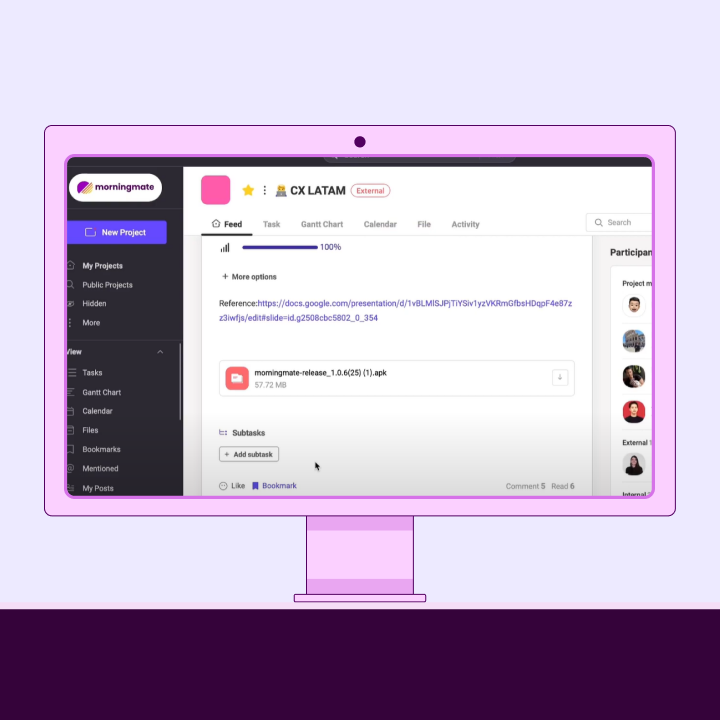
Morningmate is an excellent addition to traditional document management systems, providing the collaborative layer that many DMS platforms lack. While it is not a full-fledged document management system, Morningmate offers project-based organization, file sharing, and threaded communication that can improve document-centric workflows.
With real-time collaboration features like @mentions, notifications, and activity streams, Morningmate keeps team members informed about document-related activities without overwhelming their inboxes. This creates a more dynamic and responsive environment for document collaboration while preserving the organized structure that DMS systems provide.
Choosing the Right Document Management Software
Evaluate Team Size and File Volume
Understanding your organization’s size and file volume is crucial when selecting a document management solution. Small teams with limited file needs may find that simple, cost-effective solutions suffice. In contrast, larger organizations with extensive document libraries require more sophisticated systems with advanced search, organization, and performance features.
When considering file volume, think about not just the number of documents but also their sizes and types. Organizations dealing with large multimedia files, CAD drawings, or specialized content may need systems optimized for handling large files efficiently. Understanding storage and bandwidth requirements upfront can help manage costs effectively.
Assess Workflow Complexity and Integration Needs
The complexity of your document workflows should guide your feature requirements and system selection. Organizations with straightforward document sharing needs may find basic systems adequate at lower costs. However, businesses with intricate approval processes, regulatory compliance needs, or advanced collaboration requirements will benefit from more robust workflow capabilities.
Integration with existing business systems can significantly influence implementation success and user adoption. Systems that seamlessly connect with current email, accounting, CRM, and productivity applications reduce training needs and eliminate duplicate data entry. Look for API availability and pre-built connectors for popular business applications as key evaluation criteria.
Consider the technical expertise available within your organization for system implementation and maintenance. Some solutions require significant technical resources for setup and customization, while others offer user-friendly, plug-and-play functionality.
Focus on Ease of Use and Scalability
User adoption is often the biggest challenge in implementing document management systems. Even the most feature-rich system is ineffective if employees don’t use it consistently. Prioritize solutions with intuitive interfaces, minimal training requirements, and features that deliver immediate value to users.
Scalability goes beyond user count and storage capacity; it also includes feature flexibility and customization options. Systems that can adapt to changing business needs without costly migrations or extensive reconfigurations offer better long-term value. Consider how the system accommodates organizational changes, new use cases, and evolving security requirements.
Performance scalability is essential to ensure that system response times remain acceptable as data volumes and user counts grow. Cloud-based systems typically handle scalability more effectively than on-premise solutions, but it’s important to understand performance expectations and service level agreements.
Consider Compliance and Security Standards
Regulatory compliance can significantly influence system selection, especially for organizations in healthcare, finance, legal, or other regulated industries. Ensure that potential solutions provide the audit trails, retention policies, and security controls necessary for compliance with your industry’s standards.
Security considerations include data encryption, access controls, backup and recovery capabilities, and vendor security practices. Cloud-based systems should clearly outline data center security, compliance certifications, and incident response procedures. On-premise systems require organizational expertise in security management and maintenance.
Be mindful of the geographic location of data storage and processing, particularly if your organization operates in jurisdictions with data sovereignty requirements. Some regulations mandate that data remain within specific geographic boundaries, which can affect cloud provider selection and system architecture decisions.
Implementation Tips for Successful Document Management
Map Out Key Document Workflows
A successful document management implementation starts with a clear understanding of current document workflows and pain points. Document how different types of files move through your organization, from creation to final disposition. Identify bottlenecks, redundancies, and areas where automation could lead to significant improvements.
Involve representatives from various departments in workflow mapping to capture all perspectives and requirements. Different teams may have unique needs for document access, approval processes, and collaboration features that may not be immediately obvious to others.
Create a prioritized list of workflow improvements that the new system should address. Focus on changes that will deliver immediate value and encourage user adoption, while planning for more complex optimizations in future implementation phases.
Establish Permissions and Backup Policies Early
Setting clear permission structures and backup policies before full system deployment helps prevent security issues and data loss. Develop role-based access control schemes that align with your organization’s structure and job responsibilities. Document these policies clearly to ensure consistent application as new users are added.
Thoroughly test backup and recovery procedures before relying on them for critical data protection. Understand the frequency of backups, recovery time objectives, and recovery point objectives provided by your chosen solution. Develop procedures for various disaster scenarios, from individual file recovery to complete system restoration.
Consider data retention policies that automatically manage document lifecycles according to business and regulatory requirements. Automated retention reduces storage costs while ensuring compliance with legal and regulatory mandates for document preservation and destruction.
Train Users on Tagging and Collaboration Tools
Effective user training should go beyond basic system navigation to include best practices for document organization, tagging, and collaboration. Develop training materials that highlight the value of consistent tagging and naming conventions, demonstrating how proper organization saves time and improves document discovery.
Provide role-specific training that focuses on the features most relevant to each user group. Administrative users need comprehensive system knowledge, while end users may only require training on core functionality. Ongoing training programs help users discover advanced features and maintain good document management habits.
Regularly Audit Usage and Folder Structure
Conducting regular system audits helps maintain organization and identify areas for improvement. Review folder structures, tagging consistency, and user adoption patterns to ensure the system continues to meet organizational needs. Identify unused or redundant folders that can be consolidated or eliminated.
Usage analytics can provide insights into which features deliver the most value and where additional training or system modifications might be beneficial. Track metrics like search success rates, document access patterns, and workflow completion times to measure system effectiveness.
Regularly review permissions and access controls to ensure security remains appropriate as organizational structures and employee roles change. Remove access for departed employees and adjust permissions for those with changed responsibilities.
Conclusion: Future-Proof Your Files with a Scalable DMS
The document management landscape is rapidly evolving, driven by advancements in artificial intelligence, cloud computing, and collaboration technologies. Organizations that invest in scalable, feature-rich document management systems today will be better positioned for success in an increasingly digital business environment.
The best document management systems combine strong organizational capabilities with flexible collaboration features and advanced automation. Cloud-based solutions offer significant advantages in scalability, accessibility, and maintenance, making them ideal for most organizations. However, the specific choice of system should be based on careful consideration of your workflows, team dynamics, and growth plans.
To unlock the full potential of your DMS, it’s also important to address real-time collaboration, which many traditional systems lack. This is where tools like Morningmate play a vital role. Morningmate complements your DMS by enabling project-based communication, file sharing, and real-time activity tracking. With features like @mentions, notifications, and threaded discussions, it keeps your team aligned and document workflows moving—all without overwhelming your inbox.
Success with document management systems requires more than just selecting the right software. Organizations must commit to proper implementation, user training, and ongoing optimization to fully realize the benefits of digital document management. The time and resources invested will pay off in improved efficiency, reduced costs, and better compliance.
Ready to transform your document management processes? Start by evaluating your current workflows and identifying key collaboration gaps. A modern DMS, paired with a collaboration-first platform like Morningmate, can provide the foundation your organization needs to scale, stay organized, and thrive in the years ahead.