Businesses thrive on strong teamwork. With employees often working from various locations, such as the office or home, an effective collaboration system is essential. The right tools enhance communication, simplify project management, and facilitate file sharing.
Many companies struggle with disorganized workflows, delayed approvals, and misplaced documents. Enterprise collaboration software keeps teams connected and streamlined. This article highlights the best tools available and provides guidance on how to use them effectively. It discusses key features, benefits, and steps to implement the right solution for any business.
In 2025, top choices include Microsoft Teams for communication, Asana for project tracking, and Notion for integrating documents with tasks. While each tool serves different purposes, they all contribute to improved teamwork. Selecting the best option depends on your organization’s style, size, and specific challenges.
What Is Enterprise Collaboration?
Enterprise collaboration encompasses tools and systems that enable employees to engage and work together. It breaks down barriers between teams and departments, allowing for quicker decision-making and better outcomes.
Internal vs. External Collaboration
Internal collaboration occurs within a company, where teams share ideas and files using tools like Slack. External collaboration involves working with outside partners or clients, facilitated by platforms like Google Workspace or Dropbox. Both types are crucial for business success.
The Evolution of Collaboration in Enterprises
In the past, collaboration relied heavily on meetings and emails. Today’s enterprise collaboration software accelerates teamwork and streamlines processes. Cloud-based tools provide real-time updates, while AI features automate tasks. These solutions have become vital due to the rise of remote work.
Why Enterprise Collaboration Matters
Effective collaboration drives business growth. It keeps teams connected and projects on track. Without it, progress slows, and errors increase.
Common Benefits Across Industries
Enterprise collaboration solutions enhance overall efficiency. They reduce email clutter and expedite approvals. Teams can access files from anywhere, which is especially beneficial for remote and hybrid work environments. Improved collaboration also boosts employee satisfaction.
Key Challenges Organizations Face
Some companies grapple with an overwhelming number of tools, leaving employees unsure of which to use. Inadequate training can lead to low adoption rates, and security concerns are paramount. Organizations must select secure enterprise collaboration platforms to protect their data.
What Is an Enterprise Collaboration System?
An enterprise collaboration system (ECS) is a suite of tools designed to facilitate teamwork. It includes messaging, file sharing, and task management features. A well-designed ECS ensures seamless collaboration.
Core Features of Modern Collaboration Systems
The best enterprise collaboration software offers real-time messaging, video calls, and document sharing. Task tracking and automation are also essential. Integration with other applications streamlines workflows, saving time and minimizing errors.
How ECS Improves Productivity and Teamwork
An enterprise collaboration system breaks down silos, allowing teams to access project updates instantly. Managers can monitor progress without lengthy meetings, and employees spend less time searching for files. This leads to quicker project completion and improved results.
Types of Enterprise Collaboration Tools With Examples
Enterprise collaboration tools come in various forms, each designed for specific purposes. These tools enable employees to communicate, manage projects, share files, and collaborate effectively. The right combination of tools depends on the company’s size, work processes, and team structure. Many modern platforms integrate multiple functions to streamline workflows.
Communication Tools (e.g., Slack, MS Teams, Morningmate)
Communication tools are essential for effective collaboration. Applications like Slack, Microsoft Teams, and Morningmate allow users to send messages, make voice calls, and conduct video meetings. These solutions organize conversations into channels or groups, reducing email clutter. Teams can create dedicated spaces for specific projects, departments, or topics.
Slack stands out for its user-friendly interface and seamless integration with third-party apps, making it ideal for quick discussions and file sharing. Microsoft Teams offers deeper integration with Office 365 products, making it a better fit for organizations already using that suite.
Morningmate combines real-time chat, threaded discussions, and @mentions with task and file context—making it especially useful for teams that want communication and project tracking in one unified platform. It also supports external guest access and multilingual chat translation, enhancing cross-border collaboration.
Remote teams rely on these robust collaboration tools for real-time connectivity, eliminating delays from back-and-forth emails. Many organizations use them alongside other collaboration software to create comprehensive workflows. The most effective communication tools adapt to various work styles while ensuring security and organization.
Project Collaboration Platforms (e.g., Asana, ClickUp, Morningmate)
Project collaboration platforms help teams efficiently plan, track, and organize tasks. Tools like Asana, ClickUp, and Morningmate provide shared spaces for managing tasks, deadlines, and progress—replacing messy spreadsheets and endless email threads with clear visual workflows.
Asana offers various views, including lists, boards, and timelines, allowing teams to break large projects into manageable parts with assigned owners. ClickUp provides similar features with additional customization options.
Morningmate offers a lightweight yet powerful alternative, combining task management with Gantt charts, workflow automations, and integrated messaging—all in one place. Its project room-based structure centralizes files, discussions, schedules, and task updates, helping teams reduce fragmentation and improve accountability.
Enterprise-level collaboration systems enhance visibility across departments, enabling managers to monitor project status without lengthy meetings. Team members clearly understand their responsibilities. The best project management tools are straightforward yet sophisticated enough to handle complex workflows, reducing missed deadlines and confusion over task ownership.
Document Collaboration Tools (e.g., Google Workspace, Dropbox)
Document collaboration tools enable multiple users to work on files simultaneously. Google Workspace and Dropbox are leading examples in this category. These solutions eliminate version control issues and the need for email attachments, allowing teams to edit documents, spreadsheets, and presentations in real time.
Google Workspace offers cloud-based productivity apps with strong collaboration features, enabling multiple users to edit documents while seeing each other’s changes instantly. Commenting and suggestion modes streamline feedback. Dropbox focuses more on file storage and sharing, with collaboration features for common file types.
These tools are ideal for content creation teams, legal departments, and any group that frequently revises documents. They save time previously spent merging different file versions. The best document collaboration platforms provide robust security controls alongside collaboration features, ensuring sensitive information remains protected while accessible to authorized users.
Integrated Platforms for Enterprise-Wide Collaboration
Some enterprise collaboration platforms combine communication, project management, and document sharing into a single system. These comprehensive solutions are perfect for organizations seeking unified workspaces, reducing the need to switch between multiple applications throughout the day.
Notion exemplifies this category with its flexible workspace that integrates documents, databases, and task lists. It adapts to various team needs without requiring complex setup. Wrike offers more structured solutions with advanced reporting and automation features, often including customizable dashboards that display project health across departments.
Integrated collaboration systems are best for companies aiming for consistency across teams. They provide a single source of truth for projects and information, allowing employees to spend less time learning different tools and more time on productive work. The most effective platforms balance powerful features with intuitive interfaces, encouraging adoption across all user skill levels.
Top Enterprise Collaboration Software for 2025
Choosing the right enterprise collaboration software can significantly enhance teamwork and productivity. In 2025, several platforms excel in facilitating better collaboration among businesses. These solutions cater to various needs, including messaging, project tracking, and document management. Companies should select a platform that aligns with their specific workflows and team structures.
Morningmate — Best for Flexible Cross-Functional Collaboration
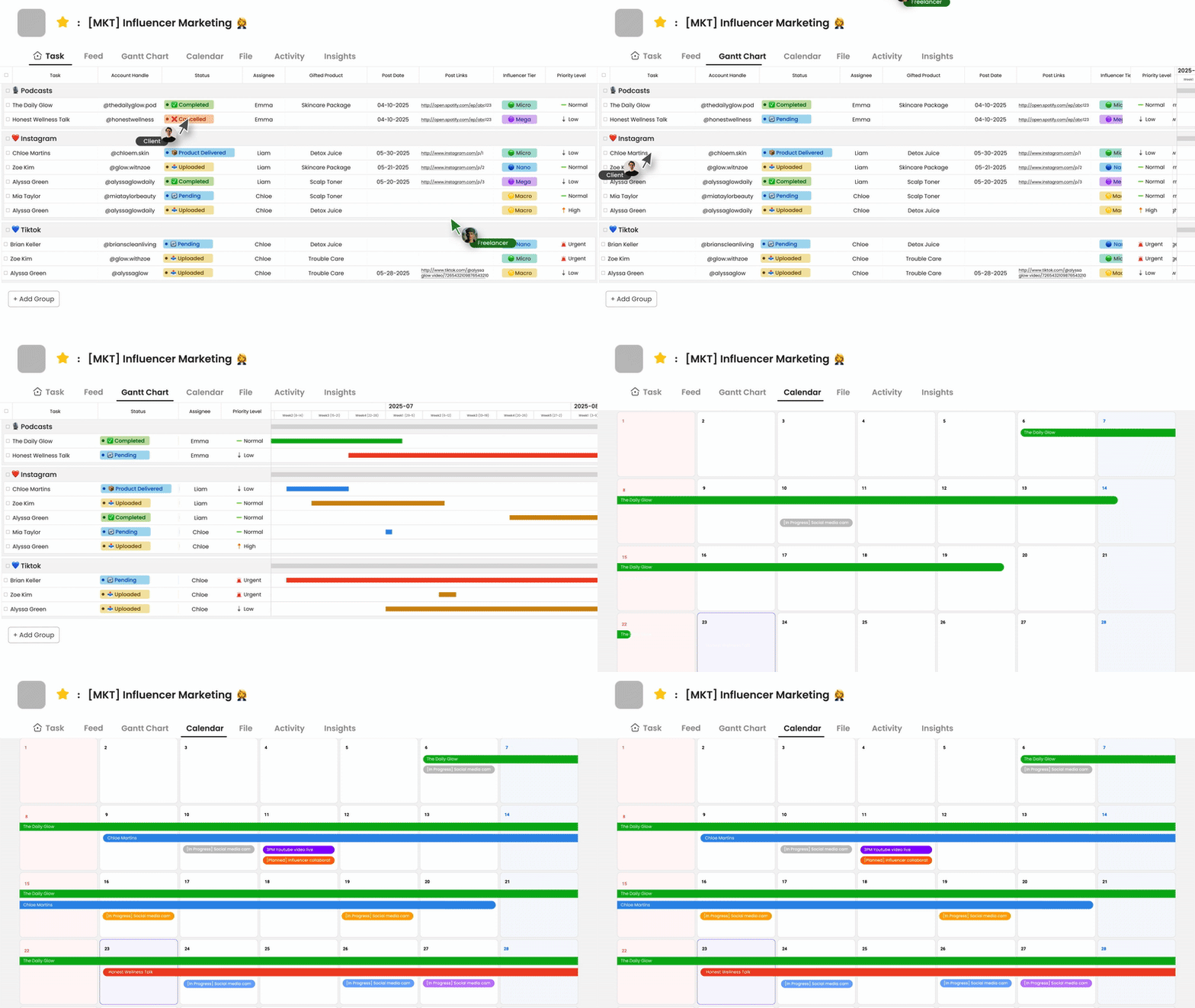
Morningmate is gaining popularity among teams across different departments and organizations. This collaboration platform supports a variety of projects and work styles, allowing marketing, development, and operations teams to coordinate effectively with customizable workflows.
The tool enables teams to manage their plans in complex environments by creating unique workspaces for each project. Its user-friendly interface reduces training time, allowing new team members to onboard quickly. Morningmate also integrates seamlessly with common business applications for daily use.
Microsoft Teams — Best for Enterprise Communication
Microsoft Teams remains the leading choice for large organizations seeking effective collaboration. Its deep integration with Office 365 adds significant value for companies already using Microsoft products. Teams combines chat, video meetings, file sharing, and app integration in one convenient platform.
The system accommodates everything from quick team messages to company-wide announcements. Its meeting features support large groups with options for screen sharing and recording. With robust security measures, IT departments can maintain control while ensuring compliance. Teams effectively connects remote and office-based staff, keeping everyone engaged.
Notion — Best for Document and Task Collaboration
Notion distinguishes itself by merging documents, databases, and task management into a single platform. It replaces multiple standalone tools with a unified workspace, allowing teams to create knowledge bases, project trackers, and meeting notes all in one place.
This flexibility makes Notion a favorite among both creative and technical teams. Its wiki-style documentation helps maintain institutional knowledge, while task tracking features keep projects on track. Notion’s templates facilitate quick starts and allow for customization as needs evolve, making it suitable for both structured processes and free-form collaboration.
Asana — Best for Project Visibility
Asana continues to lead in project-focused collaboration solutions. Its visual interface provides a clear overview of project status, enabling team leads to see who is working on what and identify potential bottlenecks before they cause delays.
The platform offers various views, including lists, boards, and timelines, to accommodate different work styles. Automation features streamline routine task assignments and status updates. Asana integrates with numerous business tools, creating efficient workflows. Its reporting capabilities help managers track team productivity and project progress over time.
Slack — Best for Real-Time Messaging
Slack maintains its status as the top choice for instant communication in enterprise collaboration. Its channel-based organization keeps conversations focused and easily searchable, while threaded discussions prevent important messages from getting lost in busy channels.
The platform excels in quick problem-solving and informal team interactions. Its extensive app directory offers hundreds of integrations, consolidating notifications and tools in one place. Slack is particularly effective for tech-savvy teams and companies with remote workers, and customizable notifications help users stay informed without constant distractions.
Wrike — Best for Structured Enterprise Workflows
Wrike is ideal for larger organizations that require disciplined project management. This collaboration system offers robust tools for complex workflows and approval processes, with customizable dashboards providing executives clear visibility across departments.
The platform manages everything from simple task assignments to multi-phase projects with dependencies. Advanced reporting features enable teams to analyze performance and enhance processes. Wrike’s automation reduces repetitive tasks in assignments and status updates, while its security features cater to regulated industries without hindering collaboration.
How to Successfully Implement a Collaboration System
Selecting the right enterprise collaboration software is just the beginning. Effective implementation is crucial for ensuring teams use the tools efficiently. A well-planned rollout can help the new system address more challenges than it creates. Follow these steps for a smooth transition to improved collaboration.
Define Your Collaboration Goals and Pain Points
Before choosing an enterprise collaboration platform, companies should identify their specific challenges. Common issues include lost files, slow approvals, and excessive emails. Some teams may struggle with remote work coordination, while others need better project tracking. Documenting these problems will help evaluate potential solutions.
Set measurable goals, such as faster response times or fewer meetings, rather than vague targets like “better teamwork.” Clear objectives make it easier to assess whether the new system meets your needs and prevents the selection of features that don’t address real workflow challenges.
Involve Your Team in the Tool Selection Process
The individuals who will use the collaboration tools daily should have a say in the selection process. Department leaders and frontline employees understand what will genuinely enhance their work. Include representatives from various teams to capture diverse needs.
Conduct small tests with potential options before a company-wide rollout. Allow sample groups to try different collaboration solutions on real tasks. Their feedback will highlight which tools are intuitive and which may cause frustration. This approach fosters buy-in and surfaces practical concerns early on.
Provide Training and Documentation
Even the simplest collaboration system requires some training. Users need to understand both basic functions and best practices. Short video tutorials are often more effective than lengthy manuals for most learners.
Create quick reference guides for common tasks, such as file sharing or meeting setup. Designate “super users” in each department to assist coworkers. Training should continue beyond the initial rollout as teams discover advanced features. Ongoing support helps prevent employees from reverting to old, inefficient habits.
Monitor Adoption and Refine Processes
After launching the new collaboration software, track how teams are using it. Monitor login frequency, feature usage, and completed collaborations. Survey users to gather feedback on what works and what doesn’t.
Adjust configurations based on actual usage patterns. Some teams may require modified workflows or additional integrations. Be ready to provide further training as needed. Successful implementation demands ongoing attention, not just an initial setup. Regular check-ins ensure the system continues to meet evolving business needs.
FAQs on Enterprise Collaboration
What is the difference between a collaboration system and collaboration software?
A collaboration system encompasses the entire framework of people, processes, and technology that fosters teamwork. This includes company culture, workflows, and communication standards. In contrast, collaboration software refers to specific digital tools that support this system, such as Microsoft Teams or Slack. While the software facilitates collaboration, it does not define the system as a whole.
What are the most popular enterprise collaboration tools?
Currently, Microsoft Teams is the leading choice for integrated communication, particularly within Office 365 environments. Slack remains a favorite for real-time messaging, while Asana and Trello are top contenders in project management. Google Workspace is widely used for document collaboration, and Notion has quickly gained popularity for combining documents and tasks.
Morningmate is emerging as a strong all-in-one alternative, combining task management, team messaging, file sharing, and even AI-powered automation in a single platform—ideal for teams seeking a unified workspace without switching between multiple tools.
The best choice often depends on the size of the company and its existing technology stack.
How do you measure the success of collaboration?
Successful collaboration is evident in reduced email traffic and fewer unnecessary meetings. Quantitative metrics include project completion rates and time-to-decision statistics. Qualitative indicators involve increased cooperation between departments and positive employee feedback regarding teamwork. Ultimately, the most telling signs of effective collaboration are improved business outcomes, such as faster product cycles, enhanced customer responses, and greater innovation.
Final Thoughts
Enterprise collaboration software is essential for modern businesses. The right tools can eliminate communication barriers and enhance teamwork across departments. Whether organizations need improved messaging, project tracking, or document sharing, there are solutions available to meet every requirement.
Top platforms like Microsoft Teams, Asana, and Notion each serve distinct purposes. Teams excels in communication, Asana keeps projects organized, and Notion integrates documents with tasks.
Morningmate offers a unified alternative—combining messaging, task management, file sharing, and automation into one intuitive platform. Its simplicity and flexible deployment options (SaaS or on-premise) make it particularly suitable for SMEs and global teams seeking quick adoption and seamless collaboration.
The key is to align the software with actual work processes rather than simply pursuing features. Successful implementation demands careful planning and team engagement. Setting clear goals, testing options, and providing adequate training can facilitate smoother adoption. Companies that invest time in a thoughtful rollout often experience significant productivity improvements.