Project Management

Good task management is supposed to keep your team moving. But if you're a marketing manager at a small business, you already know the gap between "supposed to" and reality. You plan the campaign, assign the pieces, and then spend the next two weeks playing traffic cop — chasing approvals, re-explaining context, and manually syncing people who should already be in sync.
The problem isn't your team's commitment. It's that task coordination without a shared system turns into a game of telephone. By the time the message reaches the freelancer, the founder has changed direction, and nobody told the designer. Your task management is technically happening — in emails, in comments, in chat threads — but it's scattered enough that alignment falls apart anyway.
This article gives you a repeatable workflow to keep everyone pulling in the same direction, without burning your day on status update calls. No fancy frameworks, no six-figure project management software — just a practical structure you can implement this week.
When Campaign Day Goes Sideways
Picture this: it's 8 a.m. on launch day. Your email campaign is supposed to go live at 10. The designer finished the banner last night and dropped it in a Slack thread. Your freelance copywriter thought she was waiting on the final CTA from the founder. The founder thought the copy was already approved. Nobody's wrong — and everything's broken.
You spend the next ninety minutes in firefighting mode. You're pulling screenshots, forwarding messages, and re-explaining decisions that were made three days ago in a meeting nobody documented. The campaign goes out at noon, half-tested, with a CTA the founder still isn't happy with.
This isn't a one-off bad day. It's what happens when task management lives in people's heads instead of a shared system. Every team member is doing their part — but without visibility into what everyone else is doing, the handoffs break down. And on a small team with no slack (no pun intended), one dropped handoff is a missed deadline.
Where Task Management Breaks Down on Small Marketing Teams
Small marketing teams don't fail at execution — they fail at handoffs. Here's where the cracks tend to appear.
Approvals live in no-man's land
When an approval is "just a quick message to the founder," it disappears into someone's inbox or notification stack. There's no record of whether it happened, what was approved, or what feedback came with it. Task tracking collapses the moment approval depends on a private conversation.
Context gets rebuilt from scratch every time
Your freelancer finishes one task and picks up the next — but the brief lives in a Google Doc, the latest feedback is in email, and the brand guidelines are in a folder nobody's touched in six months. They spend an hour reconstructing what they need to know before they do a single minute of actual work.
Nobody knows what "done" looks like
Without clear task workflow stages — drafted, in review, approved, live — everyone has a slightly different mental model of where things stand. The designer thinks the post is done. You think it's in review. The founder hasn't seen it yet. This ambiguity is where delays are born.
The table below maps out how task management typically breaks down across each phase of a small-team campaign — and what a structured alternative looks like.
Campaign Phase | How it breaks down | What structured task management looks like |
|---|---|---|
Briefing | Shared verbally or in a chat; no written record | Brief attached directly to the task, visible to all assignees |
Execution | Freelancer works in isolation; questions go unanswered | Questions, files and updates all live in one task thread |
Approval | Ping the founder, wait, follow up, lose track of feedback | Task status moves to "Review"; founder notified automatically |
Launch | Ambiguity about who hits "go"; tasks linger without closure | Explicit "Done" status; ownership logged and visible |
A Repeatable Task Management Play for Small Teams
The goal isn't to add process for its own sake. It's to give your task workflow enough structure that people can move independently without falling out of sync. Here's a five-step play you can run for any campaign.
Create one task per deliverable, not per person. Instead of "Email — Sarah" and "Email — Jake," create one task called "Launch email" and assign it with clear ownership stages. Task tracking works best when the unit of work is the output, not the activity.
Write the brief inside the task. Not in a separate doc, not in a message — inside the task itself. Include goal, audience, tone, deadline, and any reference links. Anyone picking it up cold should have everything they need without asking you.
Define your status stages before you start. Pick four: Draft, In Review, Approved, Live. Apply them to every deliverable in the campaign. When everyone uses the same language, task coordination stops depending on you to translate.
Assign review ownership alongside creation ownership. For every task that needs approval, name the reviewer at setup — not when the work lands on their desk. "Founder approves by Thursday" is a calendar commitment, not a vague expectation.
Run a daily two-minute task scan, not a meeting. Each morning, open the campaign board and look for anything stuck in "In Review" for more than 24 hours. That's your prompt to nudge — not a standup, not a message thread, just a status check.
Common Failure Points — and How to Avoid Them
Even a solid task management system falls apart if you don't protect it from a few predictable failure modes.
Failure: The founder gives feedback outside the system
The founder texts the freelancer directly, or drops a voice note in a personal chat. Now there's approved feedback that nobody else can see, and your task tracking is out of date. Fix this before it happens: when you set up the campaign, tell every stakeholder explicitly where feedback goes. "All comments go in the task, not in texts." Say it once, write it somewhere visible, and it usually sticks.
Failure: Tasks are created without due dates
A task without a deadline is a wish. When you're managing freelancers who juggle multiple clients, an undated task will always lose to someone else's dated one. Every task in your campaign should have a due date — even internal ones you're doing yourself.
Failure: "Done" is never formally closed
Teams that don't close tasks explicitly end up with zombie tasks — technically finished, but still showing as open. This poisons your task workflow because you can't tell at a glance what's genuinely outstanding. Make closing a task a deliberate action, not something that just sort of happens.
Failure: New freelancers get no onboarding into the system
You've built a clean task management system, then a new contractor joins and starts doing things their way — emailing you files, asking for briefs in Slack. Spend ten minutes at the start of every freelance engagement walking them through how your task workflow works. It saves hours later.
How Morningmate Brings Task Management, Approvals and Chat Together
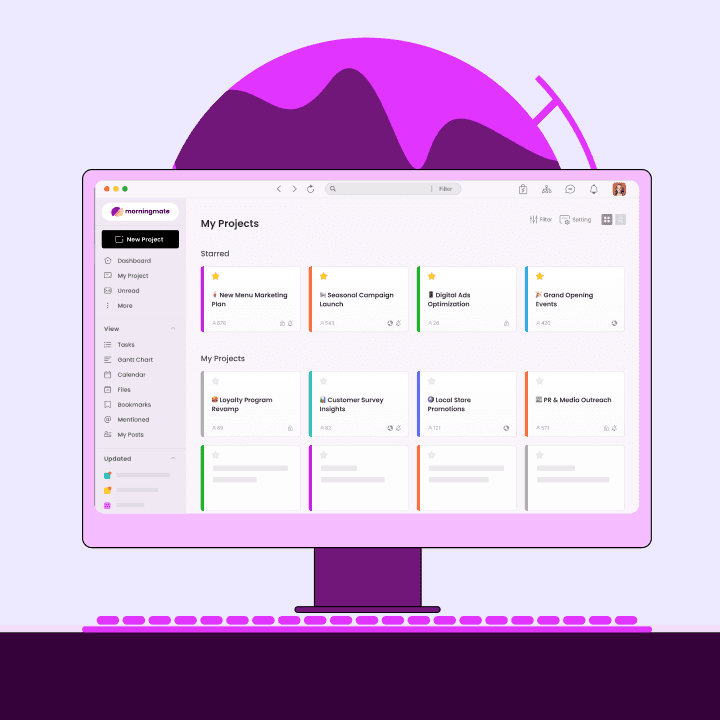
The workflow above works best when your task tracking, team communication and file sharing all live in the same place. That's exactly what Morningmate is built for — a lightweight work management tool that combines task management with built-in chat and file handling, without the complexity of enterprise project software.
Here's how it looks in practice. Say you're running a product launch campaign with a two-person in-house team, a freelance designer, and your founder on approvals. You create a Morningmate project for the launch and set up one task per deliverable — landing page copy, social graphics, email sequence, paid ad variants. Each task has the brief attached, the assignee named, and the due date set. Status stages are already configured: Draft, In Review, Approved, Live.
When the designer finishes the social graphics, she moves the task to "In Review." The founder gets a notification, opens the task, sees the files and the brief right there in one view, and leaves her feedback directly in the task comments. No email chain. No hunting for context. The designer gets the feedback, makes the change, and moves the status to "Approved." The whole approval loop — which used to take two days of back-and-forth — happens in one place, with a full record of what was said and when.
If your team ever needs to dig up context from earlier in the campaign, Morningmate's AI Smart Search lets you ask in plain language — "what did we agree on the CTA?" — and it returns the answer with the exact source and date. No more scrolling through old threads trying to reconstruct a decision.
The Feed view in Morningmate also makes it easy for the whole team to stay passively informed. It surfaces updates in a familiar, social-style format so your freelancer isn't out of the loop just because they weren't in a meeting — and you're not manually forwarding updates to everyone who wasn't in the thread.
Apply This to Your Task Management This Week
Here's a simple checklist to put this into practice immediately. Good task management doesn't require a big rollout — it requires consistent habits applied to the next campaign you run.
Action | When to do it | Why it matters for task coordination |
|---|---|---|
Create one task per deliverable with a brief inside | Campaign kickoff | Eliminates "where's the brief?" questions |
Set status stages (Draft → In Review → Approved → Live) | Before assigning any tasks | Gives everyone a shared language for progress |
Name the reviewer for every approval task | At task creation | Stops approvals from sitting in no-man's land |
Brief all freelancers on your task workflow | First day of engagement | Prevents them from reverting to email and DMs |
Do a two-minute daily task scan for stuck items | Every morning during active campaigns | Catches bottlenecks before they cascade |
Close tasks explicitly when work is complete | After each deliverable ships | Keeps your task tracking clean and trustworthy |
The teams that stay aligned without constant check-ins aren't the ones with more people or bigger budgets. They're the ones who treat task management as infrastructure — something you build once, maintain consistently, and trust to carry the load between conversations. Start with your next campaign, apply this checklist, and watch how much less you need to chase people just to find out where things stand.